Google’s Nano Banana AI Just Changed Photo Editing Forever (10 Mind-Blowing Tests)
13:22

Google’s Nano Banana AI Just Changed Photo Editing Forever (10 Mind-Blowing Tests)

Vaibhav Sisinty 29.08.2025 41 350 просмотров 1 236 лайков обн. 18.02.2026
Поделиться Telegram VK Бот
Транскрипт Скачать .md
Анализ с AI
Описание видео
🔗 Join Our AI Updates WhatsApp Channel: https://whatsapp.com/channel/0029VbBALDP84OmAI59i4b0R Google just released Gemini 2.5 Flash Image (Nano Banana) - the AI that's dominating LMArena's leaderboard and revolutionizing image editing forever. This FREE tool delivers 95% character consistency, instant product photography, and Photoshop-level edits using just text prompts. What You'll Learn: TIMESTAMPS: 0:00 - Google's Game-Changing AI Announcement 0:20 - Free Access Methods Revealed 0:38 - Image Blending: Adding Sam Altman & Elon Musk to Photos 2:08 - Room Makeover: Basic Colors to Luxury Art Deco 3:24 - Personal Branding: One Headshot to Complete Library 4:35 - Social Media Ads: Character Swaps & Text Integration 6:21 - Virtual Try-On: H&M Products & Lenskart Testing 7:27 - Travel Teleportation: Paris, Times Square, Global Locations 8:59 - Pet Cosplay: Dog to Batman Transformation 9:51 - Vintage Photo Restoration: Commercial Street Bangalore 11:06 - Product Photography: Sneakers to Nike-Level Ads 12:09 - YouTube Thumbnails: Click-Worthy Design Creation 13:16 - Conclusion & Next Steps Perfect For: Content creators seeking consistent visual branding E-commerce businesses needing product photography Social media managers creating ad variations Anyone wanting professional image editing without Photoshop skills Found this helpful? Like, subscribe, and hit the bell for more cutting-edge AI tools before they go mainstream! #NanoBanana #GoogleAI #AIImageEditing -------- To Know More, Follow Vaibhav Sisinty On ⤵︎ Instagram @VaibhavSisinty https://www.instagram.com/vaibhavsisinty Twitter @VaibhavSisinty https://twitter.com/VaibhavSisinty Facebook @VaibhavSisinty https://www.facebook.com/vaibhavsisinty/ LinkedIn - Vaibhav Sisinty https://www.linkedin.com/in/vaibhavsisinty --------
Оглавление (13 сегментов)

  1. 0:00 Google's Game-Changing AI Announcement 70 сл.
  2. 0:20 Free Access Methods Revealed 68 сл.
  3. 0:38 Image Blending: Adding Sam Altman & Elon Musk to Photos 329 сл.
  4. 2:08 Room Makeover: Basic Colors to Luxury Art Deco 190 сл.
  5. 3:24 Personal Branding: One Headshot to Complete Library 177 сл.
  6. 4:35 Social Media Ads: Character Swaps & Text Integration 328 сл.
  7. 6:21 Virtual Try-On: H&M Products & Lenskart Testing 185 сл.
  8. 7:27 Travel Teleportation: Paris, Times Square, Global Locations 263 сл.
  9. 8:59 Pet Cosplay: Dog to Batman Transformation 142 сл.
  10. 9:51 Vintage Photo Restoration: Commercial Street Bangalore 203 сл.
  11. 11:06 Product Photography: Sneakers to Nike-Level Ads 199 сл.
  12. 12:09 YouTube Thumbnails: Click-Worthy Design Creation 201 сл.
  13. 13:16 Conclusion & Next Steps 16 сл.
0:00

Google's Game-Changing AI Announcement

Sunda Pichai just wiped out millions of jobs with this one insane AI update. And here's the kicker. Anyone can access it for free. It's called Gemini 2. 5 Flash Image, aka Nano Banana, and it's completely unhinged. Watch this. I can blend myself with Sam Alman in seconds. Transform any room into a luxury design or turn my dog into Batman, all with perfect consistency. Before I show you
0:20

Free Access Methods Revealed

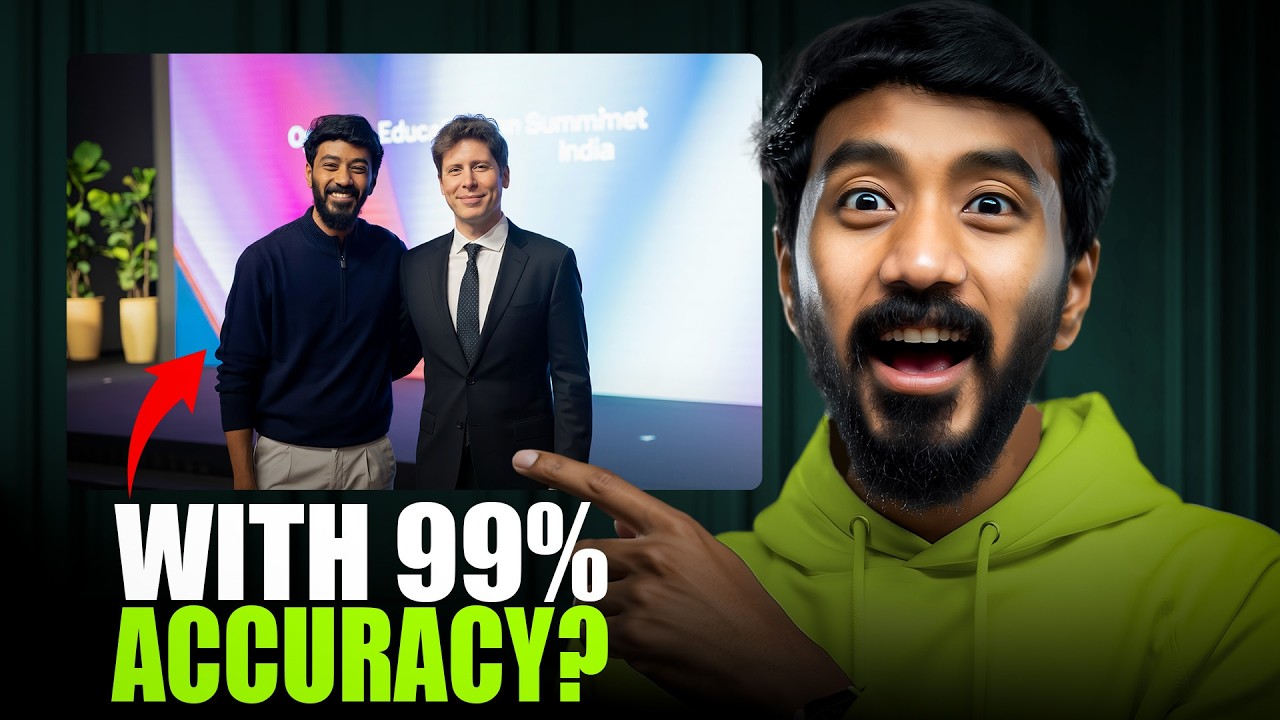
how to unlock this for free, let me blow your mind with 10 insane things you can do right now. By the end of this video, you might never need Photoshop again. I was at the OpenAI Education Summit in Delhi. But unfortunately, I missed Sam Alman. Let's see if Nanobanana can fix that. Let's jump into Google AI studio and I'm going to upload my image. I'm
0:38

Image Blending: Adding Sam Altman & Elon Musk to Photos

going to type replace lady in this picture with Sam Alman. By the way, if you're wondering who this lady is, she's Priya, the first OpenAI India employee. Priya, you're a rockstar. And swapping your image with Sam's is just a playful switch because you're truly one of a kind. Now, let's grab Sam Altman's image from Google, paste it straight into AI Studio, and hit run. It's processing. Okay, here's the output. And from the first impression, I must say it's pretty amazing. The face accuracy is off the charts. Just look at the hair. It's perfectly blended with the surrounding. The height seems a bit off, but hey, we're only working with a halfbody face image. Let's take it up a notch. Let's bring Elon Musk into the picture. Okay, Elon looks 99% real. Even his height and body are scared perfectly for the image. Now, let's make this picture perfect. Let's bring Sunda Pichai into the mix as well. Looks like AI nerfed him a lot. Why is his height so small? Yeah, obviously we've only given half body shots, so the AI has no clue about the full height. But the face accuracy is almost 99%. If we provided full body shots, the AI might surprise us with the height and scale, too. But overall, this is amazing. Now, I finally have the perfect picture. Let's increase the complexity. Now, I'm going to use another image where I'm shaking hands. Let's see how this goes. I'm going to type replace the person in the pink clothes with Sam Alman. Okay, it looks like it messed up with the fingers here. And the eye contact is totally off, but the face accuracy remains great. Let's try to improve the eye contact. Okay, now it's starting to lose some face accuracy and we'll need to play around with it more to get the desired output. All right, we just blended people perfectly, but what about spaces? Can
2:08

Room Makeover: Basic Colors to Luxury Art Deco

Nano Banana redesign entire rooms with the same precision? Let's find out. Make the walls aesthetic neon green and add some plants while balancing the overall feel and contrast of the room. Okay, nice start. Let's keep building on that. Next prompt. Transform this room into a Scandinavian minimalist design with pastel walls, warm wood furniture, and cozy textures. Cool. This looks cozy. Now, let's take it to the next level. Next up, complete architectural transformation into a luxury art deco lounge with gold accents, velvet furniture, dramatic lighting, marble details, and an authentic 1920s atmosphere. This is unreal. It reconstructed the entire space, new windows, ceiling details, and even the shadows match the new lighting scheme. This looks like a professional interior design render. If you're planning to revamp your interiors, you should definitely give this a try. Now, what's next is mind-blowing. Here's where Nano Banana becomes a gamecher for creators. We will be creating a complete brand library from just one headsh shot. Place me in a modern office setting. Flawless face consistency with the same raw texture, same person, different environment. Let's elevate this to the
3:24

Personal Branding: One Headshot to Complete Library

next level. Place this person teaching at a workshop. Maintain exact facial features. Add audience and presentation setup. Some facial features are slightly off, but it's about 75% close. However, the pose, audience, and entire setup are perfectly balanced. Let's make the challenge even more difficult. Create three different scenarios. This person presenting on a VC stage, hosting a podcast with proper microphone setup, and teaching at a university lecture hall. Maintain identical facial features across all three scenarios with appropriate lighting for each setting. Okay, now it's completely lost the facial consistency. Let's try one more time using the source image again. It seems like in close-up shots, the results are amazing. But as the shots get wider, the facial features start to fade. Let's try this again, but with all close-up shots. All right, now the output has improved close enough. We've identified the flaw and the solution. Now you can build an entire brand library from just a single headsh shot, ensuring your visuals stay consistent across social media, websites, and marketing materials. No
4:35

Social Media Ads: Character Swaps & Text Integration

photographer needed. Add agencies. Either you will cry or this will revolutionize your workflow. Let's see how it can transform social media ads. We're going to start with some fun and creative character swaps. Change Panda to a wise owl with glasses. Keep the office setting and relax tech vibe. Wow, the text is perfect. It adjusted exactly how we needed. This makes creating multiple AB test variants so quick and easy. No more Canva or graphic designers needed. Let's try a few more. Replace the alien with a confident young professional woman. Keep the business suit and city background. Change the text to smart professionals master AI. Are you ready to level up? Okay, there are some spacing issues and it didn't keep the second title capitalized, but the image swap and blending look super professional. Let's fix the text next. It improved the spacing a little, but not quite what we were aiming for. Let's give a more specific prompt. Nope, still not working. Cool. Let's try the next one. Transform the sloth into a successful entrepreneur relaxing in a luxury home office. Change text to my AI systems run my business while I focus on strategy. Update the CTA button to purple and maintain the cozy but professional atmosphere. Okay, it's kept all the settings exactly as mentioned in the prompt. But notice that only the button color has changed nothing inside the text or the shadow. Let's get that fixed, too. Cool. Looks like it's fixed. Now, when creating these ads, describe the mood and aesthetic. It's not just about the visuals. Make sure you're capturing the tone of the message. Ed campaigns covered. Now, let's get personal. What if you could try on clothes without actually trying them on? Fashion brands, take note. We'll be using real products from the H& M website and testing out image swaps. But first, some basics. Change the t-shirt to neon green. Clean color change. Maintain fit
6:21

Virtual Try-On: H&M Products & Lenskart Testing

and wrinkles. Just missed one part. Let's make it more challenging. Change to a striped shirt. Maintain perfect fit. Natural fabric wrinkles. And adjust lighting on the fabric. Okay, this is unreal. The stripes follow the body contours naturally. Lighting adjusted for the new fabric. It looks completely real. Doesn't even feel AI generated. Now, let this level up. Transform the outfit completely. Elegant black evening suit with natural draping. Maintaining body proportions. Adding appropriate accessories and styling. Adjusting lighting for formal wear. Ensuring all fabric behavior looks natural. But wow, this doesn't feel like AI at all. Pretty real. Let's take some products directly from e-commerce websites and test them out. Heading to H and M. Not now. This is insane. You can try any look on you before buying. This should be a built-in feature for clothing brands online. Let's add specs from lens card. Not amazing output. You know, a lot of startups have tried solving virtual tryons and failed miserably, but Google might just have cracked it. Fashion sorted. But what if you could change your entire location? Let's make our
7:27

Travel Teleportation: Paris, Times Square, Global Locations

neighbors jealous. Time to travel to Paris first. Place me in Paris taking a selfie in front of the Eiffel Tower. Not bad. It's pretty real. But I think the prompt needs a bit more detail. Not Okay, now we're talking. Who could tell this isn't real? Next, let's place me in Time Square. Place this person at Time Square at night. Maintain identical facial features. Add realistic city lighting effects on the face. Can you see the reflection of the screens in my specs and the lighting on my t-shirt? This is super real and hard to differentiate from something AI generated. Now, we are getting that environmental lighting right. Let's push it a bit further with a tougher prompt. Create a travel series. This person at the Eiffel Tower during golden hour with warm lighting in Tokyo's neon streets with colorful reflections and on a tropical beach at sunset maintain exact facial features while adapting lighting and atmosphere for each location naturally. Not man, this looks like it was shot straight out of an iPhone. Check out that face adjustment. I personally didn't love it, but the more detailed you go, the better the output gets. Always specify lighting conditions like golden hour, neon reflections, or natural city lighting. Now, let's have some fun. What about our furry friends? Pet owners, this one's for you. Put a neon green hat on this dog. Simple costume addition, and the dog's features are perfectly preserved. Transform this dog into Batman, maintaining the dog's facial features and expression with realistic costume details. Not totally
8:59

Pet Cosplay: Dog to Batman Transformation

impressed with the output, but the details are spot-on. Now, let's take it to the next level. Create a superhero series. This dog as Batman with authentic costume details as a medieval knight with proper armor and as a space explorer with futuristic gear. Maintain exact breed characteristics, natural fur texture, and the dog's unique facial expressions across all transformations. Not instant meme legend. Three different character transformations, but you can still tell it's the same dog. The breed characteristics are perfect. Those ears, that expression, even the fur texture looks natural under different costumes. Maintain breed characteristics ensures your golden retriever doesn't become a generic dog in a costume. Now, let's bring the rich history of Bangalore back to life with historically accurate results. Imagine reviving a vintage snapshot of commercial street from the past. Add color to this vintage photo.
9:51

Vintage Photo Restoration: Commercial Street Bangalore

Basic colorization. It already looks so much more alive. Can you see those details? So nice. Let's add a bit more detail in the prompt. Restore and colorize this photo with natural skin tones and historically accurate clothing colors. Much better. The colors are historically accurate, not modern. Commercial Street has just come to life as it was back in the day. Let's go for one more. Complete restoration and colorization with natural skin tones. Historically accurate clothing and background colors. Enhance facial details while preserving authenticity. Remove damage and improve clarity without losing the vintage character. This is time travel. It enhanced details that were barely visible in the original. Added natural skin tones and seamlessly fix the damage, including historically accurate and preserve authenticity, ensures the colors stay true to the era and avoids unrealistic modern touches. Family memories restored. Now, let's make some money. Product photography that costs thousands. Not anymore. Turn basic product shots into commercialgrade photography. Place these sneakers on a clear acrylic platform. Titz platform pedestal. Professional studio lighting with key light from front left and fill light from right. Clean white seamless backdrop. Crisp shadows beneath the platform. Much cleaner professional studio look with proper shadow
11:06

Product Photography: Sneakers to Nike-Level Ads

placement. These sneakers floating in midair against pure black background. Dramatic rim lighting from the left highlighting all the texture details and sle patterns. Now we're talking commercial photography. Create luxury sneaker advertisements. These shoes on wet reflective concrete surface at night. Neon green and white lighting from street signs reflecting on the shoe surfaces. Urban atmosphere with bokeh lights in background. Cinematic depth of field. This is Nike level commercial photography. The reflections on the shoe surface, wet concrete adds texture. The bokeh creates that premium cinematic feel. This shot would cost thousands to create in a real studio. Let's try one more. Now we are talking. I asked him to add little Indian flavor. And you can see even in background the text are SE accurate and everything else is just perfect. You just need one good image of your product and the you get 99% real unlimited images. Commercial photography handled. Final use case. Every creator needs this. Turn boring headsh shot into clickworthy thumbnails that actually convert. Let's start with a basic prompt. Make this into a YouTube thumbnail. The output was amazing. Colors, lighting, text, all looked great. The only issue, it didn't match
12:09

YouTube Thumbnails: Click-Worthy Design Creation

the dimensions I specified. So, we'll need to provide the image in the correct size as input. But for a basic prompt, this is already impressive. Let's add more details and try again. Create a clickworthy YouTube thumbnail with explosive neon purple background. Professional microphone setup, dramatic lighting with shadows, surprised expression, space for bold text overlay, high contrast, and energy that screams premium content. Okay, this is insane. The details are crazy good. Achieving this with traditional tools would take hours. The only thing it still struggles with is dimensions. Now, let's try creating a thumbnail for this video. I added a detailed prompt describing the thumbnail and included some references. As you can see, the output was okay, but not perfect, not fully optimized for YouTube. Text and details are great, but it will need more training data and even more detailed prompts to get it perfect. The good news, it will catch up faster than we expect. From basic edits to full scene reconstruction, Nano Banana has completely democratized professional level image editing, all using just text prompts. If you want to stay ahead in the AI world, join our WhatsApp channel for exclusive updates and more cutting
13:16

Conclusion & Next Steps

edge tips. And don't forget to like, subscribe, and hit the bell for the latest videos.

Ещё от Vaibhav Sisinty

Ctrl+V

Экстракт Знаний в Telegram

Транскрипты, идеи, методички — всё самое полезное из лучших YouTube-каналов.

Подписаться