Join Maker School & get automation customer #1 + all my templates ⤵️
https://www.skool.com/makerschool/about?ref=e525fc95e7c346999dcec8e0e870e55d
Want to work with my team, automate your business, & scale? ⤵️
https://cal.com/team/leftclick/discovery?source=youtube
Watch me build my $300K/mo business live with daily videos + strategy ⤵️
https://www.youtube.com/@nicksaraevdaily
Excalidraw I used in this video ⤵️
https://excalidraw.com/#json=9ddFtqBBftO438qZ1eGUh,C-i2AvXXUKr3kTrkvEZ3Bg
Summary ⤵️
This video shows how to sell a fully automated n8n system that repurposes podcasts into content for Instagram, LinkedIn, and Facebook — with a free template you can resell for $1K per client. Perfect for agencies or freelancers offering content repurposing as a service.
My software, tools, & deals (some give me kickbacks—thank you!)
🚀 Instantly: https://link.nicksaraev.com/instantly-short
📧 Anymailfinder: https://link.nicksaraev.com/amf-short
🤖 Apify: https://console.apify.com/sign-up (30% off with code NICK30)
🧑🏽💻 n8n: https://n8n.partnerlinks.io/h372ujv8cw80
📈 Rize: https://link.nicksaraev.com/rize-short (25% off with promo code NICK)
Follow me on other platforms 😈
📸 Instagram: https://www.instagram.com/nick_saraev
🕊️ Twitter/X: https://twitter.com/nicksaraev
🤙 Blog: https://nicksaraev.com
Why watch?
If this is your first view—hi, I’m Nick! TLDR: I spent six years building automated businesses with Make.com (most notably 1SecondCopy, a content company that hit 7 figures). Today a lot of people talk about automation, but I’ve noticed that very few have practical, real world success making money with it. So this channel is me chiming in and showing you what *real* systems that make *real* revenue look like.
Hopefully I can help you improve your business, and in doing so, the rest of your life 🙏
Like, subscribe, and leave me a comment if you have a specific request! Thanks.
Chapters
00:00 Introduction
00:30 Demo/Outline of Automation
02:07 Testing the Automation
04:25 Live-build
08:41 Scraping with Apify
19:13 Configuring n8n automation
28:42 Instagram Post Generator
33:13 Configuring Instagram n8n
42:19 LinkedIn & Facebook Post Generator in n8n
58:00 Fixing errors in n8n
1:01:16 Making & connecting Google Sheet to n8n
1:06:45 Setting up posting workflow
1:11:00 Organizing uploading
1:25:30 Outro
Оглавление (14 сегментов)
Introduction
Today, I'm going to build an AI podcast repurposing engine live in front of you that takes as input a YouTube link to a podcast and then outputs 10 or more high-quality social media posts, all beautifully formatted and ready to go. Uh, the reason I'm doing this video is because I wanted to show you guys what a live build process looks like from start to finish. So, I'm actually going to narrate my thoughts out loud. walk you guys through what my process looks like at every step of the way and really just give you guys an in-depth look into the actual building of a system, not just the finished product. Without further ado, let's get into it.
Demo/Outline of Automation
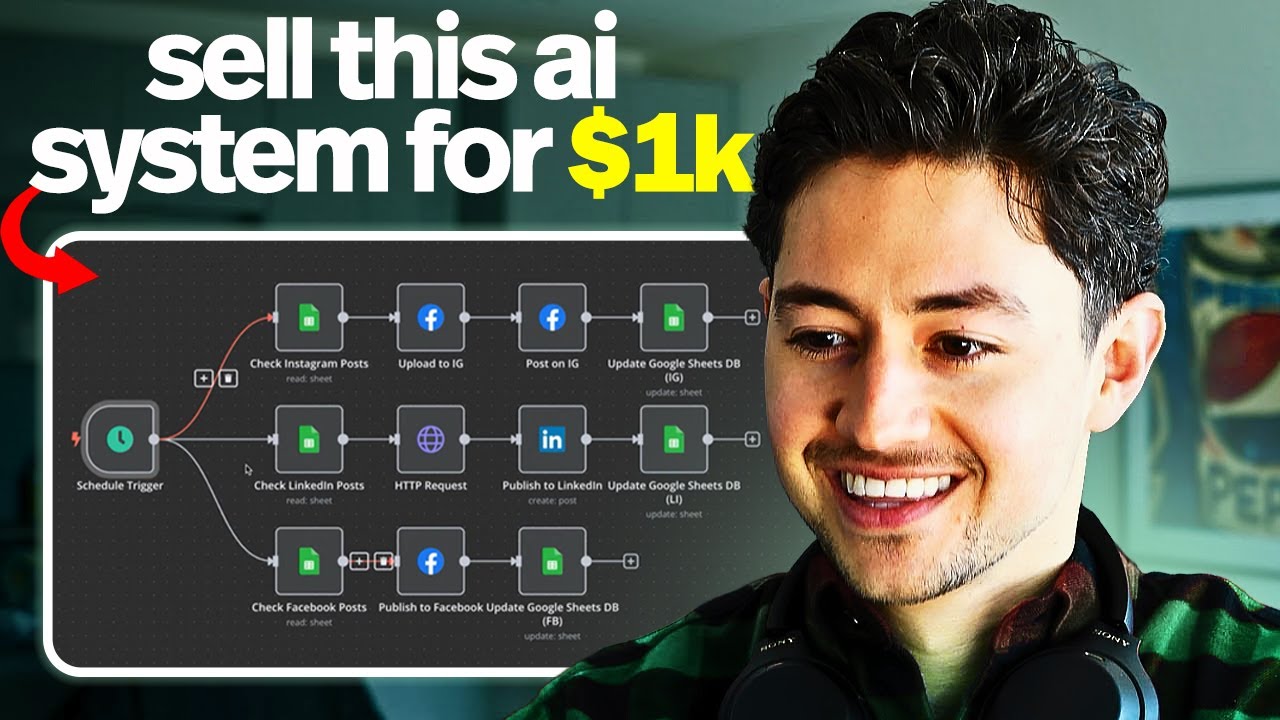
So the way that this works is we start with a form submission where I put in the URL of a podcast. I then get the transcript via a thirdparty service which costs 1 cent per transcript something like a hundred podcasts per dollar. Then we will use Open AAI to get a bunch of data, spin different transcript sections and do different things which I'll run through in a moment. We'll then split that out, loop over each item, and then here we will generate Instagram posts, LinkedIn posts, Facebook posts before finally generating the conccomment images as well. We'll then do some data processing. Then we'll add it to a database. Then finally, we'll just do some merge and then update a form. And what happens on the back end is once we've done all this posting, what we're doing is we're essentially updating a database. Looks something like this. Okay, very simple and easy to manage. four column database called date added postbody post image posted on with the platforms that we want to post to down below and our system is essentially once a day I just set this to run every morning at 7 checking through this database to see what new additions we've made so in this way our system is entirely dynamic and um it never overwhelms the service that we're posting on we can generate 10 or 20 or 50 new posts across all these platforms and then we can just drip them out according to some schedule that we've predefined after we've checked the Instagram posts I then upload to Instagram using their graph API, which I'll run you guys through before updating the Google Sheets database. And we do the exact same thing with the LinkedIn posts. It's just we need to do an HTTP request for that. And then the Facebook posts as well. In terms of what this looks like live, let me actually test this puppy out. Let's test this workflow. See a new form that's just opened. I'm just going to feed in a podcast right over here to this insert a
Testing the Automation
podcast get content endpoint. Second, when that's done, as we see in the background, we are now getting the transcript via a thirdparty web service, one of my favorite web services, Apify, which I'll cover over the course of the video, this transcript is going to come to us very nice and perfectly manicured. And then after that, we feed that to this OpenAI module. This open module's job is basically outputting a very big um JSON that contains an index with the number, the paragraph transcript, some context and feedback, and then a deep explanation of what the section that I'm talking about is along with an image description that we can use to generate some JPEGs, and I have some rules down here. Because we're feeding in a relatively long transcript to a model that has a context of 128,000 tokens, takes a fair amount of time to do this run. It's usually about 30 seconds or so. Uh but after that we're going to split it out and continue. And then as you can see we are now generating the posts and then adding them. So we just did Instagram, now we're doing LinkedIn. And finally we'll do Facebook as well. If we go back to our database, you can see that we're actually adding these as we speak. And so this is populating that sort of middle ground database which I like. Now on the back end, now that we've added these, what we can do is we can test this workflow pretty easily. So we're going to upload to Instagram first. We're going to post on Instagram and we're also going to update the Google Sheets database to tell us that it's posted. We're going to do the same thing with LinkedIn. Then LinkedIn, we need an HTTP request to do and we're going to add that there as well. And we can actually see these live. We'll just wait for this to finish posting. But if I refresh my LinkedIn company page, you can see the post has actually been made. Actually, I've done two cuz I just did one other test. But I chose like a pretty friendly kind of style here. I figured that I would I don't know. some company that did watercolor styles. Obviously, my actual brand, Left Click, is not like that at all. But, uh, yeah, I just wanted to give you guys some freedom here. You guys can generate these images however you want. Alex Ramos is doing a lot of this stuff recently, which I find interesting. He's, um, applying a specific style to a specific type of content. And then, yeah, we've now posted them across all, you know, Instagram, Facebook, and LinkedIn, which is pretty cool. And then if we go back to our database back over here, you'll see that we now have the posted on fields as done. Um, which means that we have essentially just ran through our database. and you know, post it and drip these out over time as opposed to all at
Live-build
once. Okay, so I've yet to actually build the system at this point in the video, but first thing I always like to cover before I actually do the system is why am I doing the system? Is the system important? Does this solve a problem? Ideally, you would start with the problem and then you build a system that solves that problem, not the other way around. I think a lot of people are kind of putting the cart before the horse and they're building the system before actually having a need for it. So, I know for sure that the system is worthwhile and solves problems because I talk with people all the time that have these exact customer problems and you can sell this system or you could build the system yourself to solve those problems in your own business. What are some issues? Well, AI podcast repurposing engine solves the content need. So, it allows us to generate a large amount of content from just one long form episode. Allows us to reach a much larger audience with the same marginal amount of effort. Zero additional recording time, which is cool. We get to maximize the content investment. And then if you wanted to sell this, it's why we put this in a different color here. Um, you know, you could do so for a $1,000 to maybe $2,000 service, I would say, just because it's very simple. It runs in the background. I'll show you guys a simple input method to like make all this stuff work and look hunky dory. And yeah, very straightforward, not at all difficult. So that gets us to the more important question, which is how. And the how is what we are going to be dealing with in this video. What I'm thinking of doing, and I, you know, I got like two or three nodes in for I was like, you know, I should probably record a video on this, is we're going to start with some YouTube podcast URL input. Okay. So, what I'm thinking is we're going to have some form or something, probably a form, where I can fill in the URL of the podcast that I want to generate content for. And this is the simplest way I can think of doing this. Sure, you could do this automatically. You could track podcast posts on a YouTube channel, whatever. But I'm just going to do a form. So, we'll trigger it manually. Then, from there, we're going to grab the transcript somehow. So, there variety of different ways you can grab transcripts in actuality of videos. Um, the simplest is Ampify, but you could also do something like OpenAI's Whisper. I mean, to be honest, there's like 500 of these, so I'm not going to go super in-depth there. But, um, what I'm going to do is I'm going to grab the transcript of the YouTube video, and then I'm going to feed it into a big content router. And this is where the rest of my system is sort of going to come into play from. So, what I'm thinking is we're going to start we're basically going to need like some sort of GPT call, some AI call. Let's just call it like a large language model call. Probably use GPT4 or maybe 4. 5. And then this is going to generate me some specific like Instagram content. Okay. I'm going to do the same thing with, you know, another GPT4 call. And then I'm going to generate probably like some Facebook content. As of the time of this recording, the Twitter API, or the X API, I should say, is uh like 200 bucks a month or something like that. So, I'm not going to pay for that um for this video, and I don't think a lot of people will either. So, we're just going to skip Twitter or X for now. But then we're going to do like some LinkedIn content. And also, what I think would be really cool is if we um if I give you guys everything you need to actually like clip. So, there's a couple of platforms out there. One's called Opus Clip, and there are a few other ones where basically you can feed in a longer video. Then you can actually generate clips from that video um using AI timestamping and stuff. Now, unfortunately, these guys don't have an open API, so you can't actually just like have your API call and then use that to generate, but um I'm going to give you everything you guys need in order to do so. And I'll actually walk through the API most likely. So, what I'm thinking is we're going to use AGPT and then maybe we'll like generate timestamps. And for now, we're just going to like have all those timestamps be generated with all the rest of the content you need, maybe like some hashtags and everything. And then, you know, you can either feed this into some sort of flow for an editor or whatever, and then have it generate a bunch of stuff. Okay? So, there's nothing really magic here. I mean, I'm just recombining components of different things that I've built before in the past, but I just wanted to run you guys through what my thought process is at this point in the process. This is what I think it's going to look like. Okay? And everything sounds nice before you actually get into the building, but uh yeah, let's start there. Okay, so I'm just going to use this as our road map. And then for now, we're actually just going to jump back over here to NAND. I have a little NAD workflow set up called AI podcast repurposing engine. And so really, if you think about it, like what is the first step? Well, what a lot of people like to do is they like to start at the beginning and then work their way forward, but I actually kind of like to start at the end and then work my way backward. Now, the end is relative in this case, but I just I actually want to go scrape the thing with Ampify first. Like I want to scrape the YouTube video and I want to verify or guarantee that I can actually generate the transcript. That's kind of the first thing that comes to mind. like maybe it's intuition or just because I've dealt with a lot of these projects but that usually is the rate limiting step. It's like, hey, can we get the data that we are planning on doing all this fun stuff with? Because if you can't get the data, you can't really do anything else, right? So, let's first of all verify we
Scraping with Apify
can actually get the data. So, in order to do so, I'm on this platform called Appify. Basically, this is just like a big marketplace for scrapers that other people purpose-built that allow you to do things like get YouTube transcripts. And they build out all the logic for you. You don't have to do any of the math yourself. Um, what I'm going to do is I'll just type YouTube transcript. And then there are variety of uh scrapers that come up here that say that they could do our job what we're looking for. But I'm just going to go to pricing models, go pay per result just cuz you could rent scrapers, you could pay for usage, but in my case, I like to pay for the end result. I care most about the deliverable. So how much money am I going to spend per transcript? And usually what I do at this point is I just open up two or three of these and then I just very quickly compare them. So that's what we're doing now. Let's see. Um this one allows us to extract one or thousands of YouTube transcripts fast. Save time and effort. Okay. JSON XML HTML. The reviews are pretty low, but this is $750 per thousand. That seems okay. Let's check out this one. Same idea. $10 per thousand. All right. This one $7 Well, I mean, to be honest, seems like kind of a wash. They're all about the same. I mean, they all have one or two reviews. So, let's just scroll down a bit and see if I can get some information on what I get. Looks like they will return me a big list of all of the captions. So, that's cool. Um, is there one that just gives me the whole thing in one big block? Like that would be nice. This would be pretty nice. Yeah. So, include timestamps. No. And then I just get a giant list. Let's do that. Yeah. Clean transcript. Okay. I like this one more now. And then do I just get one big transcript here? No. I get the time stamps and stuff. Listen, I think the time stamps are valuable, but I think that the first run I'm not going to use that. I'm just going to use the without the time stamps. So, let's give these guys a go. $10 per thousand results. I don't know if this is going to work, so I'm actually just going to try it out on a YouTube video. Why don't I do it on one of mine? Let's just go to Nick Sarif. Yeah, let's do the prompt engineering video. And that's 53 minutes. This one's 40. I mean, like the longer the video is probably the longer the transcripts are going to take, but whatever. For testing purposes, this is probably fine. So, I'm going to paste in my own here. No timestamps. So, I'm just going to get like the whole thing in one big block hopefully. And then I'm just going to click save and start. And so, Appify uh the way that it works is it'll spin up a server actually in the background. So, this is now like a server somewhere on the internet that has been spun up that is now running this scraping script that this other person put together. And I'm basically going to be charged uh what I think is 1 cent if my math is correct. Um per video that I get the transcript for. So, obviously very economical for testing purposes. And then uh you just pay either a monthly amount or something else and then um they bill you. So, in my case, I use a lot which is why it's at 100 bucks so far. But yeah, let's see if this one works. And of course, sometimes it doesn't work. I mean, these are scrapers other people build, right? I mean, this looks pretty good. All right. Now, yeah, this looks pretty good to me. So, now that I have this, let's just export this result. Let me just see what this looks like with all fields in a Google sheet first. Again, my whole goal is I just want to verify, hey, you know, can I get the data that I'm looking for? If I can get the data I'm looking for, everything else is really easy. So, now I'm going upload and I'm just going to drag and drop this. And I'm doing it manually first and then we'll worry about the automating part later. We're probably going to have to call some APIs, right? Okay. So, it looks like it returns the URL, returns the video title. Okay, that's cool. And then boom, we have the whole transcript. How many words is this? Really? Now I'm starting to think, okay, this is a lot of words. 8,000 words. Okay, so let me think about this. Usually people speak at about like 200 words a minute, approximately, 150, 200 words a minute. So if I were to feed in an hourong podcast, which is pretty standard. My content's kind of like that. I'd probably have like 10,000 or so words. That's a lot of words. Is AI going to actually be able to deal with this? So, I'm starting to think, all right, there are probably some edge cases here where I might feed in like a 2-hour long podcast and there's going to be too many words, too many tokens for the context window. So, I'm kind of keeping that in mind. But anyway, I'll kind of shelf that for now and we'll cross that bridge if and when we get to it. Um, obviously I've shown that this works. So, what do we actually do now? Well, um, the way that Appify works is you can actually just get a web hook call like when the actor is completed, you will get a notification. There's also an API. Um, and I don't think that Nad has a built-in appy node yet, right? Okay. So, I'm just going to go to the Appify API. I'll go Appy API. And then, you know, API stands for application programming interface. Obviously, um if you guys are unfamiliar with how to use APIs and stuff like that, I got a bunch of videos where I walk you guys through what that looks like. But essentially, what I'm looking for, so I think I'm looking for run task synchronously and get data set items. I think I'm not 100% sure. This looks good to me. I mean, there's so many dang um endpoints on the lefth hand side, that's honestly pretty difficult for me to say for sure what's what. I see a couple that look similar. Actor tasks. Run task synchronously and then there's run actor synchronously. Huh. Not really sure what the difference is here. Return output or get data set items. I feel like it's probably going to be get data set items. Right. All right. Anyway, I think I think I'm going to do this now. Um that I have the API call here. What's really cool is in NAN, you can just copy all of this, right? So, I see there's this little copy button. I'm just going to click that. I'll go back here and then I'll go um HTTP request. I'm going import curl feed this in. Okay. And it'll actually map the whole API request for me. So it's already done all the work. All I need to do is I need to swap in my authorization token. And then I think I need to do one more thing. I need to feed in an input right over here. Okay. So first things first, I'm going to get my authorization token. Now, how do I do that? Well, Ampify probably has an API key thing somewhere, right? So I'll go settings, I guess. Yep. API and integrations right over here. Let's create a new token. Let's just call this YouTube temporary cuz uh I'm just going to delete it afterwards. Do I want to limit the permissions? No, I don't think so. I'm just going to click create and see what happens. Uh okay, YouTube temporary right over here. Let's copy this. Let's um let's delete a couple of these cuz odds are I probably totally forgotten to delete them on previous videos. So, I have so many. Anyway, uh I'll paste the token right over here. That looks good. And then if you think about it, like what do I need? Looks like I need an actor ID here. So, where is that going to be? That's probably, you know, most of the time actors will put the ID up here. Yeah, I think so. So, that's probably the ID. That's usually the ID for most of these services. So, I'm just going to grab this, paste this in, and then I need to feed in the actual website that I'm going to use, right? So, I don't know how that looks, but usually on Appify, they'll show you if you go to JSON, they'll show you what the uh data looks like. Okay, so check this out. Include timestamps, no start URLs website. So, what I'm actually going to do is just copy this. Then I'll go back to my N8 endflow. Sorry, and I'm jumping around a lot. And then under body content type, I'll go using JSON. And then I'll just paste this in. Okay. So, this is fixed right now, right? I'm just feeding in one URL. But, um, I'm okay with that. I just want to test and see if this works. Let's see if there's any issue with my syntax or something. Let's see. And if there are any bugs, I keep all of them in the video so you guys could see what my thought process is. Uh, it's taking quite a while to do, which I think is positive. If I go back to Appify, we go to runs. Okay, looks like it's starting the crawler. So, I've actually initiated the crawler using my API call. Looks like it is now done. Okay. If I go back here, oh, nice. Looks like I got the data. Awesome. So, I have the transcript done. All right. So, I mean, that was really easy, right? Super easy. Very straightforward. Why don't I rename this and then I'll just call it get transcript via ampify. There you go. And now I can go back here and if you think about it, I could actually kind of like just check this first box. Okay. So, or check both of these box. Uh, actually, I'm not done that. I'm just done this. Let's make this really thick. There you go. So that step is done. So the YouTube podcast URL input step now. So if you think about it now, what I need to do, I need to verify that I could actually get input in, right? So in N8, as you guys know, there a bunch of different triggers I could do. This one's just a test workflow trigger. What I'm going to do is I'll go back here and then what I want is I want um just a form. So NAN form and I'll go on a new form event. So what I'll say is insert a podcast get content. Hey, this is a AI podcast repurposing engine. If you insert a YouTube link to a podcast, we'll generate a bunch of formatted content for you and post to relevant social media platforms. Okay, what here I will say is YouTube, maybe podcast. Uh, let's just go YouTube URL, right? Field type will be what do we got? I guess we'll just do text. And then I'll say it's required. And then I think that should be good. Yeah. Let's now test this. Let's uh where was that URL a moment ago? Oh, here we go. Let's copy this link. I got it right over here. So, I'm going to paste this in now. Insert a podcast. Get content. Very cool. I'm going to submit it. Okay, cool. So, I can get the content, which is nice. So, now I'm just going to feed this in as my variable. Uh, I should probably keep the when clicking test workflow actually because that'll just allow me to test the flow really easily. But anyway, um, as you can see, I got the form submission. So, what do I have to do now? Well, now I'm just going to make this dynamic. I'll go expression. Then I'll open up this big thing in an editor. And then right over here where it says start URLs, I'm actually just going to feed in one start URL. It's going to be this YouTube URL. So, this is the result. This is what it's going to look like. That looks good to me. Cool. Automation is mapped. We are good to go, baby. Everything should be fine. Awesome. And I think what I'll do here is I'll probably pin the output as well just so I can always run this on the exact same um video. Okay, cool. All right, so now what we have done is we have submitted our form and we've also gotten the transcript. Now the next question is how are we going to generate content for Instagram, Facebook, LinkedIn, then also maybe some timestamps or some hashtags or something like we just need some way to generate uh video ideas. Maybe we could even use hen. That might be pretty cool, actually. That' be pretty interesting. Maybe I'll screw around with that. If you guys have seen the demo already, you guys are like, "Well, obviously he's going to use hunen, right? " But I I'm not at that point yet. Um, okay. Uh, Instagram content here. Let's think about this. So, I need to now create um I need to have some sort of way to spin up three or four different model calls. Then, for each route, I need to produce something. So, some Instagram content, some Facebook content, some LinkedIn content, some timestamps, hashtags, whatever. So, I guess what I'll do here is uh do they have a router here? No, they don't really have a router. So, I think I have to use a merge node. Yeah, I think I'm going to have to do this. I don't know for sure, but whatever. Let's do um OpenAI. So, go to OpenAI and then I'm going to message a model right over here. Then I have all my credentials already connected, so I'll just use the YouTube February 4th one. But, um you know, if you don't know how to do this, it's pretty easy. You just go like to your OpenAI dashboard and then you grab the API key and then you don't need the organization ID anymore which is nice and then just do the connection. So once I have this, let's think resource text message model.
Configuring n8n automation
Okay, I'm just going to select a model right now and I'm going to make it like let me check model context windows. Um open a do we have a list? I just want the one with the biggest context window right now to be honest. Okay, we got a couple. Let's just check. Let's just check all of them. Let's just compare all these context. Okay, there you go. So, I can see it says context window. So, 128,000 200,000 128,000 128,000. All right. Well, I mean, if you think about it, they're all 128,000. How many tokens is uh 10,000 words? 7,000. So, we should actually be good. I maybe I was a little bit ahead of myself here. We should be good. I'm going to use the GPT40 for now and then I'll figure the rest out later. So, um, yeah, let's go to that. So, I'm going to use GPT40. This is the one. Let's go back to my Nit end flow and let's just go 40. Zoom in a bit for all y'all. What I think makes the most sense at this point is we should probably have one model generate a bunch of things to talk about first based off the transcript. Then we feed those things to talk about to other models and then they'll take those items and then they'll use them to generate stuff. I think that makes the most sense. So you are a helpful intelligent um let's say content writing assistant that works with transcripts. What I always do is I start with a system prompt. Okay, system is just how the model identifies. And I find that when you make the model identify really good at something, it's very, you know, you're helpful and intelligent and you work with transcripts, it's just more likely to do a slightly better job working with those things. Next up, I add a user prompt. So, here's where I actually define the task. So, you take as input a long meandering transcript and you identify the most interesting, let's say, um, the 10 most interesting, engaging points. You then generate a JSON containing those interesting, engaging points in this structure. Let's do this. So, now we're going to go JavaScript object notation. And what I want to do is I want to give it um a good structure. So the first thing I'm going to do is I will say sections. Let's do that. Now I'm going to generate an array. Okay, we're going to start with this array over here. And I know this isn't like actually proper formatting, but that's okay. Now what I want is I want another object inside of that. Uh sorry, I was wrong. where basically I generate this. We're gonna have number and then I'm just going to put one. Then over here I'm going to say paragraph transcript. Paragraph of the relevant part of the transcript goes here. Okay, this is actually getting really annoying. I thought I could like make this look nice, but I can't. So, I'm just going to go to JSON formatter. It's a lot easier. Just format it. It'll automatically take care of this for you. Okay. Uh, cool, cool. Let's just copy this and we can paste this back as the intro. So, number one, paragraph, transcript, paragraph, the relevant part of the transcript goes. So, basically, I wanted to clip a part of the transcript. Then I also wanted to like generate some something else. Description of section, a description of why this point is interesting. and some direct and some ways to make it even better. And then in addition, I also I love um having AI do this sort of like meta stuff where you give it a piece of content and then it actually takes the does something with it like it provides critique. It comes up with some new way to do it better or something. And then I also want one other thing. I want like deep explanation and I'll say a one paragraph write up based on the transcript section that expands upon its points, clarifies any ambiguities, generally fills in the blanks. Okay, let's just run with that. I think this is going to work pretty well. So, be the JSON structure that it's going to generate, right? something like this. Is this an optimal or ideal prompt? No, not really. It's pretty lengthy to be honest, but that's okay. Generate 10 points. The transcript, okay, is below. I'm going to add another message. And here's going to be the user. And what I'm going to do here is I'm actually just going to feed in the transcript. So, we can't get it out. So, we actually have to run it one more time. So, let me just test this. While this is testing, uh, basically what I'm going to do is I'm going to put the actual transcript right over here. Then I'm gonna have the assistant return the message afterwards. Let's go. Output content is JSON. Let me see if there's anything else I need. Temperature I always like to set a little bit lower. I just find it gets kind of too interesting. And then let's actually add some Let's put some rules down here. Write in a Spartan Conic tone of voice. Copy the transcript sections exactly as they are. Look for unorthodox or interesting ways to make. Let's change this to context and feedback um to make the content better in the context and feedback object. Cool. Now, what I'm going to do is I'm just going to feed in the transcript right over here. Let's actually feed in the video title, too. That'll provide even more context. Cool. And then uh let's just run this and see what happens. This is a very long transcript, right? It's a long ass transcript. So, we want to make sure that the content that it generates is good. So, because of this, you know, if you think about it from my perspective, I'm at the point where I'm trying to do this. I need to make sure that I understand what the video is about if I'm using it as a test and that I can meaningfully evaluate the output to see that it's good and not just like total makebelieve stuff. Now, this is very long. Because it's very long, it's obviously going to take a while to do. It's also going to cost a fair number of um input tokens. So, let's actually figure out how much this would cost realistically. Inputs $2. 50 per what is this per million? Per million tokens. All right. Well, that's really not that big of a deal. I just fed in like uh 12,000 tokens or something. So one 12,000 is 1/100 uh 10,000 is 1/100th of 1 million. So 1/100th of this is 2. 5 cents I believe. So it cost me 2. 5 cents to do. That's not a big deal at all. Okay, we got the output. Very interesting. Very cool. I want it way longer. I don't like how long the um the section is right now. I think that we could do a lot better if it was longer. Yeah. I mean, these are just this is just like five words. Okay. Well, it's very interesting because I've uh I'm the one that created this content, so I understand what I was talking about. And uh it actually basically went through top to bottom and just extracted the various points I was making. It's like okay point one this point two that point three that. Make sure your paragraph transcript string is long longer than just one sentence. Try and capture at least one whole paragraph of the transcript. Okay. So I'm just going to test this again. And while it's running, which is going to take a little bit of time, I'm going to um go next. And now that I have this, I think what we can do is we can just have another three or four depending on the content. And then I'll just I'll paste a bunch in. So this might be like Facebook. This might be Instagram. This might be LinkedIn. This might be another one. Then I'll combine them all with a merge node just into like one big object. Or hold on a second. Actually, what I think I'll do, we should probably add these to a Google sheet or something instead of just post them, right? Like it'd be silly to post all these immediately. So, we should probably just add them to Google sheet. What are you going to do? Post 10 pieces of content immediately on all platforms. You you'd need some serious nuts to do that. So, it's probably not the best move. Um, okay. Well, let me cross our bridge when I get to it. I guess for now, what I'm going to do is I'm just going to generate a bunch of content. So, yeah, you can actually have multiple routes like this pretty easily that just stretch and then as long as you have a merge node at the end that combines the outputs, they'll it'll just run them all. So, I guess we could do this. We could post post or we could just add all these to a Google sheet or something afterwards. Anyway, this looks good. Yeah, this is a lot longer. Cool. Nick introduced the first major hack. Okay, Chad GBT to write a story about peanuts. Cool, cool. Um, all right. So, where we at right now? We just generated the transcript. Now, we've just generated something which we can use to route the content later. So, that's good. So, now we just need to go through our routes. So, I'm just going to do an Instagram content route first, then a Facebook content route, then a LinkedIn content route, and then finally, um, yeah, we'll figure that out afterwards. So, why don't I go over here and I'll click rename, Instagram post generator. Now
Instagram Post Generator
the first thing I'm going to want to do is I'm just going to figure out what the guidelines are for this. So, what are Instagram post length restrictions or something? Looks like we can write 2200 characters. We caption, we truncate the caption at 125. We have 30 hashtags. That seems pretty reasonable. So, basically what I need to do is I just need to shorten it and then say write under 2200 characters. How many words is that? 300 words. So, I'll just have it generate me like a short snippet, like a paragraph, basically two paragraphs or something. That sounds good. I'm back over here. So, Instagram post generator. Uh, what I'll do is I'm going to write a new prompt. Your helpful intelligent content writing assistant that generates Instagram posts. You take as input information about a point. I just realized I'm going to have to change the structure here because we can't just feed in all this, right? A section of a transcript along with some observations about that section and some points of feedback and use it to generate clean, beautifully formatted Instagram posts. In this format, we will do Instagram post. We will then do uh we're only going to do one post. A clean beautifully format Instagram post in this format. We'll do Instagram post. And then since it's just one, I think we can actually just go Instagram post. Copy. Then we'll go copy goes here. Then what I'll do is I will take this and maybe we we'll generate an image with this as well and then feed that back. So right in the spartan look on voice copy any transcript sections. Uh no let's not do that. Instagram posts truncate after a paragraph. Write an engaging first paragraph and then context around the rest of the point underneath that paragraph. At the end of the post, add hashtags. Let's say five relevant hashtags. And then, yeah, that should be pretty good. Just leave that there. Then I'll say right over here. Oh, yeah. So, I can't actually map this until I figure out the structure, right? So, basically what we're going to have to do, um, if you think about it, is we just need to we need to loop over all these. So, a variety of different ways you could do the looping. You could um uh we're going to have to aggregate this, I think, because it outputs one item as you see up here, and we needed to output like a more than one item if we wanted to do the loop automatically. Also, just in um historically uh if we hit all these up immediately and we just try and do 10 API calls uh simultaneously, it usually just breaks the NAN flow because we hit rate limits and stuff. Nad doesn't have very good like built-in rate limits. So, I'll probably do the loop over items split in batches. If you've never used this before, the way this works is you feed in the item and then what it'll do is it'll loop over all of that data over and over and over again until you reach the last item and then it'll go down the done route. So yeah, um I think what I'm going to do is this replace me thing is about to be replaced. So I just want to make sure I can actually feed multiple routes into this. Can I? Does that work? Yeah. Okay, I should be able to do this. Cool. This is going to be a very complicated looking um system. Sure. It's going to sell well uh on YouTube anyway. So I'm going to loop over now. And what I need to do in the loop over items uh node is I need to feed in just this array. So how do I feed in just the array? Uh well as input to this loop over items node, I'm going to use the split out. Yes, we need this. So the fields that we're going to split out are going to be this sections array. We feed in the sections array. If we test this now, we should get 10 items. 1 2 3 4. Perfect. Now that we have these 10 items, we can actually feed that output into the loop over items. So, we're going to split out these 10 items and then we're going to go one at a time, basically calling all of these APIs. Okay, now that we've kind of figured all that stuff out, awesome. We can actually get going with the Instagram post generator. Let's click on this again and then, well, we need to execute the previous nodes if we want to get all the data. So, we have those 10
Configuring Instagram n8n
items. Now, what am I going to do? Well, I'm just going to feed in the specific items. So, I will say transcript going to feed this in. Um, oh, we need to index the item now. Uh, the reason why we have to index the item is this just doesn't know which item we're specifically referring to. What we're gonna have to do is we're going to have to it's going to grab this first. It's not able to get the specific one, is it? I don't know. I guess we'll find out. Way that naden does their items is um always sort of interesting. I did execute the previous node, so I'm not getting this preview, which is annoying. Let me go back over here. Yeah. Okay. Yeah. So, you can uh it's just when you use the split in batches, sometimes there's a problem with um the way that it's rendered. Anyway, uh cool. So, we're just feeding in these variables directly, one at a time, right? Because we only receive one item as an output. Cool, cool. So, uh, awesome. Well, let's just give this a try and let's see what happens. All right. I don't want to feed in all 10 items. So, what I'm going to do is I will just test this out on one item. So, I think if I just click test tab, we're only going to run this once, not 10 times, which is nice. Okay. Unlock the full potential of GBD models. My top three prompt engineering hacks from my journey since 2019. With GBD2 to leveraging these tools in every business, I've gathered insights that will transform your approach. Reddit, Alv, chat, GBD from your tool to autonomous team player. Let's dive in. No, I do not like this. I think this is written pretty poorly. So, No points. No leading questions. Emojis. Write like a business professor talking bluntly to his students. Let's try this one more time. except simpler. Favor words with fewer syllables. Cool. Let's try that one more time. Okay. I mean, this looks substantially better already, which is nice. Cool. Um, now we've generated an Instagram post. We can do uh a couple things with this. If you think about it, we can also like generate an image with this. So, I don't believe we're at the point where the image generator that is being used is the new GPT4 image generator. I think we're still using Dolly. What I'm going to do though is I'll see if I could feed in the previous description, an image that represents the concept. Let's see if we generate an image. What's going to happen? See how trash this is. There are a variety of other things that we could do as well. Or we could like generate some branded stuff. Cute little kawaii anime like cartoon characters or something. That'd be sweet. Um, unfortunately I can't just use the I can't use the um OpenAI API like the awesome one. Yeah, I'm not a fan of this stuff. It's kind of trashy. Um, an image handdrawn cartoon style should have one character in the middle. That's all. Let's just try that. My prompt engineering has gotten substantially simpler over the course of the last few months. Let's put it that way. Uh unfortunately getting spoiled talking to these extraordinarily smart models. So when you talk to a dumber one, uh takes a little bit of time to get up and running. Okay, let's view this puppy. What are we looking at here? Hips Hispanic speakers. Um h handdrawn cartoon style. Let's just say handdrawn um cartoon. And let's go over here and have this just generate one additional object. Short image description. a one-s sentence description of an image that illustrates the concept. The description must have one simple character like a bunny or an animal and B be catered to kids audience to a younger audience. Let's do that. Looks good to me. So now I'm just going to have to test this and I'm actually have to produce the outputs here because I'm then going to need to split them out and then loop them over the items and then do my post generation which is nice. Give that a try. And this done route I'll probably end up putting underneath to be honest cuz this is going to be pretty chunky. Uh maybe I should just do all this here. Yeah, you know what? I'll probably do it all over here actually. We'll have an Instagram post generator, OpenAI image, or maybe we should just generate the open AI image before the Instagram post generator now that I'm thinking about it because then we can just use the Instagram post and all the other stuff that we need to do. H anyway, let's see how that goes. Just testing these one by one here. And then let's now test this. Oh, sorry. I used the wrong one here. What we want is we want um loop over items and we want Oh yeah, sorry. I need one more piece of instruction. No text. Description should never talk about text. Okay. All right. Uh so what are we going to do here? We are going to handdrawn cartoon style. Then we're going to feed this in. Maybe we'll go colorful watercolor. Colorful soft watercolor of a bunny stacking colorful blocks. This isn't going to be ideal because it's going to say a bunny um with text in it. That's not really what we want the image to do. Let's turn on respond with image URLs. By the way, can we go style hyper real and dramatic? No, we want natural. I just made some changes. So, um, that looks pretty cute. Yeah, I think we could probably do that. And then what do we want for quality? Standard or HD? Uh, no, we're probably good with standard. And then we want resolution. Got a couple of different options here. Let's go Instagram post resolution. 1080 x 1080. So 1024 x 1024 is reasonable. Like it's not going to be as pretty, but I think it's going to be pretty good. And yeah, this one has text in it, but like imagine we're just going to get rid of most of that text in future ones. So it should actually be pretty fine. Maybe you have some branded channel that does something like this or I don't know. Uh like if you think about it, there's like three or four major styles that you could have AI generate, right? You could do like some sort of handdrawn stuff if you want to be serious. You could do if you just check out like Alex Hormos's Let's check this out here. Hold on. Yeah, stuff like this. Right now, he's using GPT40 image to do that. But as I'm sure you can imagine, if you just have some style like this, and it's like a standardized style, then you can generate like an almost infinite amount of content with a podcast clip. There's another one in Simpson style. Think he's publishing a ridiculous amount of content. I mean, this is like a week ago and he is like 50, right? So, that would probably be my thoughts. That's probably how I'd do it. Since we're using Dolly, it's not going to be as clean, but I imagine we're probably going to have access to that API pretty soon. Okay, so Instagram post generator. And then here we will call this generate image. Now, this will also return an image link. So if I generate this new one now, we should have an image URL, right? The image URL we can just feed directly into the Instagram post node. We're feeding in some additional parameters here, so it's going to change how long it takes to generate. Looks like it did some revisions. Oh, that's cute. I like this. Yeah. Nice. Okay, we have everything. We can actually go to I think what we need is the Facebook graph API. Could be where we make a post. Yeah, most likely. So, okay, I'm probably going to have to muck around with this for a bit before I can figure out exactly. And I think in order to do this, the credential that we set up, we have to get an access token, which we generate from something else. So, it's going to take me a minute to figure that out. And I'm just going to allow that to be the last thing that I do. From here though, as you can see, we have a pipeline that we can use to generate everything else. So now I just duplicate these. Right. So
LinkedIn & Facebook Post Generator in n8n
Instagram post generator. Very cool. Let's go over here and then let's go LinkedIn post generator. Then down over here, let's go uh what else did we have? Facebook post generator. Right now we just have to like very lightly change the parameters um the prompt basically. So instead of Instagram post, we'll say Facebook postcopy. Facebook post then no hashtags Facebook post. Let's say Facebook postcopy guidelines. Okay, this is what looks like a landscape photo. So, we're going to have to generate a slightly different image size for that. Okay. And then I don't really think there's any text restrictions. You probably go pretty long. Um, this one is not wired up right now, which is why we're getting that. So, let's go here. Oh, sorry. Was this the LinkedIn? Was I just editing that on the LinkedIn one? Probably. Oh, yeah. My bad. Uh, well, let's go LinkedIn post. Copy. LinkedIn post. And then this one here is LinkedIn. Anything. Anything else here say Instagram? I don't think anything else here says Instagram, so we're probably good. LinkedIn post. Uh, okay. Well, what's the LinkedIn post guidelines? So, LinkedIn post, first of all, let's cut the dimensions. So, it's widescreen as well. Let's see when it truncates. All right. So, honestly, this is very similar to Instagram realistically. I'm just not going to make any adjustments to this. This is going to be a good nugget that anybody could use to build out like more nuanced or higher quality systems, I would say, by mucking around with the prompt, making it a little bit better. And then here, we're going to generate a LinkedIn image. Um, just because this doesn't allow you to change the uh have multiple of the same titles. I'm just going to like add some acronyms here like Facebook image and stuff just so that we can have different um titles on them. This LinkedIn image is not going to be at 1024. Uh, we're going to have to make it like wider screen, right? So, sorry, I've already forgotten this one. LinkedIn post resolution. This is Well, actually, we can do both. We can do 1080 x 1080 pixels. So, actually, I'm just going to do 1080. So, yeah, square. I think Facebook was the one that was wider screen, right? Yeah. So, I'm going to go 1024 x 1024. That looks fine to me. It was the Facebook one that I think was different. It was 1792. So, this is about as wide as we can get. It's not the best, but I think we'll just deal with it for now. Okay, I'm going to do that here. Okay, cool. So, now we're basically going to be generating three and then we need to change this. Go LinkedIn, do this, create a post. Very cool. We got to add credentials and stuff. I'll deal with all that stuff afterwards. Um, I think that's basically good, honestly. And so, if you think about it, what we're going to do is one, two, three. we're going to have to do after this, we're going to have to merge all the outputs of the stuff together. By merging the outputs of all the stuff together, um we're going to get stuff that we could put in like a Google sheet for instance. Actually, maybe instead of us um doing the posting directly in here, we should add them to a queue. Hey, because if you think about it, like yeah, what are we going to do? Post all 10 posts immediately? No, we should just add them to the queue. So maybe we should do the posting and stuff like that in a different scenario or a module or workflow, I should say. Maybe for now what we do so we just merge all these outputs. We'll do three inputs. Thank you kindly. And this is number three. And now that we're merging these, basically what I'm thinking is we make a database of posts for all these different platforms and then every day or whatever just go through and post. That way they'll be relevant to the previous podcast. And that logic is pretty simple to put in place and probably makes the system a lot more valuable because if you just have a fragile system where you put a form thing in and then it just forces you to post 10 times, I think that'd be kind of dumb. No, no other way to like verify that the posts will always be different. Yeah, I think this is what people want. Okay. Anyway, there's a variety of different ways you could do things here. We could just append. Oh, is it going to have to execute all the previous ones? Right. It will cuz we haven't generated the images yet. So, let's generate image three. That one's going to take longer cuz it's bigger if you think about it. The other ones were,24 x,024. This one was like 17 something. So, I think that's like mathematically it's not like a 1. 7 times, it's like a three times or something. Um, just because there's so many more like total pixels in the image. Okay, that's the LinkedIn post generator. Let's see what an example of this appending looks like. We should just get an object with like all of the LinkedIn, Instagram, Facebook, right? Okay. So, the output is we got three items. Yeah. I don't like the three items being all here because if you think about it, what am I going to do with these three items? I got one item here, one item here. Well, I don't want three items. I just want one item as an output. And then I want the one item to be like Facebook post, Instagram post, whatever. And then I can map them a lot easier, right? So, I'm pretty sure we're going to have to do the combine. I think I just want to combine all of them. Oh, can I only do two? I don't know what this last item is here. Yeah, it doesn't look like I can actually do three, unfortunately. Yeah, sorry. We could just use a set. That'll be way easier. Let's go set here. We're going to take in the previous image. Okay, I'm just going to do it all in JSON. So, I'll say image URL. Image URL is going to be right over here. Then right over here in the middle, um, we'll have the post body. It looks like I'm still outputting an object called Instagram postcopy. O trash. That's not very good. Should probably go back here and then adjust that, eh? Yeah. Oh, you know what? I just left it as Instagram everywhere. My bad. You guys probably all saw that and were like, "Man, Nick is such a moron. " Um, it's true. I am. But the best part of it all is you can make mistakes. Just a little happy accident. Then you can go back here and you can fix it. I think I need to change the LinkedIn um object as well, right? Okay. No, I did. All right. Anyway, that's my happy accent. Cool. So, now that we are editing the fields, what are we gonna do? We're going to have this actually be Instagram post copy. So, I'm going to feed that in. If you guys aren't sure why I'm doing this, um, basically, I need a way that I could reference this later on. Just going to call Facebook postcopy. It's not going to do anything right now, but that's okay. And then here we'll say um platform. And here we'll go like Facebook. Okay. So I'm basically remapping stuff here so that I have the copy the image URL, the post body, and then the platform. So now I'm just going to copy this. Well, I guess I can't copy just yet. I have to copy the whole uh node. Then right over here, I'm just going to delete this. And then I'll connect this to my edit fields. Then now what I'll have is I just deactivated that, but um it's okay. We're going to go platform LinkedIn. This should say LinkedIn post generator, right? LinkedIn postcopy. Doesn't look like I can get that path back to the note cuz it's under Oh, right. There you go. Okay. So, we'll have the image URL, the post body, the platform here. That's good. Let's uh reactivate that. Then up top, let's copy this. Paste this over here. Feed this in. And then if you think about it now, what are we going to get? We're going to get um the ability to automatically determine in subsequent nodes why uh sorry which platform the data is coming from. So I'm just going to call this set Facebook and here I'll call this set LinkedIn JSON. IG JSON. Okay. So now what's going to happen if we append these together? Oh, I think I need to do one thing. Um, invalid JSON. Odd. H. Well, let's do a little bit of debugging. Okay. Uh, we're getting invalid JSON because the new lines. Yeah. So, basically what we're going to have to do is we're going to have to remove new lines. So, we could just replace all instances Can we just do new line like a reg x with a new line or whatever? Or we could just have it not generate any new lines in the initial data. Yeah, that probably makes more sense, right? Like one, it'll be easier, but two, uh it'll make sure that our source data is as clean as possible. So, why don't I go over here and then under rules, we'll say generate your new lines as back slashn characters instead of full line breaks. There should be no actual line breaks, only n characters. Cool. This will work 90 whatever% of the time. It's not going to be perfect. Sometimes the model will probably misinterpret it. Maybe one out of a 100 or something like that or maybe one out of a thousand realistically. These models are getting pretty smart. So still. Okay. So now if I go over here and I'm just going to retest this step because I want it to output the thing with the no new line. Let's just see what it looks like. Cool. We do have the new Awesome. All right. We should be good just to test this now. So it's going to run three simultaneously and then these. I guess not simultaneously iteratively, which is nice. So we're going to minimize the likelihood of us calling one of the APIs and then screwing it all up. Then from there we should be able to do our node. Uh looks like we were not able to service the request. Why would that be? H could it be an API call? Maybe it got rate limited. Probably got rate limited. Images take way more of your rate limit than um anything else. So generally good just to the second that you have a working thing, pin the response so you just never have to do this again. Also, if you think about it, how much more time is it taking when I do it? It's taking a lot more time. So looks like it had an error while processing my request. Hm. Not entirely sure where that error is coming from. It probably is a rate limit. Let's go open AI doll E3 rate limits. See how many of these puppies I can generate. Do I have coins or tokens? I go doll E. Go images maybe. Let's go per model. Let's just see dolly three here. No, I should be good across the board. That's way more images than I need. I can do 10,000 images a minute, right? That's a lot. So, I don't know. Maybe I'm misformatting the data. Maybe I can't feed new lines in or something like that. Let's see. What is this? A bunny stacking colorful blocks labeled markdown, CSV, XML, and JSON. No, that looks good to me. Hm. too big. Could be too big or it could also just be a service outage. That's how I um typically do my debugging. Yeah, looks like there are some issues recently with Sora. I don't know if those issues extend back to me. Okay. Okay, let's just try another module or another node then and let's see if it's the dolly or if it's just um my current approach with the Facebook node cuz the Facebook node is the only one that's had the issue that I've seen so far. So, I'm starting to think, hm, is it the Facebook node or is it just um Dolly in general? Fact that I haven't got an error yet, it's a pretty good sign that it's just the Facebook node. If it is the Facebook node, just got to ask ourselves why. Okay, no, it's not. It's actually just all of these dollies. Um interesting. So I'm not really sure what's going on with the image there. We saw that it was working a moment ago. Unfortunately, when you are working with the microservices economy, there are going to be situations like this with pretty inexplicable errors. Let me think. How do we proceed with this build regardless of the fact that there's some issue with Dolly? Well, I think what we'd probably want to do, hold on, let me change my API key just before I proceed. Really just throw it away. What we probably want to do is go through the execution history and then we can just pin the outputs and that'll allow us to continue regardless of the fact that one of the APIs that we're using might not be working. That's typically what I do. So, we just changed my credential. Haven't got an issue yet. Spoke too soon. So, what I'm going to do is I will go to my execution history. Let's see the last good execution. Looks like the last good execution was not here. Let's do this one. What is the output of this? Looks like we have JSON that looks like that. So, I'm actually just going to copy this. Okay. I just want everything. Can I just copy everything? Yeah, that looks good. Now that I have this, um, why am I doing it? Because I can actually go here. Uh, can I just Oh jeez. I don't actually believe I can pin the output of a broken node. Okay, so realistically, what I have to do is delete this. Go back here. Pin this like this. There you go. Then go over here. Pin this like that. And Okay. I'm now believe I could set everything else except for that pin output. So I've just deleted the entire thing. So I have to go through the whole generation again unfortunately. But just part and parcel. And now um that we will have dealt with that. We could actually merge the outputs and continue. I think when debugging it's important just to like keep a level head and note that um you know most of the time it's your fault you've done something wrong but there are some situations that are just pretty inexplicable and I wouldn't allow that to slow down the rest of your build. Like I'm kind of in my head I'm thinking there's a probability that this is some inexplicable issue that I have no control over. I could, if you think about it, just stop developing and then be like, "Well, I'm done with the system. This sucks. I'm not going to work on it. " And get really frustrated. But, uh, I'd rather continue developing a different part of the system and then I can always circle back to that at the end. I think that's an important principle of just systems in general. If something isn't working, take a breather and then focus on a different section for a little bit. Then you can always double back to that initial section that was causing you problems after you've sorted out the rest of it. Okay. Okay, so transcript is currently being pulled. I'm going to go back to YouTube transcript ninja. Looks like that will have just wrapped up. Cool. Looks like it did. We're now feeding it into OpenAI. The transcript currently being generated. Maybe it's just an OpenAI problem though. The entirety of OpenAI is down. That would be pretty rough. We may have been hacked. Got some spyware competitor that's come in and just destroyed the servers. No, they didn't destroy the servers. Okay. Uh, all right. What in item zero contains valid JSON?
Fixing errors in n8n
Exactly. I'm not seeing anything. Looking pretty good to me, my man. So, looks like we have some issue here where we do not have valid JSON JavaScript object notation. Just opening this up here. And this looks right. It's a new line thing again. Uh, why are we getting new lines here? It's not giving me any new answer. Oh, what's this? We have a quote. No, we don't have a quote. Odd. All right. Uh, well, I guess I am going to have to replace all Can we just replace all special cars? No, that doesn't count. Um, could replace all Uh I don't know if I could just do a backslash. Could I? Let's see. So uppercase any occurrences of blue or car. So what do we have to do? I think we had to use the G flag, right? slashn could I just go space? Is that going to work? I don't actually know this going to work. Probably not. Oh, yeah, it did work. All right. So, I just replaced back slashn with a space. So, basically instead of these new lines, um, we just have a space. All right. Well, that's fine. I guess I'm just going to have to do this for everything. Oh, well, glad that you just throw some stuff at the wall and have it stick, huh? Me, too. Okay, so let's do that. Let's do that. So, this test is done. Let's just see this test. Oh, and I realize I should probably not be doing this line by line. I should probably be doing this all um at once. Okay, looks like we got the same issue here. So, what's going on now? The fact that we just can't get good JSON is worrying to me. Okay, it's simple. We just didn't have a comma here. Cool. We got that. And then what about over here? Do we not have a comma? No, we have a comma. Awesome. So, I'm just going to test the merge node now. Should be good. I mean, we we're pinning the outputs of these three, right? So, it's just going to skip over this and then set the JSON. I'm going to run this. Skip over this. Set the JSON. Cool. All right. So, what does this actually look like in practice? We have three. We have image URL, postbody, platform, Instagram. Then we have another one that says platform LinkedIn, Facebook. So now you're probably wondering why the hell are you doing all this? Well, now hopefully it makes sense. Um, because we have these three items and they all have different types, we can actually match the column based off the type, and then we can add it to a Google sheet. So I'm going to go sheets. I'll go add row to or append row to sheet. Um, air table is actually better to use um for stuff like this just cuz uh otherwise um rate limits and stuff can be pretty rough. Let's just go new sheet over here. What I'm going to do is I'll call this uh my AI podcast
Making & connecting Google Sheet to n8n
repurposing engine content calendar. Maybe we'll just call this our content. Ah, let's just do that. Okay. And then what am I going to do? Uh well, if you think about it, we can actually map this, right, with an expression. Yes, we can. Perfect. So, so now what I'm going to do is um inside of my Google sheet, right, which we've now done this, done that, done that. We haven't done that last part yet, but I've done this, done this. We're now just combining all these. Um if you think about it, what I need now is I just want like content. So, what I'm going to want is um I'm going to need some sort of like date added. Then I'm going to need post body. And then I will go post image. This isn't going to be perfect because sometimes you're going to have to download the image first, but we can deal with the downloading um on some platforms later. And then I'm going to go Facebook. I'm going to add another sheet which is going to be called Instagram. And then finally, we'll have one called LinkedIn. Okay, we'll paste all these three in. All right, so now uh if you think about it, the document, sorry, the document that I'm going to do is fine. Uh the document is just going to be this document. So I can actually just grab the ID of the document, which is positioned up here. And then I can just pop that in. The sheet though, the sheet is what's going to change depending on the platform. Okay, so the sheet, if it's Facebook, we'll feed in Facebook. If it's Instagram, we'll feed in Instagram. If uh it's LinkedIn, we'll feed in LinkedIn and then it'll automatically find the specific one to do. Now, there are three columns. There's date added, post body, post image. Post image, post body is right over there. Post image is the image URL. Okay. And then the date added uh is just going to be date. So, we should just be able to go Can we go dollar sign now? Yeah. I don't really like the way that that's formatted, though. So, can we format this differently? Uh let me see. Hm. Let's see here. Um, how should we format this? Can we do day month year year? Or should we go year year month day day? We do that. Oh. Oh, the formatting is a lot easier than I thought already. April 9th, though. Can we just go DD, I guess. Oh, yeah, we'll just go DD. That looks good. Cool. Um, yeah, that should be okay. So, let's test this now. Oh, boy. That's a fat ass transcript. Wrong one. My bad. Uh, what did we have there? We had Instagram. Okay, cool. So, we just had three Instagram posts. And should we have three Instagram posts? I don't think we should have three Instagram posts. All right. So, I feel like some error occurred there, right? Cuz we should have three items each with their different platforms. But what ended up happening? Looks like we fed all of these just to Instagram. So, this is Instagram right now, but it should be dynamic, right? It should change depending on what we are putting in. Um. Huh. Well, that's annoying. All right. So, slight issue with recording there. Um what ended up happening was for whatever reason when I was pumping the data through that dynamic remapping flow with the merge uh just it just didn't work. I think it has to do with the underlying way that the naid end node functions. So anyway completely unrelated issue but my recording just stopped so I had to restart this. Basically what I ended up doing was I just hardcoded the logic in the sheets. So if I go to the first sheet for Instagram so you can see here it is hard coding the sheet of Instagram. Okay. If I go to the second one here for LinkedIn, it's hard coding the sheet for LinkedIn. And for the third, if I do Facebook, then it's hard coding the sheet for Facebook. Is this his most elegant solution? No, not really. I'm kind of annoyed that I have to do this to be honest, but is what it is. And I don't really care too much about the elegance of a solution. I care more about just like whether or not it works. So, testing this now. Going to my sheet, which is over here. If I go to the Facebook post, um, as you see that one populated, then Instagram and LinkedIn because this is happening sequentially, not all at once. You know, we got to wait a little bit. LinkedIn there. Then finally, Instagram over here. And uh yeah. Yeah, this is more or less how I went through and I solved the flow. And then at the end here, let me just recreate this for you guys. Now that I'm done it, I want some sort of user input. of, you know, experience where the person that submitted the form knows that the form is good to go, right? So in NAN, you can actually add this over here as a form ending. So you can actually generate a form ending. You could say, "Congratulations, your content has been produced. " Then I'll say, "Check your content calendar for the specific posts. " Then maybe I'll even link the content calendar here. You know, you can imagine a client experience that'd be a lot simpler and easier for them to see. Okay, cool. So, yeah, that's the flow in a nutshell. Um, the thing is this is just the first part of the flow. He's like, "Are you serious, Nick? You're an hour and is the first part of your flow? " Uh, yeah, but the second part of the flow is really simple. we just actually do the posting. So now that we have like our asset, which is basically just a list of posts, we have to do is we just need some sort of logic that checks all of these once per day. Then it basically sees, hey, has this thing been posted yet? So I've
Setting up posting workflow
added a posted on column to double check for that. Then if it hasn't been posted yet, it'll just go and it'll add a posted on column. It'll say, hey, uh, this was added on the 9th, posted on the 10th. If you think about it, if we have a bunch of these and you know we have some columns that say nth ninth, but then this one's empty, um what we're going to do is we're just going to filter to only look for the ones with empty and then those are the ones that we're going to fill in the next day and actually go through and post. So in this way, we're going to have like a dynamic um a dynamic tracker basically. Uh that doesn't make much sense to you right now. Don't sweat it too much. Let's actually go ahead and uh let's just build out the second half of this. Okay. So, I'm going to click u back to my home and then I'm going to add AI content repurposing engine 2. Just change the title to two. Now, what do I need to be the um start of this? Well, if you think about it, I'm probably just going to do a test for now. Well, actually, I should do a schedule trigger. Let's just run this once every day. Okay. Do I want to post this at midnight? Probably not. Let's do 7 a. m. or something. And minute zero. So, we get a bunch of data in here. Okay. which is nice. And then that supposedly is going to initiate our flow. What do we do next? Uh let me just pin this. Well, now we got to uh look through the Google sheet. So we got to filter and we got to post a bunch. And so the way I'm going to do that is I'm going to get rows in sheet. Okay. So I'm going to connect my credential. What is the document I'm going to be using? Uh well, AI podcast repurposing calendar. Now we have three. We have Instagram, LinkedIn, and Facebook. Okay. So I'm just going to go the first first. The filter I'm looking for, if you think about it, is I want to see if this column posted on is empty. If this is empty, then I want to return the value. Okay, so let's just test this really quickly. Doing a call, we've returned one because posted on is empty. But what if I said x is posted on x? If I click test, I'll say, oh no, no output data is returned because there's no um content with posted on equal to x. So I just verified that my filter worked right there, right? Easy peasy lemon squeezy. Okay. Now, another thing we have to think about is, well, we've just done that once with um the Instagram stuff, but we're going to have to do this again with the Facebook and LinkedIn as well. So, I'll say check Instagram posts. This one will be check LinkedIn posts. This last one here will be check Facebook posts. And here, this one has to be LinkedIn. Facebook. The column logic should be the same for each. Let me just make sure. Post it on. Good. This one should be posted on. Yeah, good. Okay. So, now that we have this, we have everything that we need in order to go and do the posting. So, if you think about it, what we're going to have to do now is we're going to implement posting logic. Post on Instagram, post on LinkedIn, post on Facebook. Simplest way is obviously 1x per day, but you can change this to be whatever you want. That's what I get for not using my pen. And then um after the post, what are we going to do? We're just going to mark it as done inside of our Instagram post and then LinkedIn post and then Facebook post, Google Sheets. And then at the end, I'm probably just going to merge them together again. And then that's it. So the question is, how do we actually go about posting on these platforms? And that's a great question. Let's uh let's go through and let's figure this out. Okay, so I just did a bunch of authentication. Now, this authentication in N8N is non-trivial. It is honestly pretty involved to get through. Let me walk you guys through what I did. I just don't obviously have the ability to share all my access tokens and stuff like that, but I'll still run you guys through what I did and walk you guys through the workflow. So, essentially, I mentioned earlier we have that schedule trigger, right? And we're checking the Instagram, LinkedIn, and Facebook posts. And then we sort of have three routes here. The first is Instagram. And so, the way that the Instagram route works is what we need to do first is connect to a graph account. The graph account is just the way that Facebook deals with all their API calls. I'll talk about that specifically, but first, if you guys wanted to set this up alongside me, if you guys didn't have the template, which you guys can obviously get in Maker School, you would have to go through the following. The host URL would just be default. HTTP request method would be post. Graph API version would be 17. The node would depend on your Facebook or your Instagram account ID. I'll cover that in a moment. The edge would be media. I set ignore SSL issues to false. Then underneath this, we'd have two options. There'd be a
Organizing uploading
caption option with the body of the post. there would be an image URL option which I actually just hardcoded here um as like a uh I don't know a silly image because I just cuz I wanted to test it out a couple of times in my account to make sure that it worked first. But I can actually go through it and I can fix it um afterwards. Okay, great. So yeah, that's all of the stuff that you need. The node the way you get that is you go to business. fas. com. Obviously I'm posting this on a business account and you go down to settings and then what you have to do is go to Instagram accounts. Right next to Instagram accounts you have the ID of the Instagram. Okay, so that's where you would go. That's the very first place that you would go to get the ID of the node and yeah, just make sure the edge is media and so on and so forth. To actually connect this to a graphic account to actually create a credentials, as I mentioned, quite an involved process. What you have to do if I go to the documentation here, so you have to first make a meta app with the products that you need to access. And my recommendation is just do all products. Okay, so I'm just going to open up a bunch of tabs here as nad guides make. What I ended up doing was I made one called nick_rive_na_post machine, but I'm just going to create a new one here just to show you guys where it's at. This is where your I don't know um app name is going to be. Then your use cases. What I always uh what I do is I just do um other. And then it'll ask which business specifically you want to work with. I have no idea why it's in Spanish, but it's in Spanish. and then your app name and then the app contact email and then your business portfolio. You would just select the business portfolio that has access to all the other stuff. Now, I mean, I'm pretty good at all this stuff and the way that Meta and Facebook does all of their different business portfolios and ad accounts and ad managers and stuff, that's still like really crazy um to me. And you know, I'm somebody that works with technology like this on a daily basis. So, don't feel out of the loop or don't feel incapable if you guys don't know what that means. Um, it took me a very long time to figure this out. An embarrassingly long time, I should say. Uh, I'm authenticated through SMS, so I just had to get myself a text message. Can I just confirm this? After you're done with this, you will have an app. It's going to take a second. Um, and they're going to verify the hell out of you. Okay, great. So once you're done with that, um you need to So I'm going to set up both Facebook and Instagram at the same time. But then you need to set up um obviously the Instagram. So click set up here. Oh, sorry. Before we do all this actually, we need to do two things. Go over to app settings basic. Then what you need to do is you need to enter a privacy policy. So I just entered this as my privacy policy. Okay, so that's number one. Next, go to tools, then go to graph API explorer. Then what you need to do, okay, is you need to generate you need to go to the specific app that you just did. So, in my case, NAN access. Then under permissions, you have to add, go to other. Um, I mean, I just added all of the permissions. I think you would be smarter than me and maybe just add the ones that are specific to Instagram. But the way that I typically do these things is, um, I just scroll through and then I find anything related to Facebook or Instagram. Then I click okay. So, as you see here, this very helpful bright red bubble is assisting me. Um, I don't do any of that. No, Okay. So, now once I have all these and you click this um generate access token button, you're going to have to sign in to your account. Again, you can opt into the current applications. So, I'm just going to do all of them. I'm Then, the application that you just created is going to uh request centrally access to your account. Once you have that, you will have your access token up here. Then you're also going to have a bunch of Instagram permissions. So access token is what you want to copy. Okay? And that's what you go and paste in here. That access token is that big fat beautiful access token. Um, and I just realized this probably isn't going to work now because I'm I have a bunch of different settings with my other access token. So I'm actually going to go back and I'm going to put in my previous access token. Uh, where am I here? Let's go back to this one. I'm going just copy that. Go back here and then paste that in. Let's save that. Okay. Anyway, once you have the access token for the specific thing you want. So, in my case, oops, I'm doing it again. That says NAN access. Go back to developers. fas. com/apps and then go back here to the main app. For whatever reason, it duplicates your apps if you add a portfolio like I did. Then uh down where it says Instagram, you can go to settings and then where it says API setup with Instagram login. This is when you would add your Instagram account. We've now just given it access to everything. I'm still getting insufficient developer role. H why is that? Not entirely sure. It might be because of this. Yeah. So, you need to make it live. Then you click allow. The app will now have access to your Instagram. Beautiful. And once that's done, you just take that GraphQL or Graph um API token, access token, I should say. Feed it in here, connect it, then you're good to go. Okay. So, after that, what you do is you feed in the post body and then image URL as I mentioned earlier. Now, um I'm actually going to fix this right now. So, I'm just going to test this. Pull some Instagram posts. Okay. Now, as you can see, we have the image URL, which I will feed in right over here. Let me just make sure I can actually see this. Uh, no, we can't. Right. The reason why is because um OpenI will automatically time these out after a while. So, I can't actually see that image, which is unfortunate. What we need to do is we need to download it and upload it um again. Okay. So, I'm just running the new image generator just so that I have access to all of the um new images. Otherwise, OpenAI will time out the images if you haven't opened them or accessed them in a while. Looking pretty good to me. And it looks like now this is working as opposed to before where I wasn't. So, that's just a good example. Focus on solving the problems that you can solve at the time of the development. Um, you know, I just went and took my attention elsewhere and then whatever problem that the API had is now resolved. Okay, so now we're adding stuff to the sheet. There's the Instagram one, LinkedIn one, and the Facebook one. Let's just access the image here. Look at that. That's really interesting. Fascinating. Here's the post image. Thank you, rabbit. Here is the other post image. W That rabbit is having a go. I really like that. That's cute as hell. Little tongue is out. Okay, great. Um, so now we've added that to the sheet. So now if we go over here to the other uh scenario, what do I want to do? I just wanted to test this. So I'm just going to test the Instagram post. Pull in the new Instagram post here. Looks like we got that one post image. Beautiful. Let's now upload that one to the Instagram. So, we just feed in post image here to image URL. There we go. Oops. So, do not delete the image URL. That's not what you want to do. All right. Should be good. I'm going to test this step. It's now executing the node, meaning it's uploading. And what happens? It returns an ID. What does the ID do? The ID is actually what allows you to take something that you uploaded and then post it afterwards. Okay. Now on the post IG node, what you need to do is you need to reference the specific page that you're using, okay? Which is 1784144. That's uh the data that we got previously. And then yeah, the rest of these settings, I'll just leave you guys here to uh to take them. But the main one in consideration is creation ID where you paste in this ID here. So I'm going to post this. We're going to get good output, which is nice. Uh guess I need to like go to that, right? Yeah, let's view this on Instagram now. So, I just posted my little bunny rabbit live. Be the first to like this. I'm just going to delete it because that's on my actual uh account. But hopefully you guys can see what that flow looks like from start to finish. Pretty easy. Lemon squeezy. Uh then we're going to check the LinkedIn posts. HTTP request and then publish to LinkedIn. Now, you're probably wondering, why do you have to do that? Well, the reason why you need to do this in the LinkedIn row is because uh LinkedIn actually needs the image file itself. Uh so let me test the im the LinkedIn route now. So I'm click test. It's not enough to get the URL like we had before. Okay. What we need to do is we actually need to get the image file. Now just because I don't want to go through a bunch of annoying stuff. Um what I'm doing is I'm just getting the image file from post image right over here. No authentication. I click test step. Now it's actually going to go and it's going to redownload the image. So I know it's a fair amount of bandwidth going back and forth, but now the image is in nad. Then the LinkedIn module works pretty easily. All you need to do to create a connection is you just click on this button and then uh if you wanted to create a new one, let me create a new one. Just go to standard and then click connect my account. It'll actually just log into your LinkedIn for you. Okay, so you just accept that LinkedIn and then you're good to go. So I'm just going to close this and go back to my first account which I think was this one hopefully. And then the resource is post operations create post is organization the organization URN. This is interesting, but basically if you go to your LinkedIn account and then you go to the pages that you have control over right over here. Give that a click. The URL is going to be the ID of the page. Basic. You see that up there? That's what you're going to want to paste down here. The text in my case is just the post body, the image category here, and the im input binary field will just automatically pull from the previous one. So I now map this to my LinkedIn. If I drag this over here, you'll see I now get a URL lii share. So, if I then refresh this, I will have my little bunny rabbit having been posted with my content, which is cool. All righty. And then, uh, what's that last one here? The last one is the Facebook route. So, let's test this out. So, I'm just going to pull all the data. I have the post image as per usual. If I want to publish this to Facebook, same flow that I had before. Okay, we connect the Facebook graph account, but here are the details. instead of the node ID. So first of all, HTTP request is a method. Graph API version is 17. The node is me instead of the node. Um and then edge is photos. This is false. Message post body then post image. Okay. When I post this, what's going to happen is it'll go on my Facebook account. It'll go and it'll create the post ID. So uh where the heck is that Facebook account? I don't really want that to be posting. Let's view this on Facebook. See that new little bunny post I made. And then uh oh, how do I actually get rid of that? That is the question. Think of all my fans. They're going to see the bunny. They're going to be like, "Nick, what the hell's this bunny all about? " All right, we just click on this and then should be able to delete it. I think it's Yeah, there you go. Cool. So, I've just proven that this works essentially. Um, feel free to trust me. Uh, what's better than trusting me is actually going out there and doing it. Now that we publish in all three, what do we want to do? Well, if you think about it, we now want to update that last uh that last record that we just gotten. And then we want to just write post it on. have that date. Since we're doing this once per day, what I'm going to do is the operation is going to be update a row. This one here, the one we are going to update column that we're going to match on is going to be let's do post image. I'm going to do So, I'll go back to check Facebook post and I'm just going to match the post image to the same post image that we had. The only difference I'm going to do here, everything else will be the same. Okay. Only thing that I'm going to actually meaningfully change is posted on. So, I'll just I'm just going to map the rest of these fields in. And what I'm going to do is I'm only going to update a postit on so that it doesn't show up in the next search. How do I do that? Um, I'm just going to go back to the formula where I got the exact formula for postit on. There you go. Change that to an expression. All right. And then instead of check Facebook post, this is update uh update Google Sheets DB. Okay. Oh, I should probably do that one more thing here. I should call it Facebook. There we go. All right. So, that's the Facebook one. We'll go over here now. Connect this to the LinkedIn one. We got to change this to LI. And all of this data is going to be different as well. Um, I'll change that in a sec. Just I really like being able to quickly and easily map this stuff out by copying and pasting it. So, just now going to move this to Instagram. Then I just want to rename this to Instagram. Cool. And I basically just have to go, you know, unfortunately I have to go through this um this rigomeroll again. So, let's test this. Let's pull that out over here. Yeah, I can't, you know, actually need to execute the previous node. It's kind of annoying. Whatever. Let's give it a try. Looks like all my LinkedIn fans are going to have to wait. All right. Uh post image was right over here. Date added One more time. Then post body was right over here. Looks good. And then posted on format looks good. That's fine. And then uh let's test this now. should update. Good for this one. Um, just test everything first. This is going to error out, but it's okay. I'm going to get the Facebook post. Then we can now update the post image. One thing I don't like about N& N's interface is that uh the expression field covers the subsequent field that you're working on, which is unfortunate. Anyway, give that a go. Cool. And then this one here, I've already verified that works, I believe. Cool. And then now, if you think about it, if we go back to our Google sheet, we now have a fully kind of like self annealing system. Um, the system just checks to see when the posted on date was last and then it'll just go through once a morning and check to see which one to post next. So, you can generate 10 new AI podcast posts and then you can go through and just um check these off one by one automatically, which is
Outro
pretty neat. All right, hopefully you guys appreciated that video. Had a lot of fun putting it together. This is a super simple and straightforward system to sell. I mean, there were a couple of gotchas as you guys saw, but nothing that was out of the ordinary. As long as you guys remain calm while doing those bug fixes and uh kind of approach everything from a first principal's perspective, it's never really too bad. If you guys have any questions about this, feel free to drop them down below. If you guys have any suggestions for other systems you want me to do, then do that as well. Please check out Maker School. We just hit 1,700 members. This is my 0ero to1 road map to get you started with building and then selling systems just like I showed you in this video to real live customers. Price goes up for every 100 members and we're currently the biggest and largest by revenue automation community out there. I mean, if you guys already have an established business, you guys want to scale it up even further, then definitely swing by Make Money with Make. This is my premier automation community where I show you guys how to take something that's working and then scale it. Thank you very much for all of the support. Really appreciate everybody that makes it this far in the video. Have a lovely the rest of the day and I'll catch you guys