n8n Just Made Multi Agent AI Way Easier: New AI Agent Tool
5:24

n8n Just Made Multi Agent AI Way Easier: New AI Agent Tool

n8n 01.08.2025 113 851 просмотров 1 758 лайков

Machine-readable: Markdown · JSON API · Site index

Поделиться Telegram VK Бот
Транскрипт Скачать .md
Анализ с AI
Описание видео
Instead of juggling complex subworkflows across multiple tabs, you can now build layered agent systems on a single canvas - making them easier to create, visualize, and debug. All thanks to the new AI Agent Tool node, out on n8n version 1.103.0. @theflowgrammer walks through this new feature 👇 00:00 - Intro 00:10 - Context: standard AI Agent with subworkflows 00:46 - Introducing the AI Agent Tool node 02:29 - Benefits of this approach 04:47 - Wrap up Follow Max on LinkedIn: https://www.linkedin.com/in/maxtkacz/ 🔗 Links and Resources: https://n8n.io to sign up for n8n cloud https://docs.n8n.io for documentation (incl self-hosting n8n) https://community.n8n.io/ for help whilst building

Оглавление (5 сегментов)

Intro

the n8n team just dropped a hot new feature for building multi-agent AI workflows. Let's check this one out.

Context: standard AI Agent with subworkflows

I'm looking here at a normal n8n AI agent. It's an analyst agent. It does, some perplexity search for the user and outputs, let's say report for them right This is how I usually will build workflows and if I wanted to do something multigenic, I would get the sub workflow tool, call another n8n workflow, and have something that looks kind of like this. As a sub workflow that works. And that's good for certain reasons, especially if that sub workflow is maybe not an AI workflow, maybe it's just a traditional workflow. It's got AI steps. in either way, you have two separate entities. You've gotta go in two different places, to work on those, which can be useful separation concerns and certain production things. But the n8n team just added the AI agent.

Introducing the AI Agent Tool node

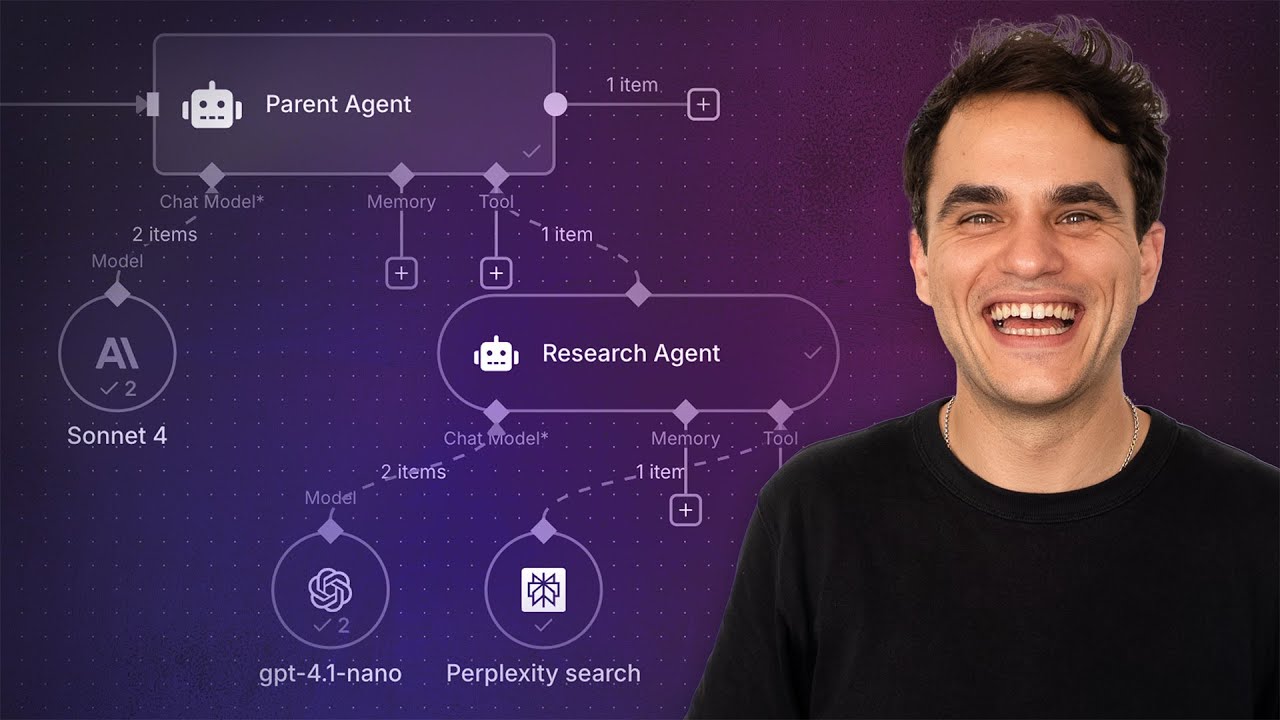
Tool itself. So you can now use another AI agent as a tool in the same workflow. So let's add that to my analyst agent and let's create a research agent that's gonna be doing the research, and then we'll have the analyst agent as kind of the overseer. Why might I want to do this right now? In my use case, I'm using sonnet four. Sonnet four is a relatively expensive model. What we're gonna do for the research agent, the subagent, which just has to take a query user tool and then summarize that and send that back, is that's gonna use a much cheaper model. We're going to use GPT-4. 1 nano, which is about 37 times cheaper. Than, called sonnet. So in this way, the analyst agent, the thinking brain, will have the power of that sonnet foundation model and use that power in synthesizing the text output. Sonnets really good at that. at the tool level, the thing that's gonna be getting lots of tokens from the real world, from perplexity, it's gonna use a cheap model to parse that, chop that down before we send it to our expensive model. In tools. This is how you would get to the AI agent tool. You just search for it once you click on the plus here, but in classic cooking show style, here's one I made earlier. So let's add this in here. Let's disconnect perplexity. attach my research agent. Let's attach the perplexity tool to that research agent. Now let's take a quick look inside the research agent, how this is gonna look like. Just like any tool, it's gonna have a description. So call this research AI agent when you need a real world research done. And then, It has the user prompt like you would in any AI agent, and this is where I'm gonna use from ai. I could also just hit this button, this is the search query is populating, this is what my parent AI agent sees as the form it needs to fill to run this tool, to run this agent as a tool. this is all set up. So let's open the chat output an analysis NANA favorite workflow automation tool. so we see the analyst starts and it decides to use a research agent and it's searching in perplexity.

Benefits of this approach

while this runs When I ran this with the analyst agent on its own, and then the multi gentech approach, the amount of tokens consumed. This is gonna do 4, 5, 6 researchers. It was about 50,000 tokens both times. It was a couple hundred tokens different. In this setup, about half or more of those tokens happen in here in the model that's 37 times cheaper than that. So all those tokens, it's ingesting or outputting happening with a cheaper model, and then we can use the right model for the right job this is a simple example. You could extrapolate this out, obviously having MultiGen, nested, tools, right? There's no reason that this agent can call another AI agent. The NNN team, has tested this multiple layers deep and there's no degradation so far. So feel free to test that out and let us know. but you can theoretically use what I'm showing you here to go multiple levels deep, really separate concerns, and have the right agent for the right job so it's not getting confused. and I think one great example of this is for research or anywhere where you need to get a lot of. Tokens from the world have your specific cheaper model process that get the roll up, the summary of what the parent agent needs to basically inform its next step and then it's gonna be more efficient this way. We can see in the logs the way this is populating. We see we've got the parent agent and then the, sub, agent tools that ran, and then the steps inside those as well. So we can see here, we populated that perplexity search tool. Here we did that again. it's getting a rollup back. This is what the parent AI agent is getting back as a tool, which is different perhaps from the raw inputs that we're getting from perplexity, right? 'cause this is that nano model summarizing that up. here is a good highlight. Let's say in the single agent model, it'll do the same number of calls, and that's relatively true. When I was testing this, we already have five calls to the sonnet model, and we have nine calls to the 37 times cheaper GPT-4 0. 1 model. So cost is one reason, but I would say the main reason, it lets you pick the right model for the right job. a lot of people say, you know, for creative writing, for outputting, synthesizing text on is, is great. the Gemini models can be good for. A certain tool calling and stuff. That's maybe another good use case here is tool calling. there's some really small open source models that are great at specifically calling tools. If you have some complicated tools that need big Js objects specified in their parameters, maybe you're gonna have an agent just for calling those tools. Okay, so this ran, let's just have a look at this output here. Uh, it outputted an analysis of NN. It says we're Swiss based in Lucerne. All right, so it's hallucinating quite a bit there. So that's something we're now perhaps at the research agent level, at the perplexity level.

Wrap up

I might want to add some prompting, some checks around that. But I can do that focus just on the research agent this is multi-agent workforce natively in n8n powered by the AI agent,, tool itself. And I think we, at the internet team, were all really excited to see the use cases that you are gonna use this for., Because this just came out, it's brand new. So think a lot of the best practices around when to use this, when to use some workflows, are still evolving. A very exciting time to be building with AI these days. I hope you found this little video helpful and happy flowgramming.

Другие видео автора — n8n

Ctrl+V

Экстракт Знаний в Telegram

Экстракты и дистилляты из лучших YouTube-каналов — сразу после публикации.

Подписаться

Дайджест Экстрактов

Лучшие методички за неделю — каждый понедельник


