Build and manage smart devices with n8n - Jason McFeetors
13:04

Build and manage smart devices with n8n - Jason McFeetors

n8n 11.10.2021 2 647 просмотров 43 лайков

Machine-readable: Markdown · JSON API · Site index

Поделиться Telegram VK Бот
Транскрипт Скачать .md
Анализ с AI
Описание видео
In this talk, Jason shows how to using inexpensive commonly available hardware, it is possible to build your own smart devices. These devices can be centrally managed with on-premise n8n, eliminating the need for an internet connection to run your smart home!

Оглавление (3 сегментов)

Introduction

going forward imagine a world where smart devices could be controlled without the internet let's not imagine it let's actually see how json is building smart devices using inexpensive commonly available hardware that is managed with on-premise ni-10 thus eliminating the need for an internet connection to run your smart home jason the floor is all yours thanks a lot archer uh so yeah i uh i've been playing around as i tend to with uh various bits of hardware and seeing what we can do with uh any then when we combine them all together um this actually started out in rather an odd way my younger daughter was having difficulty falling asleep and uh like every good nerd i saw this as an opportunity to build something so i pulled out one of my raspberry pi's and hooked it up to a speaker and had you know in a couple of days built a nice little player for her podcasts that didn't didn't require her to actually have to set it all up i could manage it all remotely from my phone but she found that at night if she fell asleep she would have missed part of the podcast and wouldn't be able to listen to it and go back so she asked if i could figure out a way to roll it all back and you know i was digging into it and found well sure enough this um application has a uh api built into it so i thought great i can control it with any then but i didn't want to give her a whole computer or even a phone to have to work with so i pulled out a wonderful little device and this is called i don't know how well you can see this or not so this is an esp32 microcontroller they're relatively inexpensive you can find them often on places like aliexpress for between five and eight dollars and this is a full-blown computer system it has bluetooth wi-fi um it has memory storage you name it it's got all kinds of abilities to build into it i thought that's kind of fun what can we do with that so i actually built a little uh switch into it and threw in a uh a nice little wi-fi connection and got it to send a request out to nan which then would go and it would turn on the her player or depending upon how she touched the button it could roll it back and then it automatically set it to turn off after an hour i thought well if we can do that what else can we do so um i started playing around and looking at this and realized well this is all the stuff we're talking about with iot the internet of things and i just built out by almost by accident a couple of internet of things devices that did not require me to have internet connectivity so i took the internet out of the internet of things so when you have devices commonly like this we all i'm sure have one of these sitting at home plugged that you go and you plug into the side of the wall and you fire up your phone and you often have a qr code on it somewhere or there'll be an id code on the back that you would scan with an app and it asks you to do you know create an account give out your favorite password that you use for all your other accounts and give them access to basically control hardware within your home um not overly excited about random people from random countries entering my home and doing random things so with some of the devices that i've been playing with now you don't have to do that anymore so i'm going to flip over and i'm going to try to flip over to a different camera here we'll see if this works or not it it's got about a 50 success rate and so i may disappear uh but with any luck uh well that's looking good there we go

Demonstration

so this is my little device that's set up it looks yeah it looks as scary as it actually is um but this device is now set up to completely run and control um nan um this button here gives me the ability to actually fire off an api call that nan can pick up with um the web hook and there is you can see a red light here and beside it there is a blue light that you can't see yet and that is actually can be responded to by any dan so i'm going to share my screen and i'm going to show you a little workflow that i've set up that actually will run i'm actually going to use this one instead and hopefully you can see my see the screen so we've got this workflow set up and here's the web hook i promised you and so i'm going to give you guys a bit of a challenge if you can somehow still see my camera where you can see the my device and keep an eye on my on the uh web or workflow that i'm sharing out they kind of have to work together so we'll see if this works or if it doesn't we'll try something else but all i'm going to do is i'm just going to execute the workflow and as you can see it's waiting the typical workflow is waiting if you can see i'm gonna touch the button when i press the button it's going to fire off the workflow and now you see we've got this loop going here i've got an on and off loop so if you take a look back at my camera my camera you will see that there is a blue button that's cycling on and off in time with the workflow it's not that complex it seems like a complicated thing this was about i'd say i put in you know a couple hours a day for about a week to set all this up and it's very like relatively simple to work with so this is kind of my proof of concept and of course i'm never satisfied with just a proof of concept so i've got a roadmap built out of things i want to do so i'm going to actually change sharing my screen here and i'm going to flip over to another screen and on that screen there we go

Demo

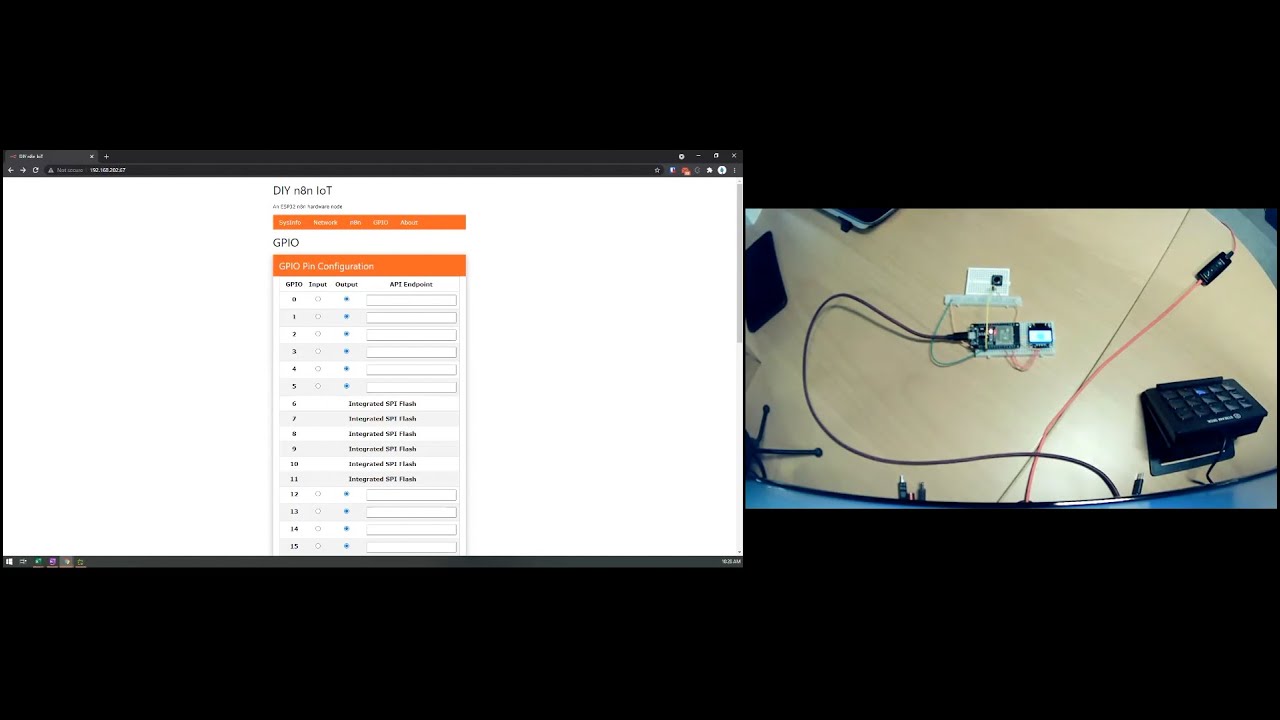
so this is the web interface that i'm actually building into that lovely little uh esp32 chip that you were uh looking at um it's not it's got work that needs to be done on it yet there's still quite a bit to go but so far i've got it set up where it'll pull up the system info so this is again running from a web server built into that chip there's no other web service this isn't on the internet this is completely built into that chip and with that web server it will uh it'll do api calls out and api calls in so you can send and receive stuff and it's still doing you'll see the chip is still going back and forth um you can also see in the screen i've got so here's your networking info this is all pulled in real time so when i restart the chip and it takes about four seconds for the chip to restart um it'll pull all that information in you can then go in and modify your networking information include changing your host name changing your ssid um your nad information so you can change with the address in here you can tell you want to go to your test or your production environment so it will change your web hook url it'll add the test piece onto it automatically um and then the gpios so those are the all the pins on the chip so that you can talk to them uh this is the piece i'm still working on but i'm going to have the ability to build the pick and choose any one of the pins control it and then give it an api endpoint so either it will if it's an input node it will actually create the api endpoint automatically on the chip so that anyone can talk to it or if it's output node um it will actually connect to n8n from that api so this is a little bit i have to go yet um i also want to add in a couple more things so for example if the first time you boot it doesn't see um the wi-fi information it'll actually go into a host node so it'll create its own um wi-fi network and you'll be able to connect to it and then do the pre-configuration again without any internet connectivity and it'll be able to fire that up and i've also got and i don't know how well you can it's hard to see even on the camera this little device here so that's actually a screen so it's about a two centimeter screen and on there is a dynamically created qr code that if you take your smartphone and you were to of course i don't have it queued up because why would i have a q-tip that wouldn't make any sense and here we go if you take your favorite barcode scanner and put it over it it'll read the qr code and i don't know if you can see that or not take you straight into the web interface without even having to punch anything in so those are the toys i've been playing around with the things um i still have plans to write all this up and i want to make a nice little package for it and when i do get it all done and written up i'll make it all available on my website and you guys will be able to pull this down and build your own if you want and uh play around with it and do all kinds of fun things because the wonderful thing about this now is this is kind of the course just the base but i can start adding in other things you know like for example i can add in a sonar so that it can detect distance and learn how to follow things i can put in a high voltage relay which will allow it to literally turn on any high voltage device we can start playing around with servos will let us physically control things so we're looking at robotic arms we can start creating and controlling different physical devices that way um you can you know work with it within your home you can turn it into with a temperature sensor turn it into a thermostat that can control different devices control your furnace whichever you like um ir receiver is really good because you can actually uh could then take this and hijack signals from your remote control and when you go to turn your tv on with the remote control maybe it'll actually catch it and then with any end turn down the lights so there's possibilities with that um you know we've got you know a flame control module so you can control your gas fireplace it's really quite endless as to what you can do with some of this stuff now that we've kind of got this interface out into the rest of the physical world and with that i'm going to uh i'm going to stop sharing my screen and i'm going to flip over to my normal camera because everybody needs to be reminded that it is friday and that's why i'm wearing my friday shirt and i'll uh pass it back over to you herschel wow okay i'm just still processing all the stuff that i saw and this was amazing jason thank you for sharing it i'm like the possibilities are kind of endless now and i'm sorry folks for asking for recommendations on tv shows and movies i think i know what i'm gonna do this weekend uh but let's move forward and uh move forward because i see a lot of questions coming and a lot of people are now excited about the ideas that you said jason so we have a lot of questions coming in

Другие видео автора — n8n

Ctrl+V

Экстракт Знаний в Telegram

Экстракты и дистилляты из лучших YouTube-каналов — сразу после публикации.

Подписаться

Дайджест Экстрактов

Лучшие методички за неделю — каждый понедельник


