Image Caching System Design for Mobile Apps | Mobile System Design

Image Caching System Design for Mobile Apps | Mobile System Design

Machine-readable: Markdown · JSON API · Site index

Поделиться Telegram VK Бот
Транскрипт Скачать .md
Анализ с AI

Оглавление (6 сегментов)

Segment 1 (00:00 - 05:00)

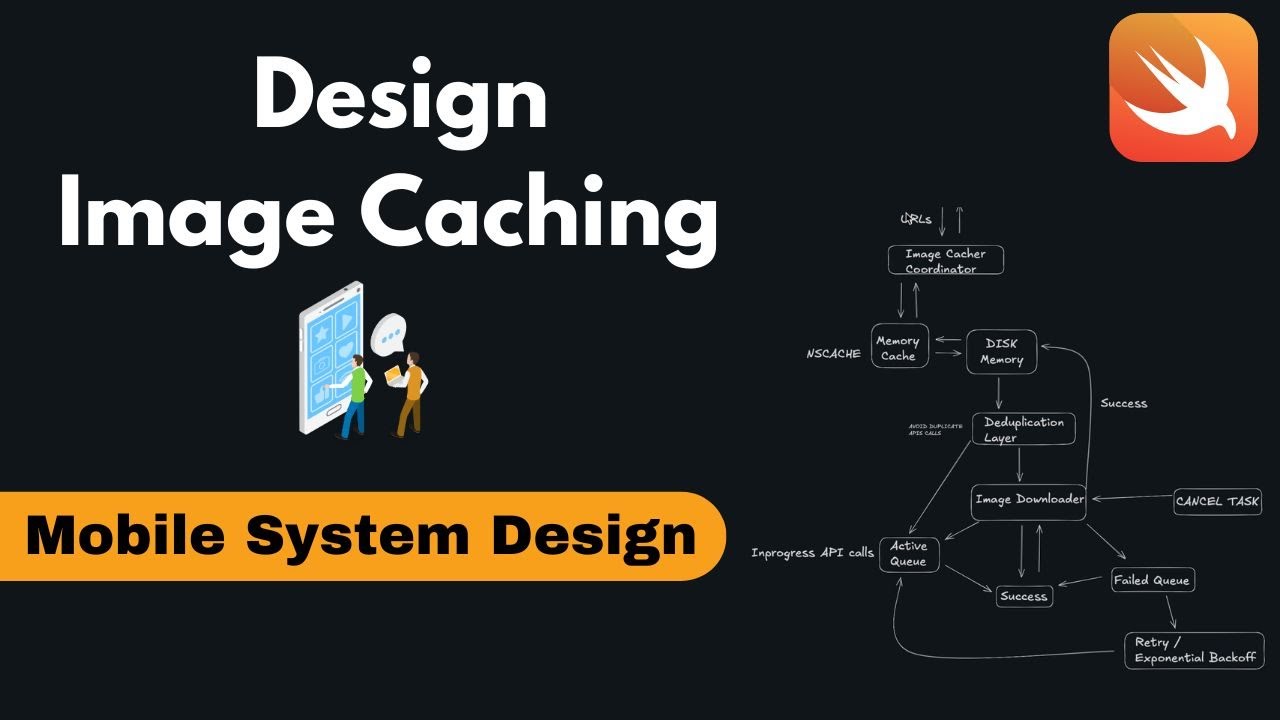
you are doing well. Today we are going to discuss another CVS that is for system design mobile interview questions. In this we will start with the very basic interview question that could be asked like design an image cacher in iOS like how you would be designing your image cacher as a iOS developer like what would be your thought process like how you would be building this entire caching technique and how you would be downloading. So you need to give the interviewer a basic rough map like how things goes on. For that we will just basically start like what is image cacher or what is the ask. These are the things that you need to ask in the interview like the you basically interviewer and you should know like you have a same platform to talk about. So basically our talks would be like what we have here like what is the basic we need an caching. Okay. Then we need to have basically the caching that needs to be done in the disk also and in the memory ns like memory because memory could be volatile. So we need to make sure like it is in the disk as well. Then we need a cancellation mechanism like let's say the user scrolled up and those cells are not in the memory anymore. So you can cancel them simple. Then basically you can have a retry mechanism if the image failed to download. In that scenario will you have a retry mechanism? If yes then how you would be going ahead. Okay. And then in the success scenario if you have those success then how you would be going ahead like what is the flowchart you would be following. And in the cancellation and retry you need to have some data structure in order to store those values. Let's say if the user has five images, you have five API calls that has to be made together. Okay. So those five asynchronous API calls you would be making. So you have to maintain a queue that will be storing these images URL and they would be making the API call and let's say user moved ahead and we do not need these API calls. So we need basic Q that will hold whether how many API calls are going in progress or active, how many API calls failed in retime mechanism. Those things we have to talk to the interviewer and tell like these things I would be designing in my image caching techniques. Okay. So this is like what we should have a clarity on like what does it have and how we have to do. So let's start with the basic diagrams like how we can start with this. So first of all like keeping in mind the solid principles and segregations we can first basically make a coordinator. Okay, this we can call it as a coordinator. This coordinator's main role is basically to coordinate between your mobile UI or view model and to your logic of your image caching. So this we can say as an im coordinator for the image. Okay, this will talk to your app like this. If at the top is this is your basic mobile app that you have or your view model. So this will talk to it. Okay, no other person will talk only this will be talking to the scene. So once it this coordinator we can say as image downloader or im cache image caching coordinator anything image cacher coordinator. Okay. So this is our coordinator we have for the day and he would be doing our jobs. So this is our basic image cacher and we will be pointing it. So they both will be talking to each other. Okay, they will be passing the values. If app wants the data, okay, well and good. If app do not wants the data then how we have to behave in this manner also we will be showing it. Okay, so here we go. Like these are the values they would be talking to each other. Great. So now here in this coordinator once the app give us any of the URL for the image. Okay let's say we have any of the URL that has to come over here. So we have image URLs that the apps is giving to us. So here the coordinator's role is to check whether that particular image is already existing in your memory cache like that we call it as NS cache or in your file or what we call it in disk memory is it there or not so basically this image cacher would first talk to let's say you have here one basically it will talk to one of your two basically so Let's make it one more over here and we copy and we paste it. Okay. So first it will talk to basically. So keeping in mind the memory

Segment 2 (05:00 - 10:00)

segregation principle the segregation principle segregation we have to make sure we have one memory cacher over here that will check for memory caching like our memory caches been present or not. Okay. So here it will check for that particular thing like is the memory is the data or the image is present in the memory or not. The by memory cache I mean is NS cache. Okay, this is a volatile memory. So every time we cannot be sure like is it present in the NS cache or not. As we know the operating system might delete the images from the cache if it is needing more of more data or the space for some other work. So it might delete it. And next we will be also storing them in the as we talked about in the disks. So here I can say it disk in the disk memory that is our basic memory of the phone. So here we would be having two it will ask any of two will you are you having your memory cache. So first the priority will be it will ask our memory cache. Okay. So we can ask like here we can just make the pointer go in this manner. Basically they would be talking. So first our priority would be to check in the memory cache. If it is present well and good the memory cache will return okay I have the value and it will return. So simple flow and this will return to the app. But in case if the memory cache is not having then we will have a fallback and we will check in the disk memory. If this memory it is having it will return to the memory cache. Okay. So we can cache it first in the memory and then give it to the image cacher so that next time if it is asking we can have directly from the cache and we do not have to go to the memory cacher. So and then we can pass it ahead or if you want you can directly give to the image coordinator and then image coordinator can later store in the memory cache. This would be a triangle and a long work. So we can keep this flow. So this flow will help our data to go in a consistent manner. So every time we will be always checking and if it is not there we can directly store it. So here the dis memory could be the source of truth. So if it is not present in the dis memory it means your entire app level. So if the images are not present in your app level what you have to do basically now here you will check you will make one layer that we call as a duplication layer. We will talk about it later. So I will just write the layer. We will in next upcoming few minutes I will talk like what I am calling this and why I'm calling this as a duplication and then we call it as layer. So the idea of this dduplication layer I will talk in next few minutes. So basically once we have dduplication layer it is here like if you have any particular URL. Okay. So here you would be storing those image in your memory cache based upon those URLs what the user is passing. Since we will be assuming that the URLs that the user is passing is unique and if we want we can encrypt them using SHA 256 algorithm. If those URLs are secure uh like they are sensitive and secure we have to make them encrypted and we have to make sure like they could not be used by some other X person. So in security purpose if those URLs are sensitive we should cache them first in we should like encrypt them using S sh 256 using cryptokit and then we can store them in the memory based upon those. So this dduplication layer what we will be doing here basically we will be checking like uh is uh the app loading already some of those images if it is then we will delete. So we will talk about it. So let's go ahead after this dduplication layer we will have a downloader that will do the main purpose of the app like what this app is we are building for we are sitting together for the so here we will be basically having our main we can say image downloader or you can directly call it fetcher anything as of now I am keeping the names very same and simple so that we are not confused with the naming So here I am downloading the images. You can use as per your convenience URL session, LMO fire, whatever your business logic suits you. We can tell the interviewer like if we are going with the native approaches and we want some iOS app Apple friendly. So we can go with URL session. But if you want to have control over the calls of the APIs and all you can use MLM fire. So these are your basic calls. You can talk about it. Okay, here in the downloader you need to have basically when we will be have to keep a target. If here we will be having basically one that we call it

Segment 3 (10:00 - 15:00)

as a image downloader in this we will be having three basically one and let me first draw them two and then one more. So image downloader will do three works. First of all, let's say all those images that are API calls are going on. We can call it as an active Q. We will maintain a queue or something. We can say based upon that on your array or something. We are just talking about the same. So let's keep it as an active queue. Here are those like active APIs that have been yet in progress like user we can say in progress API calls for your easy in progress API calls. So here okay and let's drag this. So these are in progress API calls that the API calls are going on. Let's say the images could be of 5 MB, 10 MB so on and so forth. So these are keeping a track of all the active API calls. Here we will have like the API calls that are successfully. So once they are successfully downloaded. So we can have this in the success and once we have them success what we can do once we get them we will just directly pass those images. Image downloader will pass directly to basically our disk memory. Okay. So here it will talk to the disk memory. Okay. Um I think we can make this arrow and here we have okay and here directly done. So it will talk basically directly. So here we have so once we have the things we like if it is success so we will pass them in the success Q for the temporary purpose like we can know it is success and once we have them in the success image downloader on success will pass it for the storing in the disk memory as well as in the memory caching okay in the success flow here we need to have one more thing that is known as when I was talking about we can have some bad days also let's say we have So we have failed Q we have to maintain a mechanism like where we have the allowed we allow the user like in sense if the things are being failed in how we will be handling those failure scenarios. So we can have happy case and as well as a bad case. So here in this fail Q you have to make sure like uh if the things are failing in those scenarios you have to maintain a retry mechanism. Now you have your fail Q and now what you will do like you know like okay these images have been failing. So now in this scenario you need to have a retry mechanism that we can have like a user can say like you can retry four times you can retry any number of times. We can ask like user like how many times you want to retry. Okay. So basically we usually keep a threshold of four or five or max to max three and usually we keep max but if the user wants to go then we can give them an upper limit of whatever they want but usually by default we will keep a retry mechanism of three. So what we will have here we will be doing the retry. Okay. So here in this retry mechanism we have to focus like we are not making API calls again and again like if the API call failed after again simultaneously we meet another API call if it we got the again response 400 500 again we made the API call. No in this way we are overloading the server and this is not a correct approach. What we can do there is a mechanism that we called as first of all this is our retry and we would the retry mechanism we would be following that we what we call is exponential back off so what does this do like why so what does exponential back off is uh doing so here in exponential back off let's say you made an API call now you will wait for around 1 second and then you will make another API call. If that API call also fails, then you will wait for 5 seconds and then you will make the second API call. Hypothetically, if that second API call also failed, then you will wait for 10 seconds or 8 seconds and then you will make the third API call. So in this scenario, we are allowing the server some time maybe it can reset it can refresh the values and maybe luckily after some time if we are making the API call, we might get the data. So directly overloading the server again and again with the API calls without any break is not a good approach. So exponential backoff is basically we are making API calls for the retry after a certain amount and that time amount is increasing for each retry. Let's say our business logic as per what we can say for the first time we can say we will retry okay after

Segment 4 (15:00 - 20:00)

every one second. Then for the second retry we had then we are retrying after 5 seconds. Okay. And then for the third one we will retry after 8 seconds. So in that case we have been waiting for 15 seconds. We have expanded our window also. Maybe in this scenario we might get a chance like the API will respond and we will get the images. So this is a better approach that we follow. So you can talk about the retry mechanism to the interviewer. So this is your fail Q. So once whatever you are getting and it gets succeeds. So let's say it is getting succeed. So you have to put it in the success. Okay. So once you get the success you can pass it to the image downloader like hey my values are success and then you can go ahead. So this is a particular way. So okay to be honest let's go ahead and go in this scenario like the failed mechanism once we are going with the retry um let me first make the arrows this is a retry okay now in the retry we will be again checking we would once we make the API call we would be going in the active queue because our API calls have been made so once we are going in this active queue what we are doing we will be making the API calls and if this active queue makes anything success So this active Q will pass on the values to the success. Okay. And once we get the success, we can just directly give it to the image downloader like hey I get the success now. So this is a basic flow. These cues will be talking to each other in the image downloader. So we will be handling all the cases that we can have. Okay. So let's say if again this active Q is been failing. Let's say we have a fail scenario. Then in that case again this image downloader will have the failed scenario. The fail Q we will have it and then again the image downloader will pass it into the fail Q again. Then we will do a reactive scenario and then again the active calls API will say to the image downloader hey this failed again. So we will pass it again the values. So this is a basic that I'm telling you a normal flow like you can just remove these arrows also if you want. So basically you can talk to the interviewer like this is my image downloader it will handle and this is how the cues will talk to each other. So the image downloader will take care of it. We can speak like this also. Now what I was talking about dduplication layer let's say we are having five API calls. Okay already five API calls were made and let's say later down we were having one image that is already been in download or and it is a duplicate. So in that scenario if we already have a image that is already in progress why we should download it again maybe let's say there are 10 cells in the UI as of now and out of that two cells have the same image so again making that particular call for the second time is not a worthy option in that scenario we are making this dduplication layer this is just to avoid duplicate API calls basically avoid API calls. Okay. So if the API call is already in progress, why we should make it? So we will be how we will now check. Now you will talk to me like hey how we will check it like is it in duplication layer or not? So basically this duplication layer what we will have? We will be basically checking like we will have here the task basically if we are talking about in swift UI we will be having the task of what are the images that are already there. So once we already have this active Q so this active Q could be shared between and duplication layer and the image downloader. So once we have this share data of this active Q. So there the we can check like if this active Q is already having so this duplication layer will already remove. So directly we can make it. So this active q would al is talking to the duplication layer. So if the APIs are in call already so we will not make it. Okay. So that is an important thing you need to note. And if the API calls are avoid duplicate calls if they are not then we will actually make the calls in the image downloader. So this is a basic flow that we have. Now another thing that comes to the picture is our cancel. So here we have the active Q and let's say we are asked to cancel something. Okay. So let's say the images of the user do not want to download. Now let's say the user went back to that particular page or those cells are not in the memory anymore or not in the screen anymore. In that scenario we have to cancel those things. So what in order to cancel in this dduplication layer we will also have one more that is known as basically a cancel task. So here the cancel task is

Segment 5 (20:00 - 25:00)

basically we will be asking if in the memory it is already there we cannot do anything but in the dduplication layer what we can do we already have the list of active cues like what are the active in progress API calls we can the dduplication layer in this we can directly talk like this will directly talk and cancel all the task so simple it will be cancelling all the tasks that are already in progress or you can want you can just directly call I we can just directly in the image downloader we can talk to it. So it can just directly cancel the task. So we can put it in this hierarchy. Um let's move this to this basic hierarchy. Okay. And here we can just cancel the task as well. Like let's say if we want to cancel any of the task the user wants the im the image downloader it will talk to the image downloader. Okay. And once it has all the tasks so it can just directly image downloader will ask and it will cancel the tasks that are already active. So this helps us. Okay. If you want you can make this active queue as outside also so that the things are easy for us like you can make a shared instance of this active Q so that everyone can see like what are the active cues that have been there. So and then with the image or downloader we can cancel all the tasks that are already the part of it. So if you want for the clarity let's keep it here. Okay. And here let's say if the user has already so here in the dduplication layer we will be having a cancellation flow. If the cancellation flows come in the we will check if it is an avoiding an API call and then we will have the cancellation of the task that could be performed here. So this is a basic image or the API diagram that we can have here. So let's directly like just go ahead with the same and do it in a recap. So this is a user app and in this we will pass the user URL. Image coordinator is our basic one that will talk to the app and we will hide all the other implementations. And here we will have first check on the memory caching. If it is not present in the memory then we will go to the disk and all those cachings and all namings would be done on the URLs that are sent. If those URLs are sensitive in terms of security, we will be using SHA in order to encrypt those URLs and then store it in the file name and to be used as a file name to be stored in the disk memory. And once we have the duplication layer, we will check like before making the API call is that particular URL already been in active download. If it is there already in active download, then basically we will not call it. Okay. And it and we will just directly pass whatever is present there and if it is not then we will come image downloader will do all the stuff that is for first it will make the API active call. If those are active and they are successful well and good. If they are not successful image downloader will put them into failed que and then if they are in the failed queue then again they will go in the retry mechanism. In the retry mechanism, we will put them into active queue again and then this flow keeps on going on. Okay. So this is a basic flow. So basically we can delete this success because it will directly not come under success. This is of no use. So this is could be eliminated. Okay. So we can eliminate this and okay. So it is I think something is wrong. It is not going. So we will just keep in mind like we can eliminate this also. So this arrow could also be gone. So after this let's go ahead. Okay. Um something is not right with this board. Um 1 minute. So let's remove this. Okay. I think something is wrong. Yeah. So here let's remove this. This is not required. Okay. So since the failed mechanism if it is failing it is going here. So in the retry mechanism we studied we have exponential back off and we will have these retry things and if they are active then image downloader will give the values that is basic are um the images to the duplication layer. Dduplication layer and then dduplication will pass it to the disk memory and finally we will have the data back in the image. And once we are having the downloaded data, we are making sure like it is also getting cached as soon as we get them. So this is a basic flow that you need to have if you are designing our normal image caching app. So here the interviewer can ask let's say if we are making an API calls like five API calls like what would be your trade-off like how you would be going those questions also could be answered like let's say we have to make sure like we are using first of all task and all the downloading is going on like some of the backup things we need to have like some prerequisites we should have it let me just write them quickly so first of all we would be having all the API calls

Segment 6 (25:00 - 26:00)

that are there in the background thread. Okay, so those will be in the background thread and the we can use the latest task and async aait for the same as async and await. So once we using async aait we have the facility like we can use groups here and we can make five asynchronous calls or how many we want to make. Secondly, once we are talking about like we have to make sure like we are not doing dirty, right? We have to make sure like the memory that we are talking to should be thread safe. So thread safety is another priority that we have to take care and in swift we can use actors for the same and if you're not aware with the actors you can use semaphors and locks technique but actors we should use as we are evolving in swift and then after thread safety we have to make sure like uh all those like if there is memory vol memory is also excreting if we exceed the memory then in future we can have some questions like what and user do not have the memory user don't have a memory and user is not having sufficient space then in what scenario you will do then it would be just basically we will be do not doing the caching and we will give a error to the user not enough space in order to go ahead with that so this is like how we can do like make it user friendly that could be a follow-up question like if the memory is not sufficient so you have to prepare with these kind of questions as well so that's it for this video if you like this video do like and subscribe to the channel and stay tuned for more videos. Thank you.
Ctrl+V

Экстракт Знаний в Telegram

Экстракты и дистилляты из лучших YouTube-каналов — сразу после публикации.

Подписаться

Дайджест Экстрактов

Лучшие методички за неделю — каждый понедельник