Intro to burr: A State Machine for LLM apps

Intro to burr: A State Machine for LLM apps

Machine-readable: Markdown · JSON API · Site index

Поделиться Telegram VK Бот
Транскрипт Скачать .md
Анализ с AI

Оглавление (2 сегментов)

Segment 1 (00:00 - 05:00)

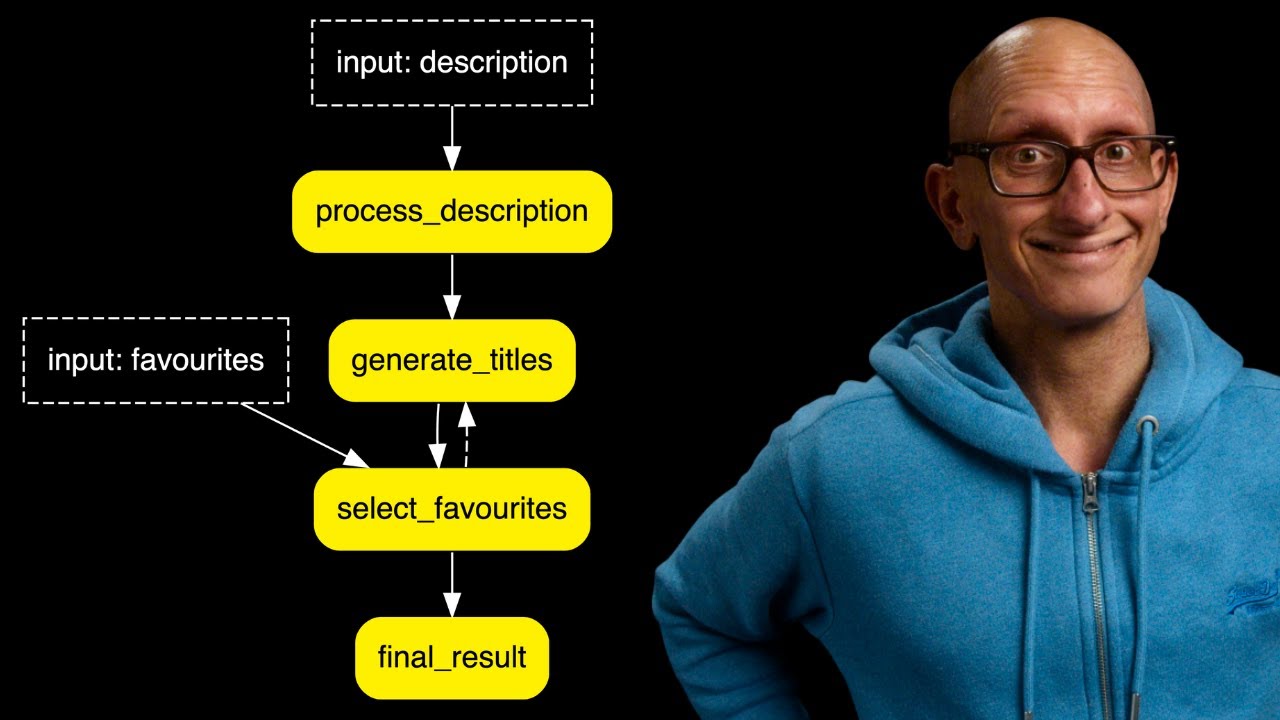
bur is a python library that has you express your application as a state machine it makes it easy to develop llm applications that make decisions so for example chatbots agents or simulations in this video I'm going to get it to help me generate YouTube video titles from a description so we're going to start out simple and have it generate US 10 video titles but by the end of the video we'll have introduced some transitions so that we can have the llm generate more titles like the ones that we like so let's create app. py we're going to bring in some imports and then we're going to initialize the rich console and open AI we're going to be using instructor so that we can create structured outputs from what the llm gives us we're then going to create ourselves a function so it's going to have an action so we can say what state do you want to read so in this case nothing and then we're going to write some state to burst it's going to be post and description now anything that you put in the right you need to make sure that you write that state in your function otherwise it's going to throw an exception we're now going to create our functions it's going to be generate titles we'll pass in the state then description so that's going to come from the user and then we're going to have our llm client and we'll return some State then we're going to initialize our prompt from the description and then we'll call the llm passing in the model and then the response model is going to be video so it's going to take the response and convert it to video now video is a pedantic model that has just one field which is titles which is a list of strings and you can see it's ideas for video titles it needs to be a minimum of 10 and a maximum of 10 so IE 10 if we come back you can see we then need to pass in our messages so this is just kind of normal Al llm flow to tell it the system message this is what you're going to do and then the user message is going to be the prompt and then we'll update the burst State at the end passing in the post and the description so remember those were the two things that were in our annotation at the top now we're going to initialize our application so we'll use the application Builder we're going to pass in an action so normally this could be just the name of a function unless you want to bind in a value that is somewhere else so IE in R case we want to get the llm client and bring that in and then we're going to have transition so we'll leave that empty for the moment then we need to tell it where does it where should it start so the entry point so that's going to be generate titles and then we'll build it and then we're now going to paste in our video description so this is the description of a video that I made on llama 3. 2 Vision we're then going to create ourselves some inputs so we always need to have some inputs this time it's just going to be a description then we're going to capture the action the result and the state from calling application. run we'll have halt before that's going to be empty so H before means when you reach this state or I you're going to call this function I want you to call me before you call it so at the moment nothing there halt after is going to be generate title so after you've called that I want you to return control back to me and then we'll pass in the inputs and then we're going to print out the action and we're going to iterate through the titles that it's generated and print them to the screen let's come over to another Tab and we're going to run our application using UV and you can see it comes back it tells us the state or the action is generate titles and it's given us a bunch of titles that might be interesting now we're going to update it to our ask us to select our favorite titles and for now we'll just print out the ones that we've selected so I'm going to come up here I'm going to add in a wild trul liip it's kind of going to go round and round we'll just tab that other code across and then we're going to delete the bit from action downwards we'll put that up to the top of the screen so we can see everything and we're going to write in some new actions that we're going to create in just a minute so we're going to have one called select favorites and it's going to say which ones do you like and it's then going to print out the ones that have been generated and then we're going to ask us we'll have an input to ask us which numbers do we like uh once we've got that input we're going to convert it into a list splitting on the comma so we're expecting like the user IE me to write in which ones do you like so EG 5 comma 7 comma 8 and then it will create a list out of those and then we're going to have another state or another function called final result and here it will print out the ones that we like and if we get to this state we are now done there's nothing else to do and we're going to break out let's now come up and we're going to add in a Hulk before condition so that's going to be select favorit so just remember Hal before means when it's going to go into this function or into this state give us back control before you do anything so before you call Select favorites ask me cuz I'm going to then tell you what my favorites are and then you can call the select favorites function and then halt after is going to be now final result let's come up to the top and let's write ourselves our select favorites functions so that's going to take in the favorites we're going to convert it from string index values to integers and then we're going to go and look up in the post titles we're going to going and pull out the indexes so that we actually get the values instead of the numbers and then we're going to update our states we're going to have the favorites so that's just going to be a list of values and then we're going to have a favorite draft that's going to be app pendant so we're going to have a list of lists inside that favorites draft and then let's write our other function so final results this is going to be the one that then gives us back the result first thing it's going to do flatten out those lists and then we'll write it into the variable or the state variable final result let's now come down to actions

Segment 2 (05:00 - 07:00)

and add those actions in so we need select favorites and final results to be actions and now we're going to add our first transition so what this means is after you've done the first thing do the next thing so I. E first one's going to be after you've done generate titles go to select favorites remember it comes back to us before it does select favorites and then after you've done select favorites go to final result now let's run it again and you can see this time it asks us to choose our favorites so let's choose some and you can see it just immediately prints them out so now we want to add in a loop to make this more interesting so after we've chosen our favorites we want it to go back to the llm and try and generate some more like the ones that we said are our favorites so we want to go from select favorites back to generate titles if we provide some favorites if not it can still go to final result and finish so we're going to go and add in a new transition so this one's going to be from select favorites to generate titles if the length of favorites is greater than zero so it's going to go and look at the favorites State and check did we provide some favorites okay cool let's go and generate some more and if we didn't then we're done we can exit and then the other thing we're going to do is we're going to add in a new transition from process description to generate titles and the reason that we need to do this is we need to add in a new state to capture the initial description and make sure it's in the state available all the time uh because we're not going to be passing it in to generate titles anymore and we're going to just go down and tweak our entry point to become process description let's add in process description as an action and now it's time to write that function it's not going to do anything too complicated it's going to write the description that we received from the user I. E the video description and just write it into state next let's update generate titles we're not going to write the description anymore so let's delete that from right we're going to be reading from description and favorites description won't be a parameter anymore either so let's get rid of that prompt now comes from State description and we're going to tell it that if there a favorites we want to use a different prompt where we tell the llm hey I liked these ones that you came up with can we come up with some more like that and then let's not write out the description into State anymore and then finally we'll come down to the bottom and we need to initialize the favorites to be an empty array otherwise we'll get an exception the first time that generate titles gets called because at that point there are no favorites now let's run it again you can see it asks for some favorites we'll pick some it then asks us for some more favorites and we'll pick some again and then the last time we're just going to say I don't want anymore and we'll press enter and you see then it prints out the ones that we've chosen there's way more stuff that you can do with B this is kind of just skimming the surface you can do Telemetry you can do persisting state to disc they've got loads of really cool examples maybe we'll have a look at it more in another video this is sort of borderline gent Ki although it is obviously very simple I also created a video for a similar Library called langro so you might want to check out that one next

Другие видео автора — Learn Data with Mark

Ctrl+V

Экстракт Знаний в Telegram

Экстракты и дистилляты из лучших YouTube-каналов — сразу после публикации.

Подписаться

Дайджест Экстрактов

Лучшие методички за неделю — каждый понедельник