Stamp-Sized ESP32 Super Mini Boards Tested: Range, Programming Tips & Best Pick

Stamp-Sized ESP32 Super Mini Boards Tested: Range, Programming Tips & Best Pick

Machine-readable: Markdown · JSON API · Site index

Поделиться Telegram VK Бот
Транскрипт Скачать .md
Анализ с AI

Оглавление (3 сегментов)

Segment 1 (00:00 - 05:00)

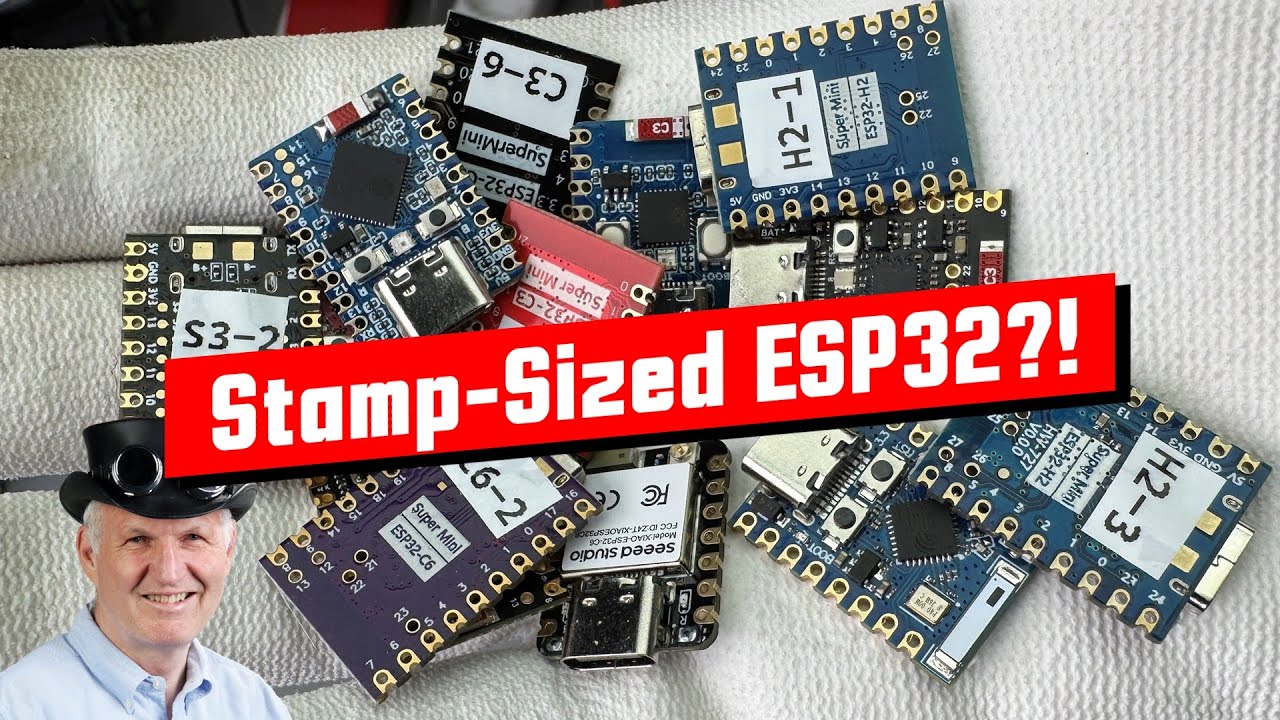
Are these stamp-sized ESP32 boards a clever way to shrink your project, or just a small headache waiting to happen? In my last video, I tried to bridge 36,000 km using one of these small boards — and it didn’t go well. So today, let’s test a bunch of them and see which ones are actually worth using. Grüezi YouTubers! Here is the guy with the Swiss accent, bringing you a new episode with fresh ideas around sensors and microcontrollers. Remember: If you subscribe, you’ll always sit in the first row. In this video, we will cover: 1. What mini ESP32 boards are and why they matter 2. How their form factor and pinouts differ 3. Antenna choices and a real-world range test 4. Programming tips and tricks 5. Useful accessories 6. My final verdict and best picks Let’s dive in! What Are Mini ESP32 Boards? We all know the standard ESP32 development boards. They include an ESP32 chip, a USB-to-serial converter, power management (sometimes with battery support), and they expose most of ESP32’s pins through headers — up to 40 of them. Then came these mini boards. They're smaller and use two rows of headers to expose the pins. I’ve used them in many projects because they still offer a lot of functionality, but let you build smaller enclosures. With newer ESP32 chips offering native USB support, there was no longer a need for the USB-to-serial converter. That’s when Seeed Studio started something new: The XIAO family. These boards are extremely small, have a consistent form factor and pinout, offer a wide choice of MCUs, and some compatible extension boards. Now, other companies are following this trend. But none of them copied the XIAO layout exactly. So, let’s look at what these boards have in common — and what makes them different. To give you an overview, I created an Excel sheet with essential information about the boards. The link is in the video description. Form Factor and Pinout All these boards, like the Raspberry Pi Pico, have castellated pins. This means you can solder them directly onto a PCB. Because they only expose fewer than 20 pins, the designers had to make some tough choices, and many MCU pins are left unconnected. Some of the unused pins are available as pads on the underside of the board — not very DIY-friendly, but still useful. There’s no real standard. For example, C3 boards usually have 16 pins, S3 and H2 have 18, and C6 boards have 20. Also, on one of the boards I tested, the power pins are on the left, while on all others, they’re on the right. So be careful, especially if you’re using one of those premade prototype boards. Some boards use through-hole pins instead of pads for the unused pins. I personally prefer the through-hole version for wire soldering when I don’t use a PCB. Thankfully, the ESP32 is very flexible with its pin functions. You can assign many features to different pins. But of course, not all functions are available on all pins, so you have to check before you buy. Only one board in my test had components on the bottom side — important to know if you plan to solder it to a PCB. Soldering quality All the boards I got had decent manufacturing quality. However, one board didn’t work at all. I couldn’t upload any code. Maybe it was from a bad batch, or maybe it has a design flaw. Either way, I’d avoid it — there are better options. Antennas To make the boards so small, the designers had to replace the usual PCB antenna with a chip antenna or a tiny antenna connector. Chip antennas are new to me and I wasn’t sure what to expect from them. My first experience with them was not great. Also, I thought that size also matters here. Maybe some manufacturers thought that I was not the only one not trusting these tiny chip antennas.

Segment 2 (05:00 - 10:00)

So they also included antenna connectors. But here's the thing: the ESP32 can only use one antenna at a time. There are three ways to choose between the chip antenna and connector: 1. A small zero-ohm resistor that you can move between two positions — a classic method. You can clearly see this on this board 2. Some boards have unclear switching methods and no documentation — not great 3. The XIAO C6 uses a GPIO-controlled antenna switch — a smart idea, but it adds cost Let’s now test how these options actually perform. Range Test Note: I didn’t test the H2 boards because they don’t support Wi-Fi. But I included all others with chip antennas. Here’s how my test worked: • I used ESPNow to send messages • A standard ESP32 with a PCB antenna acted as the “receiver”. I wanted to have a level playing field • The receiver sends a “START” message and waits for a reply • The “device under test” board replies with its name and the signal strength it received • The receiver then logs the response, including the signal strength and the used channel, via MQTT. Node-RED saves the data as a CSV file • I added a boot number to the board name to track each run. Each run includes 100 messages. BTW Now we have to talk about the frequency selection. Wi-Fi offers channels from 1-13 with center frequencies between 2. 412 and 2. 462 GHz. If we choose non-overlapping 20MHz channels, only three are left: 1, 6, and 11. Because I wanted to give these little buggers the best chance, I chose channel six because it is in the middle of the useful spectrum and should provide the best performance. I mounted the receiver high on my roof and tested all boards from increasing distances. I also included the standard board with a PCB antenna for comparison. The first position was about 25 meters away. All boards were able to exchange messages. The next position was about 85 meters away. Also here all boards, with the exception of the XIAO C6 were able to communicate. The third position was 125 meters away. Still, most of the boards were able to bridge the distance. The second C6 board was also no longer capable of communicating. It seems the range of the C6 boards is a bit shorter. I also learned that the maximum range is in this direction, not as I expected in this one. Already here, I had to move the boards in different positions to get the connection to work. So I would say this distance is no more reliable. The last position was about 150 meters away. Only this board was still exchanging messages. Interestingly, the one with the PCB antenna also failed. So, these tiny chip antennas are much better than expected! The C6 XIAO board with the convenient antenna switch had the worst range. That matches what I saw in my last video. Concerning the H2 boards: They use the same chip antennas as the others. So I’d expect similar performance when using 2. 4 GHz protocols like BLE, Zigbee or Thread. These chip antennas are asymmetrical and have a dot at the feed point. The other side is soldered to the PCB without a connection. As with PCB antennas, it is important that no copper traces are close to the antennas. Programming Tips Since these boards don’t have a USB-to-serial chip, they rely on the ESP32’s built-in USB. This causes some issues: - The chip needs to be set to use USB CDC at boot. If not, your PC might not recognize the board and behave strangely - You have to press the boot button while powering the chip up or while resetting the

Segment 3 (10:00 - 13:00)

board to program it the first time - I found that C3 boards were especially picky during this process - Once you successfully upload a sketch with USB CDC enabled, the board will behave normally - To speed this up, use a simple sketch like Blink to avoid long compile times - If you want to use USB functionality, I suggest using a standard development board at least for programming - Another possibility is using OTA to avoid using USB for uploading Battery support Some boards include battery charging and protection. This can be very handy. Just connect a small 3. 7V Li-Ion battery and it works right away. Accessories You can buy different types of prototype boards that fit these mini modules. But they usually expect the power pins to be on the right side. You get them for 16, 18, and 20 pins for the different board form factors. So check your board before ordering. They also offer 3. 7V battery management independent of the boards inserted. Seeed Studio offers a broader range of add-ons for the XIAO series. They follow a standard layout and should be fully compatible. Other MCUs You can also find Raspberry Pi Pico modules in this size and breakout boards for them. Seeed Studio even sells XIAO boards with “exotic” chips — great for experimenting My Verdict - These “stamp-sized” boards are great if you don’t need many pins. - They can shrink your project enclosure a lot - Boards with bottom pads are okay — but not easy to use. If you need more pins, look for a version with through-hole pins or even better, for a conventional mini board - There are different sizes available: 14, 16, 18, or 20 pins. The XIAO family uses a standard layout, the rest seem to follow chip type (e. g., all C3 boards have 16 pins) - The pinout is also somewhat standardized for the knock-offs. Check the number of pins and the power pin side before buying — especially if you want to use prototyping boards - Some boards support battery management — very useful - None of them use PCB antennas — only chip antennas - Surprisingly, their range was about the same as traditional PCB antennas - Chip antennas seem to have directionality. To know that might help in tricky environments - No USB-to-serial chip means you must enable “USB CDC on boot”. Otherwise, they will not output serial, and sometimes behave strangely - To enable this feature, you have to press the boot button during power-up and program a first sketch - All in all, these are very useful little boards. I’ll definitely use them in future projects — also because they are cheaper than full-size dev boards That was all for today. As always, you can find all the relevant links in the description. If you found this video useful or interesting, please support the channel. Thanks for watching, and see you in the next video. Bye!

Другие видео автора — Andreas Spiess

Ctrl+V

Экстракт Знаний в Telegram

Экстракты и дистилляты из лучших YouTube-каналов — сразу после публикации.

Подписаться

Дайджест Экстрактов

Лучшие методички за неделю — каждый понедельник