How to make money with AI in 2025: https://youtu.be/Tx8g3vlKd64
Learn how to make $30-50k/month with AI: https://www.goinsiders.ai
IG @lukealexxander
X @lukealexxander
#ai #n8n #aiautomation #manus #openclaw
This video explores Manus, an autonomous LLM, highlighting its capabilities beyond standard LLMs and positioning it as a superior alternative to tools like open claw. We dive into how this powerful system works, including its prompt box, model options, and file upload features, showcasing its potential for being a true AI assistant. Manus is a better choice than some other options like openclaw for multi-task execution and knowledge training
How to make money with AI in 2025: https://youtu.be/Tx8g3vlKd64
Оглавление (3 сегментов)
Segment 1 (00:00 - 05:00)
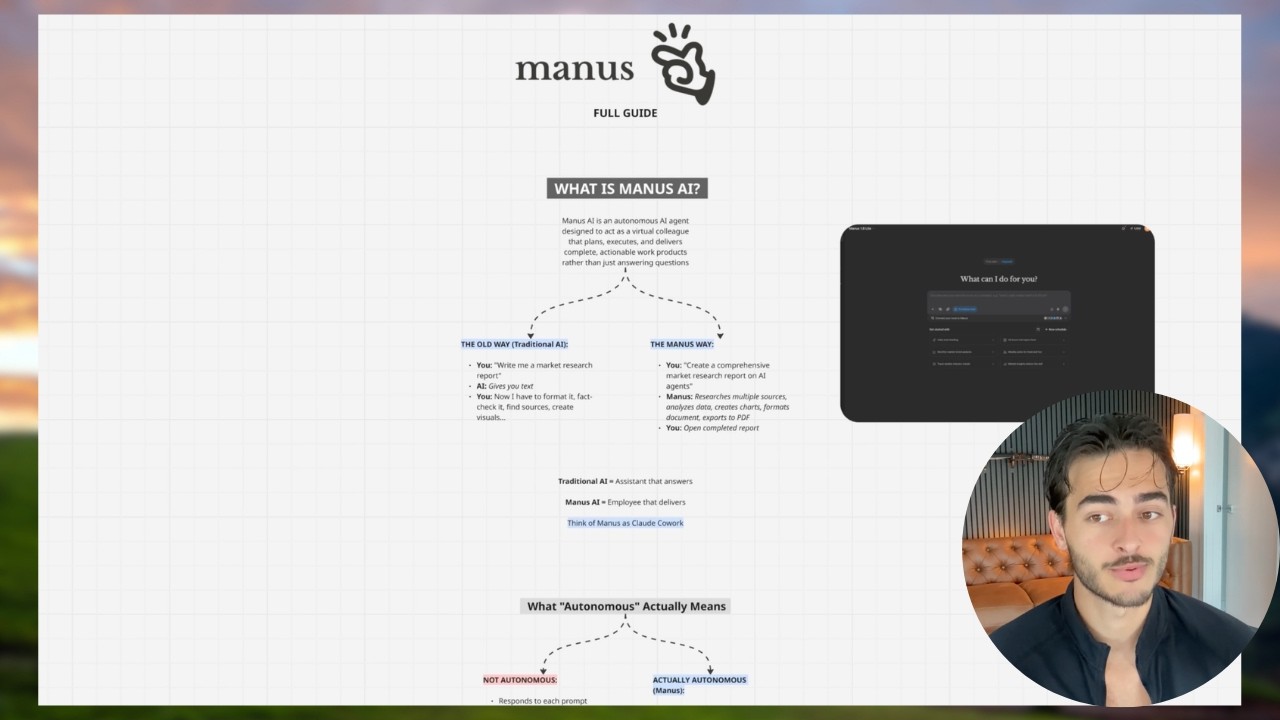
Good morning everybody. I'm going to show you in this video what I really believe is one of the most slept on. I don't even know if you could call an LLM. I think this is the best way is a autonomous LLM. So it does give you information. It does do proper LLM things, but it also does things for you. Um again, this is probably a better use case for you than OpenClaw. I have my Mac Mini right in front of me. It's a pain in the ass to use. Open Claw breaks all the time. I don't care what hype people say. Manis is a better product for 99% of people um depending on specific tasks. So, what is Manis? And by the end of this, you're going to know exactly how to use it. So, Manis just was acquired by Meta, which is actually super cool. Um I don't think that means it's going to get deprecated and turned into crap. I think it's actually going to help a lot. Uh it's going to automate paid traffic, media buying, a lot of that. But anyway, Manis is a autonomous AI agent that lives on your browser designed to act as a virtual colleague that plans, executes, and delivers complete actionable work products rather than just asking questions. So, I'm going to show you a few examples here of things that I've done. So, like traditional AI is, hey, write me a market research report. Gives you text, right? Manis will literally turn it into a website, a PDF documents like format and do slides and everything and it does a really good job. So, here's two examples. So, number one, it does autonomous things. So, I literally asked it to find me leads for my sales team for Kindo, and it did it. And it threw them all into a really wellorganized spreadsheet and pulled all the contact info that it could off the internet like crazy. Next, I was like, I'm making this Claude Code video. So, I fed it some of my past videos, and it made this for me. It made this like website like with animation here on the side that literally goes through what is vibe coding, what are the basics like it just made me a course module basically um from just a road map basically that I gave it. I said hey I want this in it whatever this is beautiful this makes learning way easier. This took no time of mine because manis made it and it does a lot of in between things like that. So here's what autonomous actually means when it comes to these things. So not autonomous is like responding to each prompt, waiting for instruction, needs handholding, gives you pieces. Real autonomy is it takes the goal and runs with it. It figures out the step itself. It works while you sleep and delivers the finished product. Now what may do if you're using it is it will basically think and then it will give you a button like this and it'll basically say approve and it'll tell you how many credits that you need to spend to do that. So, Manis works on a credit based system, which we'll get into here in a second, I'm sure. Um, basically, when you throw context into an LLM, if it's too big, it will condense it down. It's called compaction. So, it'll compact all the stuff in the LLM and then it will summarize and it'll skip details. Mannis, however, goes through each one and you get charged per credit you use, basically. So like each token um it doesn't miss things really because it's going through it one by one and you're paying for usage rather than you're paying and you kind of get an end result that you want and it's kind of summarized. It's weird. Um also it has some really cool tech that other LLM don't have. So it has its own computer. So literally will use the manis computer. It'll like use it. It does multi- aent so it can be doing multiple things at the same time. You can integrate tools with it like web browser, uh, database stuff, API connections, software applications. Now, as of like a week ago, Manis now has, and I don't know if, uh, let me see if we can see it here. It's somewhere in the connectors. Oh, yeah. Meta. Yep, there it is. Meta Ads Manager. So, like it it's you it's basically going to try to replace OpenClaw in a sense, but it's safe. It's more secure. Um, and it runs continuously. So here's how Manis works just so you guys can really master this. Okay. So number one, you give it a highle goal. So a bad prompt is do some research. A good prompt here is like very detailed again like everything that we do with constraints. I'm not going to go over prompt engineering. We have a hundred videos about that on the channel. Number two is it plans kind of like how cloud code plans. So it'll break it into subtasks. It'll identify like whatever you're asking it to do. So it'll go through step by step by step and you see it actually thinking. then it will autonomously execute that. So this is what it looks like when it is doing so. It'll say, "Oh, I'm synthesizing data. I'm compiling it into a report, whatever. " And I'll like give it action and I'll just go work on something. And then I'll just come back to it and it does it for me. And then once it's done, it'll deliver it in a clean format. Now, one thing that Manis does, which is super cool, like I showed you, is it does different formats. Like every other LLM would just give me plain text here. This saves me so much time because you're barely going to use plain text unless you're just like writing copy. Um, you can say, "Hey, put it into like a learning environment or like slides or a website or something and it'll do that. " And then you can obviously iterate like we do with all good prompt engineering.
Segment 2 (05:00 - 10:00)
So, hey, add a section for this, you know, do this. And it maintains context because it is credit token based usually. Um, that way it remembers everything from before. So, you don't start over. Now, there's a lot of use cases for Manis. My students have been using this for a long time. They actually um to be fair, they started using it before me and then I was like, "Okay, I should probably start using this. " Um, number one, market research. It's really, really, really good at that. Hence, where I said to pull leads similar to our current customers and it found a bunch of them and their contact info. Um, that's because it it basically can use browsers and computers and so it can like tap into databases. It can tap into um all these different lead lists, etc. Number two, competitive intelligence. So something like, "Hey, analyze my YouTube client's growth opportunities. It's pretty smart and so it will basically look at everything on the internet that it can," it'll come to you with some pretty good feedback. Um, number three, it's really good at cloning websites and development. So if you want to like download things, uh, capture like CSS of how a website's designed, like just think if you had a computer super minion and you were like, "Hey, go do this computer guy. " It can do that. Number four, SEO um audit and optimization. I've seen a lot of people on Twitter doing this. Number five, automated content creation and copy at scale. My friend Sanjay makes hundreds of ads a week with Manis and they're really good. Um like he prints for his clients, so they got to be good. Number six, resume screening and candidate analysis. Uh this is a really good use case. So you can screen like a 100 people and pull the top candidates. Uh number seven, process automation. So, for example, let's say I'm like doing ecom, uh something that's really manual and tedious or like searching for real estate listings or properties or just things like where there's data online, but it takes just time to go through. It's really good at doing things like that. Um, number eight, educational content creation. I already showed you an example of that. It does really well. Um, it literally without much instruction, it went through and literally showed like what's for beginners, what's advanced, you know, the vibe coding workflow. It even gave these cool graphics. Um, this is super cool. Like, I'm very impressed. It did a great job. Um, number 12, data analysis. This is something that it's really good at because it still is an LLM, so it's good at data and big numbers and like crunching things. However, it has the agentic capability to go to the internet and to pull things and do like charting and uh plotting of data and things like that. So, it it's like a step up above like a I don't know, like Gemini is now good at visuals, but like think perplexity or something. It's a step up above that, which is really really cool. Um, it genuinely is one of the best AI tools I'm using right now, guys. So, uh, this is how you use Manis. It's a little bit different. So, number one, you have the prompt box. You know what this is? Number two, there's the current models for Manis. Obviously, they're going to cost different things. Number three, we have file upload. So again, you want to give it local files, spreadsheets, your Google Drive, um let's say you want to clone some CSS or some design, you can screenshot, give it a visual reference. It's really good at all that. And then it also has a knowledge base kind of like a claude uh project or a Gemini gym. Also mid task control. So while it's working, you can literally see what it's doing and chat to it still. So if you see it like going the wrong way, you can add a constraint. You can pause. you you have like full control over your little uh AI employee there. Um and output management. So it can create a lot of different formats. So like reports, spreadsheets, docs, Google docs, presentations, different files, uh different kinds of code, different kinds of data, uh different visuals like you saw in that example there. And they're all downloadable. And so for example, I asked it here because I wanted to put this into our our course in a text format. So people could like add this to their notion or whatever. So it took this, which is beautiful, but I said, "Hey, like turn it into text. " And it just gave me the whole thing in text, but still formatted well. Like still beautiful. It's not just plain text. Like this is really really quality um output from using an LLM or an AI tool. Now, there's also some advanced features if you want to become a prouser. Number one is multitask execution. So you can do multiple things at once. So task number one, market research. Task number two, website SEO audit. Uh audit audit. Task number three, competitor analysis. Right? So you can run three things in parallel and just be more efficient, you know, like basically multitask and get more things done. Now, knowledge training. If I want to write ads, I want to make images, statics, whatever, all I got to do is give it a brain voice. Again, the same prompt engineering we go through like earlier in this channel. if you go back and watch those videos, the context profiles, the instructions, you know, the references, and then it will
Segment 3 (10:00 - 12:00)
consistently create the output that we want because we're putting guard rails up basically. Um, scheduled and recurring task. So, like, hey, every Monday at 9:00 a. m. do this. Now, if I did this open call, this would be a heartbeat. And depending on what LLM I'm using, that heartbeat cost me money every time it does something. Uh, a heartbeat basically means just it it's like doing something at a set time every time it's supposed to do something. So like your heartbeat, hence the the word heartbeat. Um, and so it can do the same stuff, but it's in a secure environment and it's not going to like destroy your life like Open Claw could. Then it has really good integration. So you can connect all this stuff. Now you have Meta Ads Manager. I haven't used it yet cuz I have a feeling that Meta is going to encourage it to spend more money. Um, and I'm already spending a ton of money as it is. So but there's a lot of integrations. your calendar. You know, you can do all that sort of stuff. So, here's when to not use Manis. Like, what is it not good at? Real-time customer support. It's not a chatbot. You don't want to hook it up and have it talk to your customers. Don't do highly sensitive data. That's a good rule for everything. Tasks requiring human judgment. That's kind of common sense. Um, super simple tasks like just do other LLMs because you're paying for the token usage here um differently than you are paying for like your Claude plan or something. And then mission critical stuff without review. So, always review the output. Don't just blindly trust it. Like I go through everything that we get anyway. Um, and there are some best practices here. Again, just like everything, be specific. Define the format that you want the deliverable in. Set clear constraints. Provide the right context. Include examples. Don't be vague. Don't assume it knows your preferences because it has no idea. Um, don't skip details. Don't use unclear language. And don't expect it to read your mind. Okay? If you use this right, which if you're watching this channel guys, you should be pretty advanced at prompt engineering. We have a lot of sauce on here for that. You should be getting crazy output from Manis, like really crazy. And here's a template for you as well if you'd like to screenshot. So, the bottom line here, um, it's an autonomous agent, lives in the browser. It's really good. It's like open call but for most people. Like, you don't got to do technical setup. I literally go to Manis. I log in. Oh, that's project. I log in and I'm good to go. And it's already like, what would you like to build? Landing page, dashboard, portfolio, corporate, SAS, link and bio, ecom, like games. It can do a lot of stuff. Stripe integrations, like it's a good product. I'm very jealous that it's not my product. I think it's a phenomenal product and I highly encourage you all to use it and I think you're going to get a lot better use case than you would out of setting up OpenClaw, doing the whole Mac Mini thing, um, and all that sort of stuff. So, go use it. It's awesome.