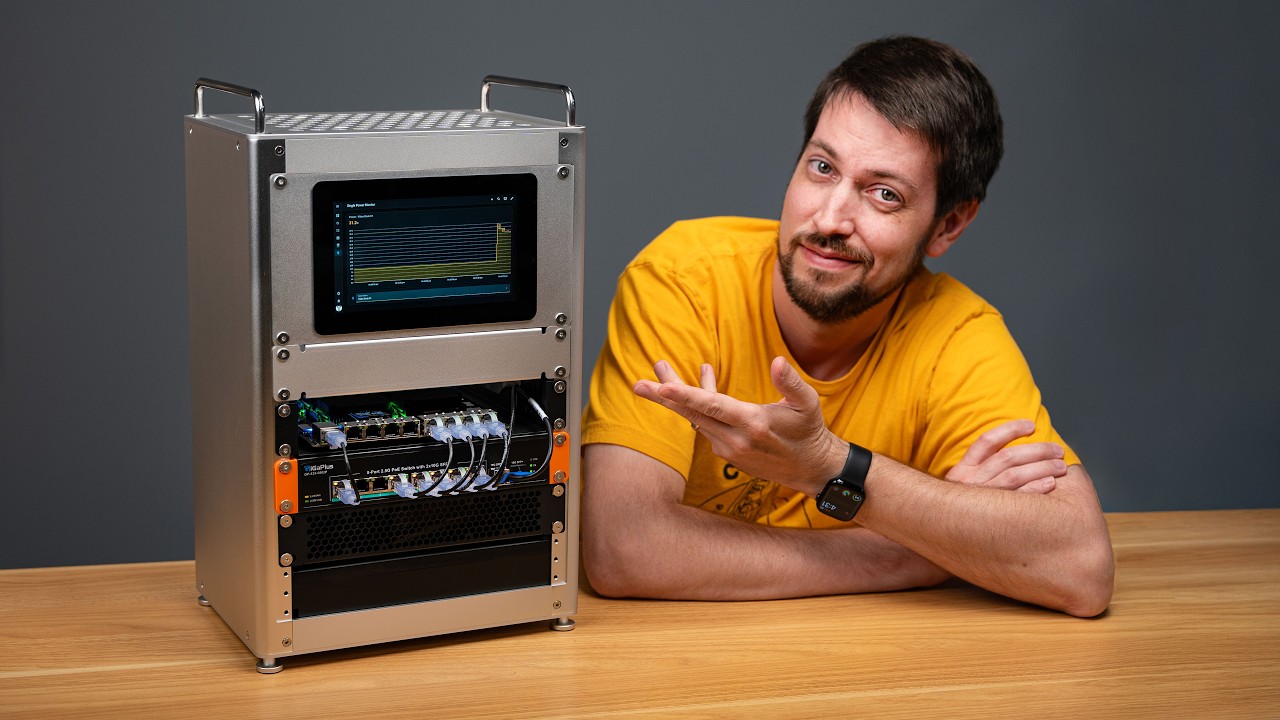
Apple gave me access to this Mac Studio cluster to test RDMA over Thunderbolt, a new feature in Mac OS 26. 2. The easiest way to test it was with a new version of Exo, an open- source private AI clustering tool. RDMA lets the Macs all act like they have one giant pool of RAM, which speeds up things like massive AI models. This stack of Macs costs just shy of 40 grand. And if you're wondering, no, I cannot justify spending that much money for this. Apple loaned the Mac Studios for testing. And I also have to thank DeskPi for sending over this new forost min. It's always my policy to mark a video as paid sponsorship if I didn't purchase the things I'm testing, even when they're on loan. But no money has transferred hands, and somehow Apple doesn't have any say over what I'm saying in this video. And if they did, I wouldn't be making it. Anyway, for a little context, last time I remember hearing anything interesting about Apple and HPC or high performance computing was back in the early 2000s when they still made the XServe. They had a proprietary clustering solution called Xgrid that landed with a thud. A few universities built some clusters, but it never really caught on and now Xserve is just a distant memory. Well, I'm not sure if it's by accident or Apple's playing the long game, but somehow they built these Mac Studios in a way that turned out to be great for like private local AI. They also hold their own for like scientific computing, all while running under 250 watts and almost whisper quiet. This cluster is actually running a model right now. And I'm not just tooting Apple's horn. These Mac Studios are great workstations if you can afford them. These two ones on the bottom with 512 GB of unified memory and dozens of CPU cores cost about 10 grand each. Then the two on the top with half the RAM are 8 grand each. So not cheap. There's a reason why the Mac Studio I use is the much less expensive M4 Max version. But with Nvidia releasing their DGX Spark and AMD with their AI Max Plus 395 systems, both of which have a fourth of the memory of this thing, I thought I'd put this cluster through its paces. And in a stroke of perfect timing, DeskPai had just sent over a new four-post min called the TL1 the day before these Macs showed up. I did a whole video about mini racks earlier this year, but the idea is you can have the benefits of rack mount gear, but in a form factor that'll fit on your desk or tucked away in a corner somewhere. Right now, I don't have any good solutions for mounting these Mac Studios in a mini rack, so I just put them on some shelves that I installed here. The most annoying thing about putting any nonproax in racks is the power button on the studios. It's kind of tucked away on the back rounded corner, which means rack mount solutions need to have a way to get to it. On my desk rack mount, there's a complicated arm that presses the button from the front side. On this mini rack, though, I can just kind of reach around the side and reach into the open frame. Anyway, it is nice to have the front ports, though, so I can plug in my monitor, keyboard, and mouse without much hassle when I'm managing the cluster. And for power, it's great that Apple has an internal power supply. Too many boxes these days have bulky power adapters that are outside the box and you have to figure out where to tuck them. Sometimes you get lucky with the design. Like these little Dell Pro Maxes have adapters that just fit in the bottom of this tiny rack. But other times you end up with a mess. Anyway, you do need to use Apple's non-standard power cables. So that could be improved, but that's more of a cosmetic gripe for me since I had to deal with the bundle of extra cable in the back. The thing that Dell Pro Maxes and DJ Sparks do so much better than Apple, though, is networking. They have these big rectangle ports called QSFP plus. The plugs hold in really well and they're easy to plug in and pull out, too. The Mac Studios have 10 gig Ethernet, which is fine, but the high-speed networking for this cluster comes courtesy of these Thunderbolt ports. Even with these premium Apple cables, I don't feel like this mess of plugs would hold up in the long run. And I thought I'd get the opinion of someone who's had a few decades on me for cabling experience. So, when I showed you this Mac Studio cluster, the first thing you noticed besides the fact that there's all these cables is — well, I noticed that they're connected with these the USB things and like I'm thinking how easy to pop that USBC out, mouse, you drop a screwdriver, pick it up, yank one, they there's no retention like what's up with that. — And in radio engineering, you have a lot of different connectors and — and almost all — Have any of them ever come out? And they do come out. Especially this the old deconnectors and stuff when you didn't screw the things in and you know eventually something wiggles enough like if you just do this and pow it comes out. These are better than that and a deconnector. Maybe I would use retentive connectors if I was doing this kind of data flow from machine to machine. There is tech called Thunder Lock A which adds a little screw to each cable to hold it in. But I wasn't about to drill out and tap these Mac Studios. I mean I don't own them. The other downside to this cabling is unlike Ethernet, I can't find any switches that let you plug in multiple computers with Thunderbolt and route traffic around to each other. So in lie of that, you have to plug each Mac into every other Mac. And apparently only the first three ports can be used for RDMA because of something to do with like internal naming conventions. And I'm not exactly sure why, but that
Segment 2 (05:00 - 10:00)
limits you to four max and not for max, but for maximum. Why did they have to go with max and ultra for their naming? But I wanted to take a step back and ask, even if you do need to run local AI models and stuff, do you really need a full cluster of Mac Studios? Because just one of these things is already kind of a beast. And take it from me, managing clusters can be painful. To prove that, I thought I'd just get a baseline. How fast is a single maxed out Mac Studio? And one caveat, I'm not going to compare this to someone's roided out multi-GPU workstation. Those are different beasts built for different purposes. They're usually a lot faster for AI, but also a lot more expensive and power hungry. Instead, I'm going to compare it to the two other most popular AI desktop systems that I've tested. The Dell Pro Max with GB10, which runs the same chip as Nvidia's DJX Spark, and the Framework Desktop mainboard with AMD's AI Max Plus 395 chip. Now, first off, here's Geekbench. And remember, this is the M3 Ultra, so it's two generations older than Apple's latest and greatest machines. But even so, it still beats these other guys in every metric. Switching over to a double precision FP64 test, my classic top 500 HPL benchmark. The M3 Ultra is the first small desktop I've tested that breaks a teraflop on a single node. It's almost double Nvidia's GB10 and the AMD AI Max chip is just kind of left in the dust. Efficiency on the CPU is also great, though that's been the story with Apple since the A series with all their chips. And related to that, idle power draw on here is less than 10 watts. I mean, I've seen SBC's that idle over 10 watts, much less something that can be considered like a personal supercomput. Just on one system running AI inference, the M3 Ultra punches a bit higher than the other two. Now, Llama 3B is a pretty small model, so the victory isn't that stunning considering the cost of each of these systems, but when you go to bigger models like the 70 billion parameter version, the M3 Ultra starts to pull away. And then if you go bigger still, models like DeepSeek R1 don't even run on a single node of the other two systems. Not even two of them. You'd need four of them to even run this thing. But I mean, this is a $10,000 system we're talking about. You usually expect more when you pay more. But it gets crazy when you think this single Mac has more horsepower than the entire framework desktop cluster using half the power. I also compared it to a tiny cluster of Nvidia's little GB10 super chips, which is also close to the price of the M3 Ultra. And the M3 Ultra still comes ahead in performance and efficiency with double the memory. Honestly, if you're going to get like the Lambo of local AI workstations, this is it. There's no competition today. But there's a stack of these things here. And I love cosplaying as a CIS admin. That's why I made this shirt that you can get on redshirtf. com. So, how is it managing a cluster of Macs? Well, the biggest hurdle for me is Mac OS. Now, I automate everything I can on my Macs. I even maintain the most popular Ansible playbook for managing Macs. So, I can say with some authority. Managing Linux clusters is easier. Every cluster has hurdles. But one thing I never even thought about was Apple has no way to run a full system upgrade over SSH. So, like when I upgraded to Mac OS 26. 2, I had to use screen sharing to log into each Mac and click through the UI like a chump. I know MDM exists, but I don't want to have to run extra apps and tools just to manage a few computers in a small cluster. I just want to run shell scripts and stateless commands. Anyway, rant mode over. Most things are easy enough to automate since Mac OS is still a Unix like OS. And when you're managing four computers, unless you don't care about your time, you should be automating as much as you can. And once I did get it all automated, I tested running workloads like HPL over 2. 5 GB Ethernet and llama. cpp over the same setup. For HPL, I got 1. 3 teraflops with a single M3 Ultra. With all four put together, I got 3. 7, which is less than a three times speed up, but keep in mind those top two studios only have half the RAM of the bottom two. So, a three times speed up is probably around where I'd expect. I did try running HPL through Thunderbolt, but every time I tried it would spend a couple minutes running, then the two Macs I was testing on would both lock up and reboot themselves. I also looked into using Apple's MLX wrapper for MPI run, but I couldn't get that done in time for this video. Next up, I tested Llama. cpp running AI models over 2. 5 gig Ethernet versus Thunderbolt 5. Thunderbolt definitely wins for latency, even if you're not using RDMA. But RDMMA does work with Exo, which is half the reason I'm making this video. So, to get Exo running full speed, I had to enable RDMA on each Mac Studio first. For security, this requires you to boot into recovery mode. I held down the power button for 10 seconds, went into options, and opened terminal. And there, I typed in RDMA control enable, and pressed enter. After a reboot, RDMA is enabled on that Mac. So, of course, now I had to do it on the other three. Once that was done, I ran a bunch of huge models, including Kimmy K2 thinking, which at like 600 plus GB is too big to run even on a single one of these huge
Segment 3 (10:00 - 14:00)
Macs. But Exo uses RDMMA to put all the memory of all these MACs together in one big pool, which speeds up inference a little bit for each MAC that you add via Thunderbolt. I ran the same models using llama. cpp, which distributes layers of the model on different nodes and can't really see all the memory at the same time. So, it has to go round robin, which makes things slower the more nodes you add. So, here's how the cluster works with each tool. Starting with quen 3235b, which is a pretty hefty model. The trend you see on this graph will repeat over and over with llama. cpp. CPP. As you add more nodes, it slows down in its RPC clustering mode. Exo speeds up, hitting 32 tokens per second on the full cluster. That's definitely fast enough for vibe coding if that's your thing, but it's not mine. So, I moved on to testing Deepseek V3. 1, a 671 billion parameter model. I was a little surprised to see Llam. cpp actually get a little speed up here. Maybe the network overhead isn't too bad when it's running on just two nodes. I'm not sure why that happened. But if this graph doesn't show the benefit of RDMA, let's move on to the biggest model I've ever run on any cluster, Kimmy K2 thinking. This is a full one trillion parameter model, though there's only 32 billion active parameters at any given time. That that's what the A is for on the A32B there. But we're still getting around 30 tokens per second. Working with some of these huge models, I can see how AI has some use, especially if it's under my own local control and not in a cloud somewhere. But it'll be a long time before I put much trust in what I get out of it. I treat it kind of like I do Wikipedia. It may be good for a jumping off point or exploring a topic, but don't ever let AI replace your ability to think critically, but this video isn't about the merits of AI. It's about this Mac Studio cluster and Exo, and both of them performed great when they performed. Now, caveat, I was working with pre-release software, and a lot of bugs did get worked out over the course of making this video, but it was obvious RDMA over Thunderbolt is new tech. When it works, it works great. When it doesn't, well, let's just say I was glad I had Antsile set up so I could shut down and reboot the whole cluster quickly. I also mentioned HPL crashing when I ran it over Thunderbolt. Even if I do get that working, you're talking a maximum of four Macs with the network setup like this. Besides that, I still have some underlying trust issues with Exo in general since the developers kind of went awall for a while. They are keeping true to their open source roots though, releasing Exo 1. 0 under the Apache 2. 0 license. But I wish they didn't have to hole up and develop this thing in secrecy. That's probably a side effect of working so closely with Apple. I mean, it's their right, but as someone who maybe develops things too much in the open, I hate it when there's layers of secrecy around any open source project. But I am excited to see where they go next. They teased putting a DJ Spark in front of this Mac Studio cluster to speed up prompt processing. That's something that these Macs aren't quite as good at. Maybe they'll also get support readded for Raspberry Pies, too. Who knows? But now I'm left with more questions like where's the M5 Ultra? If Apple released one, it would be a lot faster for machine learning like we're doing here on that theme. Could Apple update the Mac Pro to basically be like this whole stack but with tons of PI Express expansion so places like Research Labs have the networking bandwidth they need? Then there's the software side. With RDMA support, could Macs get SMB direct? That would make it so like network file shares look and feel like they're attached right to the Mac through Thunderbolt. That'd be amazing for like video editing. Finally, Exo makes RDMA support pretty easy to use, at least when it's working. But what about other software? Llama. cpp and other apps could also get a speed up. The crazy thing about this is these Macs aren't just good at AI. These are ridiculously powerful little computers. And the fact that they're nearly silent while doing this is the main reason I have one in my studio, albeit a much cheaper model. So unlike most AI related hardware, I'm kind of okay with Apple hyping this thing. When the AI bubble goes bust, these things would still be great workstations for creative work. I can't say the same about most other AI hardware these days. But it's not all rainbows and sunshine in Apple. Besides being more of a headache to manage Mac clusters, Thunderbolt 5 actually holds these things back. I'd much rather have QSFP, but that would make the machine less relevant for most people who just want a computer to use. Maybe as a consolation prize, they could at least replace the Ethernet jack with 100 gig QSFP. That way, we could use network switches and cluster more than four of these things at the same time. Until next time, I'm Jeff Gearling.