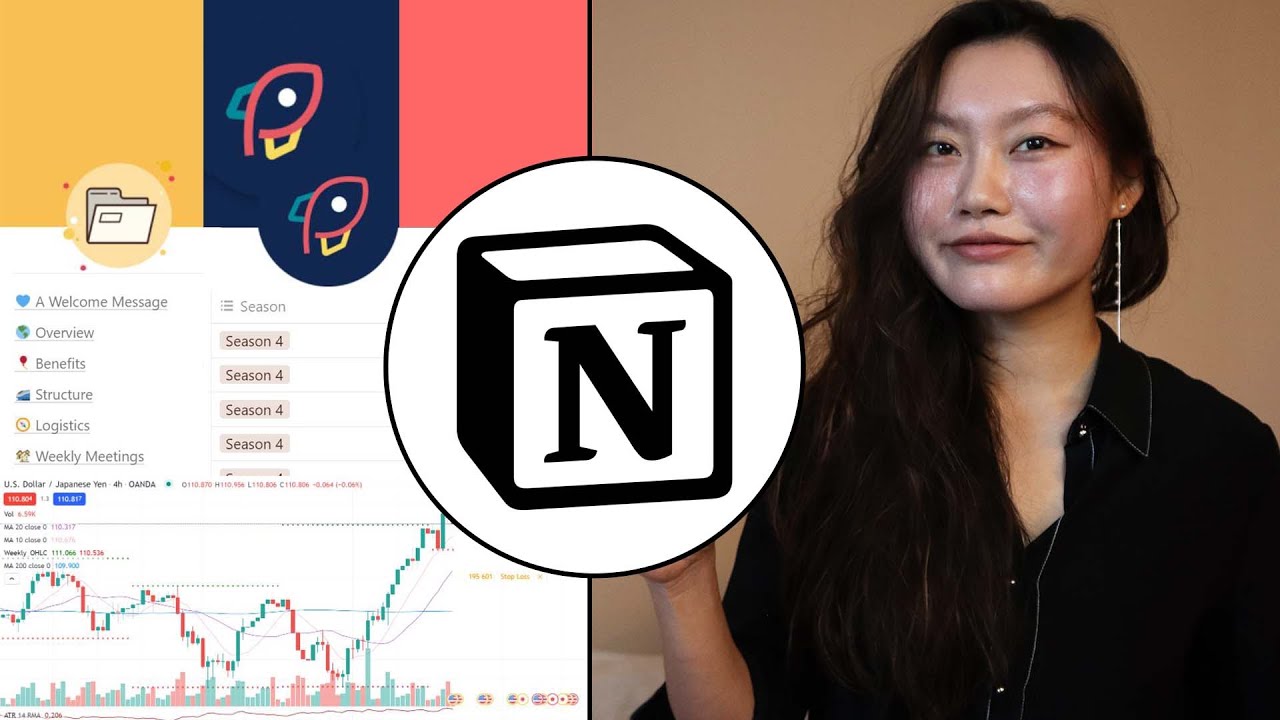
How I use Notion in 4 different ways
14:08

How I use Notion in 4 different ways

Tina Huang 18.11.2021 33 915 просмотров 1 142 лайков обн. 18.02.2026
Поделиться Telegram VK Бот
Транскрипт Скачать .md
Анализ с AI
Описание видео
Sign up for Notion here: *https://ntn.so/tinahuang In this video, I show y'all 4 different ways that I use Notion in team settings and personally for trading and planning my workouts. Timestamps 00:00 intro 01:41 My team 07:18 Propel 10:56 Trading 12:08 Workout _____________________________________________________________________ Links mentioned in video Propel: https://www.notion.so/propelprojects/Propel-Projects-Season-4-Infohub-dbd4a42c517a4902b345a7fb7287cedf Trading template: https://www.notion.so/3ddfcc51c983411299cdbf3efb9c1c21?v=1836152b18274a508697d1d64c950730 (I think it was recently made private tho :c) 🔗Affiliates **365 Data Science: https://bit.ly/3tIUBCY (link for 57% discount for their complete data science training) **Check out StrataScratch for data science interview prep: https://stratascratch.com/?via=tina 📲Socials instagram: https://www.instagram.com/hellotinah/ linkedin: https://www.linkedin.com/in/tinaw-h/ discord: https://discord.gg/5mMAtprshX 🤯Study with Tina Study with Tina channel: https://www.youtube.com/channel/UCI8JpGrDmtggrryhml8kFGw How to make a studying scoreboard: https://www.youtube.com/watch?v=KAVw910mIrI Scoreboard website: scoreboardswithtina.com livestreaming google calendar: https://bit.ly/3wvPzHB 🎥Other videos you might be interested in How I consistently study with a full time job: https://www.youtube.com/watch?v=INymz5VwLmk How I would learn to code (if I could start over): https://www.youtube.com/watch?v=MHPGeQD8TvI&t=84s 🐈‍⬛🐈‍⬛About me Hi, my name is Tina and I'm a data scientist at a FAANG company. I was pre-med studying pharmacology at the University of Toronto until I finally accepted that I would make a terrible doctor. I didn't know what to do with myself so I worked for a year as a research assistant for a bioinformatics lab where I learned how to code and became interested in data science. I then did a masters in computer science (MCIT) at the University of Pennsylvania before ending up at my current job in tech :) 📧Contact youtube: youtube comments are by far the best way to get a response from me! linkedin: https://www.linkedin.com/in/tinaw-h/ email for business inquiries only: hellotinah@gmail.com ______________________________________________________________________ Links marked with ** are affiliate links and I may receive a small portion of sales price at no cost to you. I really appreciate your support in helping improve this channel! :) #notion #howiusenotion #tinahuang
Оглавление (5 сегментов)

  1. 0:00 intro 335 сл.
  2. 1:41 My team 1117 сл.
  3. 7:18 Propel 775 сл.
  4. 10:56 Trading 256 сл.
  5. 12:08 Workout 444 сл.
0:00

intro

hey guys how's it going welcome back to another video in case you guys do not know what notion is in their own words notion is a tool that blends your everyday work apps into one it's the all-in-one workspace for you and your team notion is the sponsor for this video it's a really great tool that people use for both team collaborations and also individually as well what i think it's really known for is absolutely how flexible it is and how customizable it is and i probably don't need to introduce notion anymore because you've probably seen a bunch of videos already out there made by people who swear and live by notion to be honest i don't use notion for every aspect of my life and the reason for this is because i tend to get overwhelmed easily and i'm also not a naturally organized person like organization does not come naturally to me where notion really shines for me is in two specific settings the first one is in a kind of team slash collaboration based setting because notion is so flexible and so customizable whatever the purpose or nature of the team or collaboration is notion allows you to customize it specifically to suit that purpose and it actually feels really cohesive and tailored in branding it's also really good for displaying different types of information as well as allowing people to collaborate effectively across the team the second thing that i really like notion for is kind of very simple specific purposes that take advantage of the flexibility and customizability for example i use it for tracking my trades and also to figure out what to do at the gym in this video i'm gonna go through two examples of how i use notion in a team or a collaboration based setting as well as the two personal examples i talked about in how i track my trades and how i plan my gym workouts let's get started
1:41

My team

so this is my team which consists of me tony our wonderful editor maddie you may know her from our study with tina's streams as well as chris our newest member so first of all i want to say that full credit for this notion goes to maddie and chris i think actually like last week chris made some pretty big overhaul changes which i started using which i'm really liking and i'm really excited to use it more in the future so everything in this notion is internal so we have less emphasis in terms of branding in terms of information and it's much more focused in collaborations and having a lot of flexibility because there's often a lot of different moving parts and mattie and chris designed this notion specifically with that in mind this is what it looks like we have this dashboard over here um in terms of the main pages that you can click through as well as ongoing projects over here and there's a little clock so it's currently 3 14 pm on sunday so clicking through to the projects tab over here projects the database which holds all plan ongoing and past projects so we do have some information being displayed as well but this is mostly in terms of documentation credits to chris over here um in terms of how to actually use the projects um and it also makes it easier for us to onboard new people moving forward and then if you click into sponsors it also has a similar documentation over here so in terms of showing you guys how the collaboration process works it's probably easiest if i just make a project right now um so you guys can see so let's create a project over here doesn't necessarily have to be a video it's pretty much anything that anybody is doing but in this case let's just pretend that we want to make a video project so click over here there's a project template and say the video that we want to make is how to beep like beep it's created november 7th 2021 and say it's not going to be a sponsored video and the owners over here i'm going to add myself as well as tony who edits the videos and then we can have over here project details i don't know um a video about beep beeping how to imitate him something like that and then we can create a new task say like script video over here and then assign this um to me and then let's say like the due date here is um friday so we can do that and the priority um we do we want this as highlights generally we do want this highlight it's a video that we're currently working on and then it has a lot of different tasks as well and then the next task over here could be um after i script the video i have to film the video so that's another one assignee is also to me over here and then november 14th something like that and then another step that needs to be done over here is to edit video over here and then i would be assigning this to tony if you want the publication date to be on the 19th for example then we probably want to put this as the 17th right so i will assign this task to tony over here who would get an alert about this and you know if he's like oh this is unreasonable i can't do that he can be like okay i'm going to change this to like on the 20th or something like that so this is how we can know what each person is doing and whether the dates in which they're supposed to get it done now i'm just like should i actually do this video and then there's also a few other things that i want to show you guys in terms of collaboration so we have our sponsors page um i think i'm not going to show you guys specifically for each sponsor because we do have some exclusivity and privacy clauses over here but it's very similar to the project section in which you will create a sponsor and then you add the specific information uh the different kinds of exclusivities that you have and other things as well actually we can just look at the template over here sponsored task template so is it prospective investigated on going past the client and then for each of these uh we would just have specific information for them and another thing i wanted to show you guys is the exclusive exclusivity calendar this is something that chris recently made and i think it's absolutely brilliant so something i realized as i've come to take more sponsors is that some sponsors will tell you that there's an exclusivity so you can't do any collaborations with their competitors for a certain amount of time however this can be very difficult to keep track of because it's like okay these people don't want you to do like three months with four companies and then these people don't want to do like with some other companies for however long it's very hard to keep track of that and flipping through um each of the contracts is also it's like pretty time consuming and it's not the best and then there's always like this fear that maybe i'm gonna get sued because i forgot that i wasn't supposed to collaborate with a company so what this is that you have the sponsor and then it has like these little tabs over here where it tells you like this the exclusion is going to be at this certain period of time again i'm not going to open each of these because it's supposed to be kept private i don't know what the exclusive exclusivity clauses are but if you open up each of them it would say like okay so you can't do like certain things during that specific time frame so this makes it so much easier because when we're thinking about a new sponsor we can just very easily see like okay is there any exclusivity i cannot say that for that specific sponsor yes so really love this functionality here's also a deadline calendar as well which is super helpful because if you know anything about me if it's not on a calendar and i don't get a notification about it i'm just going to pretend that it doesn't exist and not do it so very helpful
7:18

Propel

propel which used to be called chronic coder academy propel centers around application based learning fellows come from a lot of different backgrounds like for example students where people who want to change their careers or upload with their careers and in propel they're able to collaborate with cross-functional teams and you end up building a project and oftentimes these projects are actually given from startups so after you complete this project it actually gets used it's a great way to get a taste for one of these roles and how it actually functions in industry i don't work on propel on a day-to-day basis so full credit for developing and operating propello goes to these guys over here and this notion specifically was designed and populated by joey who is notions number one fan hey i'm joey the head of uxf propel and i live notion all right now let's jump into it okay so this is the way that propel looks and i do want to emphasize here that propel is public facing right because there's people who are applying to propel and there's cohorts that are being run and the different projects that are being built uh so people are viewing it if you're an applicant they're also a startup who wants to collaborate with propel the branding and the way that it looks is really important and in this case the notion is almost like a website as well as a portfolio so there's a lot of information that's being displayed here so first let's talk about branding as you can see very beautiful branding that you have here really nice designs the and then you have these emojis that are consistent throughout it's very consistent well thought out and aesthetic and it just kind of fits the entire vibes i really appreciate the simplicity of it and how utilitarian it is as well so now let's actually click through some of these in detail to look at how information is being portrayed as this is where you start seeing how powerful notion can be because notion allows you to portray information a lot of different ways you're able to display the information in the format that is most suitable for that information for program details and overview it's pretty text heavy but you have a little table of contents that you can click through most of it over here is written in text and then you can actually click through to each of these as well to see like more specific things so in this case we're looking at program specific resources um and you can see it's actually displayed now in a table format as opposed to just as text whereas a list and this is really conducive because you're able to see which week it is like what happens over here what's the overview and then also the resource that's linked over here you can also see how powerful the database feature is for notion you can click through for week one for example you want more details and you can click over here and then it opens up as a separate page so let me show you guys a few more examples of how information is displayed so here for the projects tab um this is where pictures and information from past seasons are stored feel free to go through them as a reference and slash word inspiration so okay we have a project over here say like anna extractor um this is from season four the status is ongoing branch is chrono coder academy and it's in phase number two so you can also click on this over here and you can see who the members are who are currently working on this where we have the common board over here where there's collaboration that's happening so you can have different tasks that are being done and then assigned to different people and they go from begin prepare to execute so you can actually easily see an overview of what is currently happening in this project and then you can scroll down shared resources and the pitch the problem the solution so as you can see there's a lot of different views that are being done here and all of them are bundled together under each project so there's a lot of other pages and examples i can go through but i've already gone through a few of them but do check out our notion i really think it's done super well and also if you're just interested in propel in general to check that out
10:56

Trading

so the last two things i wanted to show you guys are those very specific tasks that i use notion for this is my trading journal it's super simple um it's just for each row it's going to be a specific trade and then i just have what is it the currencies forex the date place they filled um entry point stop loss point these are things i just track and then if you click through each of these over here i just talk about like why it is that i decided to enter at a certain date what my assessment was my reasoning i can embed screenshots really well this is one of the primary reasons why i love using notion because i can embed these screenshots directly into here so when i look back at my journal i'm able to like very clearly see the market condition in which i enter that trade and also my plan is over here um kind of monitoring throughout as well and then finally my exit which i have not exited yet right now but usually in my exit i was also have a screenshot of what the exit looks like and any other comments or details that i would also put in here so this is how i use the trading journal and in this use case it's specifically the ability of embedding things directly and having this table view that you can filter stuff that makes this really useful for me and the other example i
12:08

Workout

have is for workouts so this is like way more simple than anything else i've shown you but seriously i have for the longest time been trying to find something that allows me to do this and it's like super simple so let me just kind of give you a little bit of reasoning for this like what i want i don't actually like planning out what exactly i'm going to be doing that day so what i tend to do is i tend to collect exercises through like whatever i see on youtube or instagram or pinterest or something like that and they usually fit into one of these categories and i want to try them out so what i do is that every time i collect these exercises i would just make like a what is that called like a sub a subcategory of each of these that i like doing for some of them i would have just a brief description and for some of them like say like playing to dolphin over here um i could just not remember how to do it i often forget so i can actually embed these pictures on so i'm like oh okay so this is how you do it um whenever i want to go to the gym and do this exercise and before each gym section like say i'm on abs day what i do is like i look at these exercises and i usually pick four to five different ones that i would be doing for that specific gym section and this is just like works wonderfully for me it's so simple but it works so well i can just keep collecting exercises so i don't end up just forgetting exercises that i want to try out and it also allows me to just choose whatever it is i want to do for that specific workout i find that a lot of fitness apps they're usually like way more complex they always like want you to exactly design like what you're going to be doing for each day and you have to enter a bunch of information and in my case like this is all i want and this is absolutely perfect for my use case all right we've come to the end of this video i hope you found this video helpful seeing all the different use cases that you can use notion for if you're interested in ocean they have a plan that's completely free that you can sign up in the descriptions below have a wonderful day and i'll see you in the next live stream or video

Ещё от Tina Huang

Ctrl+V

Экстракт Знаний в Telegram

Транскрипты, идеи, методички — всё самое полезное из лучших YouTube-каналов.

Подписаться