Best Stock Screeners You Should Use!
10:29

Best Stock Screeners You Should Use!

Wisesheets Investing 16.04.2026 38 просмотров 1 лайков

Machine-readable: Markdown · JSON API · Site index

Поделиться Telegram VK Бот
Транскрипт Скачать .md
Анализ с AI
Описание видео
Finding great investment opportunities starts with using the right stock screener. In this video, I tested 7 of the most popular stock screeners and break down my top 3 picks you can start using today. We’ll cover what each screener does well, where they fall short, and which one gives you the most flexibility when it comes to financial analysis, valuation, and stock research. You will learn: • The best free stock screeners available right now • How to filter stocks using valuation metrics like P/E ratio and dividend yield • The key limitations of popular tools like StockAnalysis and Finviz • Why coverage matters when searching for international stock opportunities • How to build your own custom stock screener inside Excel or Google Sheets • A powerful alternative that gives you access to 60,000+ stocks globally What’s the best stock screener you use right now? Do you prefer: • Web-based screeners • Or building your own inside spreadsheets? Let me know in the comments 👇 Create your Wisesheets account: wisesheets.io 📈 Free stock analysis spreadsheet templates: 1. Excel roaring kitty (DFV) analysis template: https://wisesheets.io/assets/discord_template.xlsx 2. Excel discounted cash flow model (DCF): https://wisesheets.io/assets/dcf.xlsx 3. Google Sheets stock tracker: https://docs.google.com/spreadsheets/d/1oIfpoPd9eBJUYlVGOMWvrvjHCepnhdBVgZTdcQP8eek/template/preview 4. Google Sheets roaring kitty (DFV) analysis template: https://docs.google.com/spreadsheets/d/1-yPCnrSwAuncAXW3YUqCC3I1M1_sRpTD_9IkmLxI6QA/template/preview 5. ETF/Funds Comparison: https://wisesheets-templates.s3.us-east-2.amazonaws.com/ETF/Fund%20Comparison_49198.xlsx 🗣 Connect on social media: https://www.tiktok.com/@wisesheets?lang=en https://www.instagram.com/wisesheets/ https://discord.gg/YkxfnCvvzb https://x.com/wisesheets 0:00 Intro 0:12 StockAnalysis.com 2:19 FinViz Screener 5:06 TradingView 7:11 Limitations 7:45 Wisesheets Screener #StockScreener #BestStockScreener #StockAnalysis #InvestingTools #StockMarket #Investing #ValueInvesting #StockResearch #FinancialAnalysis #PEratio #DividendStocks #TradingView #Finviz #StockAnalysisTools #MarketResearch #InvestSmart #LongTermInvesting #StockPicking #EquityResearch #PortfolioStrategy #Wisesheets #ExcelInvesting #DataDrivenInvesting

Оглавление (6 сегментов)

Intro

I tested seven of the most popular stock screeners. And in this video, I'm going to provide you with my top three screeners that you can be using right now to find profitable stock investment opportunities. At number three, we have

StockAnalysis.com

stockanalysis. com. And this is a pretty handy stock screener that you can use. Is absolutely free to use. Of course, it has its own limitations unless you go into the paid version of it. But what I really like about it is that it's super simple to use. You have all your list of companies right here. You can change how many rows that you can see at any given point. By default, they give you 20, but you can change it up to 50 and then more if you have the premium version. If you want to go to the next row, you click on next. But really, what matters here is the filters. And in terms of filters, this stock screener does very well. You can click right here to see all the different filters that are offered. And as you can see, you can just select more and more filters. And this all gets added to your list. And then once you have this, then you can start filtering the companies based on this particular information. You can also order by greatest, by the lowest numbers, etc. And as you can see, once you add a filter, they make it very easy right here to filter over different conditions and then also over different values that you can set yourself. You can, of course, reset all the filters to go back to the default view. And one of my favorite parts is that they have this pre-built filters. So you can click on dividends, financials, valuation, and according to that, you will see some filters that are related to that specific category. So you don't have to scramble to figure out what filters you want to look at for your analysis. Now, one of the major downsides of this stock screener is that it only covers about 5,500 stocks, which is quite limited, especially if you're looking for international opportunities. Now, if you're only investing in the US, that's another story because then you can have a good experience with this stock screener. But if you're looking to expand your search and really look for those deep value companies that are often found in other markets, this may not be the stock screener for you. But don't worry, the next ones may be the actual answer that you're looking for. Okay. Now, at number two, we have one of

FinViz Screener

the most popular options out there, and that is without a doubt Finnvvis, which is a very popular website. A lot of people like their screener and if you look online for screeners, this is one of the top results that you're going to see. And this is not without a reason. I personally really like the screener myself. As you can see, again, there's different like types of screeners that you can use. So, for example, this would be for valuation. This is for financials, ownership, performance, etc. So this makes it very easy for you to navigate different types of screeners and filters that you want to apply for your particular investment style. So yes, that is great. Now the other thing where it goes above the stockanalysis. com stock screener is the fact that this screener, as you can see right here, covers around 11,000 companies. So almost double the previous screener which gives you a lot more room to find opportunities across a broader set of markets. Now one of the things that I found that is really key is that if you look at this filters you can see that they can seem quite limited unlike the stock analysis screener that allows you to chain a whole bunch of metrics all at once. So, what I recommend is that whenever you use this screener that you click on the all filter because then here, this is where it allows you to find a lot more filters and you can even add more to the list here. So, if you're looking to build very comprehensive screeners with a whole bunch of criteria integrated into them, this is the way to go. You can start chaining them. Now, of course, some features are going to be gated, only available on the paid plan that the company offers, but that is any screener available out there. But overall, for a free stock screener, this one does actually really well. The main downside that we have is the fact that the results that you're shown are pretty limited. You're looking about 20 companies that are shown on any given moment. And personally, that is a big drawback because I like to see many like even like hundreds of companies in one view if possible. This makes it kind of annoying. Every time you want to see a new view, you have to click on next speech. And now you could say, okay, why not just export it? Well, as you can see, if you export it, you need to become a premium customer on this platform. And that is not the most affordable option. But overall, I think this is a very solid screener, and I definitely can see why a lot of people recommend this screener for all types of stock investors. But the next screener is the one that I think is going to hit the hardest. And then I even have a bonus for you after that one that I think you're going to really love as well. And at number one, my favorite

TradingView

stock screener to use, especially when it comes to using a stock screener on the web, is the Trading View screener. And the reason for this is simple. It's the most well-rounded screener that you can use in my opinion. So, as you can see, the number of covered companies is not 11,000 like Finiz is, but it is a very comprehensive number. So, in this case, we're talking about roughly 8,000 companies that you can filter and have access to. What I really like about this screener as well is the fact that you have infinite scroll. So you can see hundreds and even thousands of companies just by scrolling on your computer without having to click on the next page or anything like that over time becomes annoying. And then on the other hand, the number of filters that you can access is actually phenomenal. As you can see, you can just click right here and you're going to get a whole bunch of filters ordered by different categories and you can just keep adding them to your columns. Now, some of them just like any other screener, you do need an account. But the good thing is that for this with the free account, you can get away with a lot of stuff. Now, some of it you of course are going to need a premium account to be able to access all of the functionality and all of the power that the screener has to offer. And again, you can just click right here. In fact, I think Trading View was one of the pioneers in enabling this functionality where you can just get different filters based on different criteria like valuation, dividends, profitability, etc. You can of course just filter and sort by ascending, descending, move to the right, look for specific values. So there's a lot of flexibility, but the beauty of that is that it's also very simple to use. So regardless of your investment style, you can start using this screener. So that way you can find good opportunities to look into further a lot faster. So this would be my best screener, but there's one bonus that I think will help a lot of you. So stay for that because I think you're going to love this. So as you could tell, one of the main downsides of

Limitations

all screeners included on this list is the fact that they have limited coverage, meaning they have a very finite number of companies. So if you really want to look across international markets, that's going to be very limiting. The other thing that all of them have in common is that if you want to download this screener and put it on your spreadsheet, you have to go on a paid account. And this is the same with Finniz. stock analysis. com. They all want you to have a paid account, which can be quite unaffordable for most investors out

Wisesheets Screener

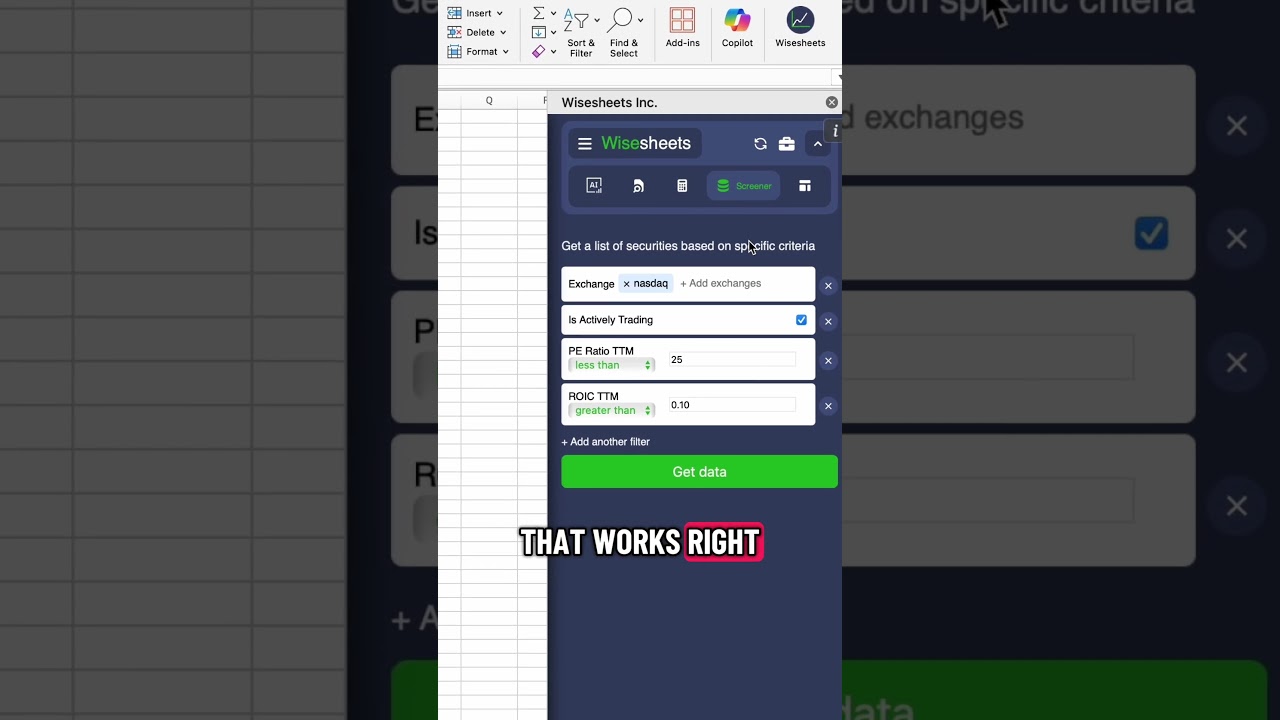
there. And so the last screener is my favorite and the one that I use all the time and this is from Y Sheetse. And what it does is it provides you all of the data that you need right here on your spreadsheet for you to apply any calculations, graphing filters where you can just sort by ascending, descending, all of it taking advantage of all the power that Excel has to offer. And yet at the same time is very affordable for investors and is super simple to use. You simply select the filters that you're looking to get data from. And as you can see, it's very comprehensive where you can just keep scrolling and adding more and more filters that you want to use. You simply enter the conditions for these filters, click on get data, and automatically you're going to get all of the data automatically updated for you. But my favorite part is that this actually covers a ton of companies. I don't even know how many, but a lot more than the rest of the screeners. So, let me just show you. If I get rid of this filter right here for the exchange, and let's say I just want companies that are actively trading, this is going to give me the entire universe of stocks available through the screener. I'm going to click on get data, and the number of companies, as you will see, it's gigantic, but yet is going to process the data very, very quickly. So, if I go right here and I go all the way down, you can see there's over 68,000 securities. And this is not even including the ETFs that you can screen for and get data automatically updated for you. And as you can see, this will include all this information right here, plus any filters that you decide to add. So if I want to add the P ratio, I can simply add it right here. If I want to add the dividend yield, I can add it right here as well. And then this is going to allow me to really slice and dice the data exactly how I want. So, for example, let's say I want P ratio less than 25 and I want a dividend yield greater than 3%. I click on get data and I'm going to get a new tab that then filters out the list of companies that meet this specific criteria. And if you don't believe what I'm saying, uh, look at this. If I scroll down to the dividend yield, you will see that all of it is above 3%. So, it matches that criteria. And then on the P ratio side, if I sort it by ascending, well in this case descending, you will see that everything will be below 25 just as we instructed. With that being said, I hope you enjoy this video and let me know in the comments what's the best screener that you use on a regular basis and why. and I'll see you in the next

Другие видео автора — Wisesheets Investing

Ctrl+V

Экстракт Знаний в Telegram

Экстракты и дистилляты из лучших YouTube-каналов — сразу после публикации.

Подписаться

Дайджест Экстрактов

Лучшие методички за неделю — каждый понедельник