(Sorta) Affordable Mini PCs Aren't Dead Yet: GMKTec K17 Review
8:22

(Sorta) Affordable Mini PCs Aren't Dead Yet: GMKTec K17 Review

Lon.TV 22.04.2026 8 114 просмотров 442 лайков

Machine-readable: Markdown · JSON API · Site index

Поделиться Telegram VK Бот
Транскрипт Скачать .md
Анализ с AI
Описание видео
Find one at GMKTec - https://lon.tv/hy4dc (compensated affiliate link) - the GMKTec K17 sells for around $550 and doesn't feel as compromised as I expected given the current supply constraints. The only issue is a lack of upgradeable memory. See more Mini PCs: https://www.youtube.com/playlist?list=PLCZHp4d1HnItE_zvA8tShvdxgCEL648ZY and subscribe to my weekly email : http://lon.tv/email and the channel! http://lon.tv/s VIDEO INDEX: 00:00 - Intro 00:45 - CPU 00:52 - Power Consumption 01:09 - RAM, Storage and Upgrades 01:52 - Ports 02:45 - Video Output Options 03:07 - Ethernet and Wi-Fi Performance 03:45 - Web Browsing and YouTube 04:34 - Browserbench.org Speedometer 04:42 - Video Editing 05:27 - Gaming and Emulation 06:22 - 3DMark Timespy Benchmark 06:50 - Thermal Stress Test and Fan Noise 07:22 - Linux Support 08:02 - Conclusion Visit my Blog! https://blog.lon.tv Subscribe to my email lists! Weekly Breakdown of Posted Videos: - https://lon.tv/email Daily Email From My Blog Posts! https://lon.tv/digest See my second channel for supplementary content : http://lon.tv/extras Follow me on Amazon too! http://lon.tv/amazonshop Join the Facebook group to connect with me and other viewers! http://lon.tv/facebookgroup Visit the Lon.TV store to purchase some of my previously reviewed items! http://lon.tv/store Read more about my transparency and disclaimers: http://lon.tv/disclosures Want to chat with other fans of the channel? Visit our Facebook Group! http://lon.tv/facebookgroup, our Discord: http://lon.tv/discord and our Telegram channel at http://lon.tv/telegram ! Want to help the channel? Start a Member subscription or give a one time tip! http://lon.tv/support or contribute via Venmo! lon@lon.tv Follow me on Facebook! http://facebook.com/lonreviewstech Follow me on Twitter! http://twitter.com/lonseidman Catch my longer interviews and wrap-ups in audio form on my podcast! http://lon.tv/itunes http://lon.tv/stitcher or the feed at http://lon.tv/podcast/feed.xml We are a participant in the Amazon Services LLC Associates Program, an affiliate advertising program designed to provide a means for us to earn fees by linking to Amazon.com and affiliated sites.
Оглавление (15 сегментов)

Intro

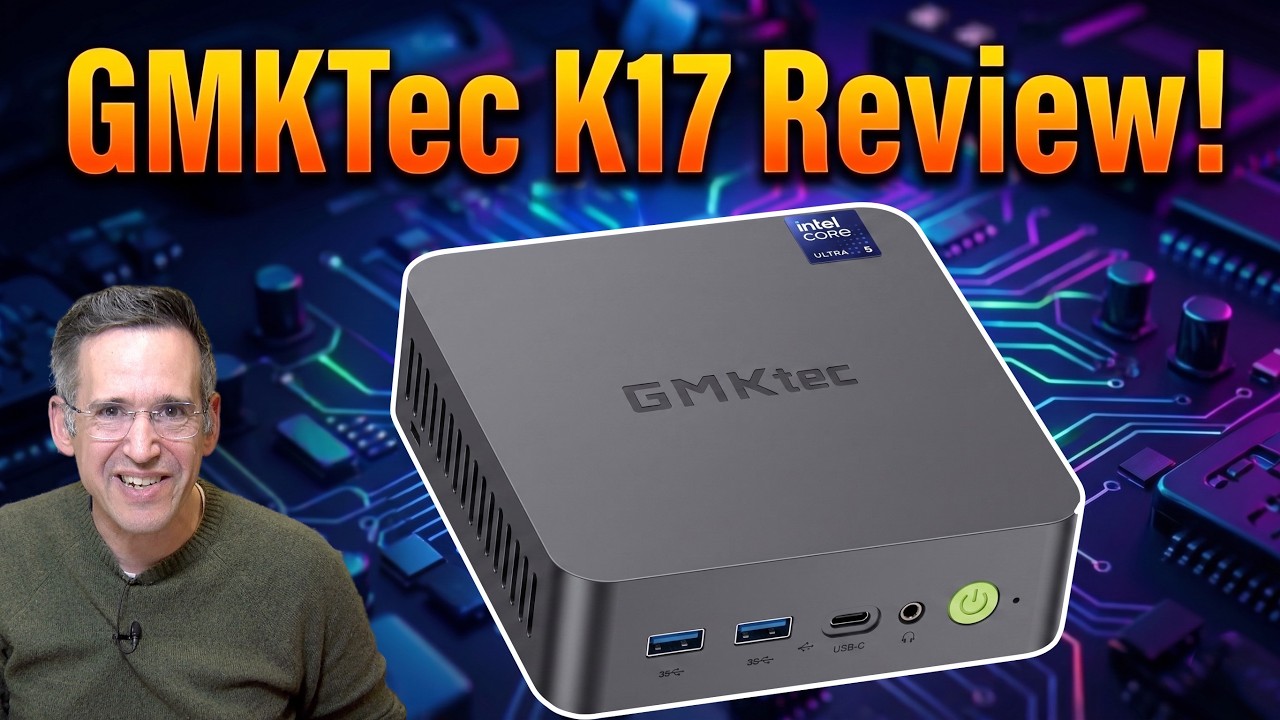
Hey everybody, it's Lyman. Mini PCs used to be a super awesome value proposition, but lately it's been a bit challenging given all of the supply constraints, but I'm still finding stuff worth talking about. This one is the GM Kek K17. It is around $550 or so, and it has a decent onboard GPU, and it is super quiet. And so I thought I would give it a run here and show you what it's all about in just a second. But I do want to let you know in the interest of full disclosure that this came in free of charge from GMK Tech. However, they did not review or approve what you're about to see before it was uploaded. All the opinions you're about to hear are my own and no other compensation was received. So let's take a look at it now and see what this mini PC is all about. Now

CPU

this mini PC is powered by an Intel Core Ultra 5226V processor. That is a Lunar Lake chip. It

Power Consumption

is very efficient from a power perspective. Only five watts under idle conditions and about 48 watts under load. So, it really doesn't consume all that much power. But, as you'll see in a few minutes, it does perform quite well even for more intense kinds of things like gaming. It unfortunately though has

RAM, Storage and Upgrades

soldered memory. This might be where some of you tune out. It's got 16 GB of DDR5X8533 RAM, but it cannot be upgraded. You can though upgrade the storage. It does have two NVME 2280 slots on board. Both PCI Express 4 and it does of course have a hard drive installed. Mine had a 1 TBTE drive. There's also a second slot available on the lefth hand side there for putting more storage in so you can do dual booting or whatever. One thing that I did notice though is that the Wi-Fi antennas are on the bottom of the case and you have to be careful pulling up the bottom. Otherwise, those antennas get disconnected and it did take me a little while to get that little plug

Ports

plugged back in. Now, it does have a number of ports on board, but you do have to pay attention to the labels on here. So, the USBA port on the left here will support 10 Gbit per second connections, but this one only supports 5 Gbits per second. You can see there's a little 10 on the label there. This is a USB 4 port that runs at 40 gigabits per second. It is compatible with Thunderbolt devices and it's full service. So, you could use this as a power input along with a video output and of course supporting USBC and Thunderbolt devices. Again, up to 40 gigabits per second. So, it's nice to see a full service port there. This is a headphone microphone jack. You got your power button here, a Kensington lock slot on this side, nothing on the other side. And then on the back, we've got a USB 2. 0 0 port for plugging in your keyboard. And then you've got three USBA ports that are all only 5 Gbits per second each. The HDMI output here will

Video Output Options

support 8K at 60 frames per second, but the other one is 4K you can get three total display outputs using the USB 4 port here in the front with a dongle along with the two HDMIs in the back. So, you'll have two at 4K 60 max and one at 8K 60 max. You also have 2. 5 gigabit

Ethernet and Wi-Fi Performance

Ethernet here. And I did test that a little bit earlier on my multi- gig connection here. And as you can see, we were getting what you would expect out of a 2. 5 gigabit Ethernet device. It is an Intel i226V. The Wi-Fi also performs pretty well. You can see here we were getting about 718 megabits per second on the downstream and 83 upstream. Now the Wi-Fi is Wi-Fi 6E only, not Wi-Fi 7, but it is running with an AMD RZ 616 chipset that, as you can see, performed pretty well. So, why don't we plug this thing back into power now and see how it performs. All right

Web Browsing and YouTube

let's begin with some basic work here. We'll boot up my web browser and head over to the nasa. gov homepage. As you can see, everything here is just springing up almost instantly. This is, of course, what I would expect from a processor of this era. So, as you're browsing the web here, I don't think you're going to have any issues uh going through all of your day-to-day tasks. Microsoft Word and PowerPoint and Excel all should run great on here. This is a great system for basic work, but it can also do a lot more than that, which we'll see in a few minutes here. A little bit earlier, I did some YouTube on it as well, a 4K 60 video, and this performed as expected without any drop frames after things got started. So, for media consumption, YouTube watching, Twitch, all the other stuff that's out there, you'll be able to watch high frame rate, high resolution video here without issue. And on the

Browserbench.org Speedometer

browserbench. org speedometer benchmark test, we got a score of 30. 7. Again, keeping up with other processors of its

Video Editing

generation. Now, it also has a pretty decent little GPU on board. And earlier, I did some video editing with Da Vinci Resolve with a 4K 60 project. You can see it rendered in that cross dissolve without any lag or delay. So, that was nice to see. I dropped in another one here and that one worked just as nicely. It does though, of course, bog down significantly when you do more heavyduty effects and color grading and everything. So, this is not going to be a professional video editing platform unless you put an external GPU on it. But for basic work, it's fine. But you can see just how long it takes for it to render in that effect that I dropped in. It took about a minute or so, if not longer, just to get a preview frame out of it. So that's where I think having an external GPU plugged into that Thunderbolt port makes sense. And gaming

Gaming and Emulation

wasn't too bad on this either. This is Cyberpunk 2077. We're running this at 1080p at the lowest settings. I was getting just over 40 frames per second most of the time in the bar scene here, which tends to bog things down a bit. And then when I did the outdoor scene here, we were pushing about 50 frames per second. And of course, if you went down to 720p, you could probably get around 60 for this game. Of course, at a lower resolution, but not bad there, uh, given the price point and power consumption, at least at this stage of the current market. And you can see the final results of that test there. I also did some emulation on it. So, this is a PS2 emulator running Burnout Revenge. And here we were getting uh the full speed out of that emulator, probably with some room to tweak the graphics a bit as well. So, I was very impressed and pleased with the quality of the GPU on board and the very low power

3DMark Timespy Benchmark

consumption. And on the 3D Mark Time Spy benchmark test, we got a score of 3,458. We did see a better score out of the more expensive K13 that we looked at from GMK a few weeks ago with the Core Ultra 7 256V chip, but this one is performing very close to where an Nvidia GTX 1060 or 1650 GPU performed just a couple of years ago. So, it's really fun to see just how far these onboard GPUs

Thermal Stress Test and Fan Noise

have come. And it also doesn't appear to have any thermal issues. I ran the 3D Mark stress test on it. We got a score of 98. 9% which indicates very little thermal throttling. You can also see some of the other charts here including the temperature where it landed at about 59° Celsius throughout that test. One thing that really surprised me about this machine is how quiet it is even under load. The fan is barely audible. You hear a slight little wor but that is it. This is by far one of the quietest mini PCs with a fan that I've ever heard. All

Linux Support

right, one last thing to take a look at here, and that is its Linux performance. As always, we booted up the most recent version of Abuntu on this. Everything got detected properly, including Wi-Fi and Bluetooth and audio and video here at 4K. All is good. The performance is great on it, too. In fact, it's a little better than Windows. This does come with a Windows 11 Pro license, but if you wanted to dual boot Linux, you certainly can with that extra slot there. and allin for running alternative operating systems, this is going to do just fine. In fact, it does feel a bit nicer on the Linux side than it does on the Windows side these days. So, you've got some options and of course, very low power

Conclusion

consumption as well. So, all in, I found this to be a very good mini PC despite the current market conditions that we're under. This one isn't all that expensive. It's super quiet, very power efficient, and performs pretty nicely as well. So that is the GM Kek K17. And until next time, this is Lon Siden.

Другие видео автора — Lon.TV

Ctrl+V

Экстракт Знаний в Telegram

Экстракты и дистилляты из лучших YouTube-каналов — сразу после публикации.

Подписаться

Дайджест Экстрактов

Лучшие методички за неделю — каждый понедельник