This is NOT a theory course. This is a real production-grade DevOps project from scratch.
𝗣𝗿𝗼𝗱𝘂𝗰𝘁𝗶𝗼𝗻-𝗚𝗿𝗮𝗱𝗲 𝗗𝗲𝘃𝗦𝗲𝗰𝗢𝗽𝘀 𝗣𝗿𝗼𝗷𝗲𝗰𝘁 (𝗨𝗱𝗲𝗺𝘆 𝗖𝗼𝘂𝗿𝘀𝗲)
https://www.udemy.com/course/devopsshack-the-production-grade-end-to-end-devsecops-project/?referralCode=39223F9B2E65E471B1A6
💸 Use Coupon Code: DEVOPSSHACK
𝗪𝗵𝗮𝘁 𝗬𝗼𝘂’𝗹𝗹 𝗟𝗲𝗮𝗿𝗻
- Build end-to-end CI/CD pipelines using GitHub Actions (QA → Production)
- Design real-world branching strategy (feature, QA, prod)
- Implement DevSecOps (Gitleaks, Trivy, Checkov, SBOM, SonarQube)
- Configure GitHub OIDC → AWS → EKS (no static credentials)
- Manage secrets using AWS Secrets Manager + ESO + IRSA
- Deploy MySQL on Kubernetes using StatefulSets & storage
- Set up production EKS with ALB, Route 53 & ACM (HTTPS)
- Implement observability (Prometheus, Loki, Tempo, Grafana)
- Configure custom domain + SSL for your app
Оглавление (4 сегментов)
Segment 1 (00:00 - 05:00)
Hello team and welcome back to this channel. So, we are going to talk about a production grade end-to-end DevSecOps project using GitHub Actions. And this is not just any other project that you see on YouTube or anywhere else. This is something that is going to help you learn production level things. For example, most people do not know how a QA-based application or QA-based deployment gets promoted to prod deployment, right? Most people do not know how exactly we can set up authentication from our pipeline to a Kubernetes cluster like EKS because, you know, most people will be using either a service account token or a Kubernetes config file. But in reality, we need to use the best possible method. For example, a secretless method where you don't have to store any kind of secrets, right? So, most people do not know that. Similarly, most people do not know what is the correct way to write a pipeline, right? CI/CD pipeline. Do we have to write the same CI and CD in single pipeline? Do we have to keep it separate? How do we write the production grade pipeline? All these things you need to know, right? Similarly, from security point of view, Trivy and SonarQube, most people will teach you. But not many people will teach you Sbom. This is something that every company uses. Something like GitLeaks. Something like Checkov, right? These are something These are certain things that you need to know. You must know when going for a like interview, right? Similarly, so recently what I have done, I have actually created a Udemy course. This is a total 9-hour course with a detailed end-to-end project where I teach you everything from scratch. What kind of things you'll be learning? First, you'll be learning how to write the CI/CD pipeline, understanding branch-based promotion from QA to production, branching strategy you will understand, real one. Then DevSecOps practices, right? Then secretless authentication to AWS using GitHub OIDC. That is also something not many people know. Right? How we can integrate AWS Secret Manager with Kubernetes using external secret operator. Why I'm using this? Because, you know, when we are going to be using a database, we have to use the credentials. So, where do we store it? Instead of storing inside a Kubernetes secret, we can store it inside AWS Secret Manager. But we need to learn how exactly we can fetch the secrets back to our pipeline, right? Then stateful set deployment for database. How we can set up a AWS EKS architecture with ALB, Route 53, ACM for secure HTTPS traffic routing, right? Then observability stack. So, on observability also, what you need to monitor, you need to know about monitoring metrics, logs, you need to know about tracing. These three things are most important which we have covered in the course, right? And also, one of the most important thing like most people still do not know how to configure a custom domain, how to get a custom domain. So, I have actually shown you how to purchase it, how to configure it, and then how to get the SSL certificate from AWS, right? So, all these things are covered in the course, but detailed information about what we are covering in the course, you'll be getting further. So team, finally we have created our first Udemy course, right? All the details will be in the description including the coupon code which I have created to make sure that you are getting the course for minimum price, right? But before you enroll yourself in the course, make sure to watch the whole video to understand what exactly we are covering in the course in very detailed format, right? Hello team and welcome to the course. So, my name is Atif Iqbal. That's why I run DevOps Shack YouTube channel and this is my LinkedIn ID for those who want to get more information about me. Talking about this video is about the course overview where you are going to learn what exactly build, right? So, what I have seen basically, most people get confused about the actual flow. Whenever you create any DevSecOps project, most people get confused what exactly is the flow. And flow, I'm not talking just about the CI/CD. I'm talking about from scratch. Like when client says to me we need to deploy this project, we need to make changes in the project, so what are the steps that are involved? How exactly course gets built and deployed? First, it gets deployed to lower environment, then how do we promote it to prod environment? What kind of monitoring we have to do? All those things will be covered in the single course. And in order to help you understand like how exactly everything will be done, let me help you understand everything with help of a diagram so that it will be more clear to you what exactly you'll be learning and building. So team, I have divided everything in multiple phases so that it's clear to everyone what exactly we'll be learning and doing, right? So, first thing is going to be project architecture and application walk-through where we are talking we are going to be talking about the exact application that we are going to be building. What is the architecture of it and what is the structure of it? Side by side, we are also going to understand about what are the files inside it, what each file does exactly, right? Then we are going to move to branching strategy and Git workflow. And side by side, we
Segment 2 (05:00 - 10:00)
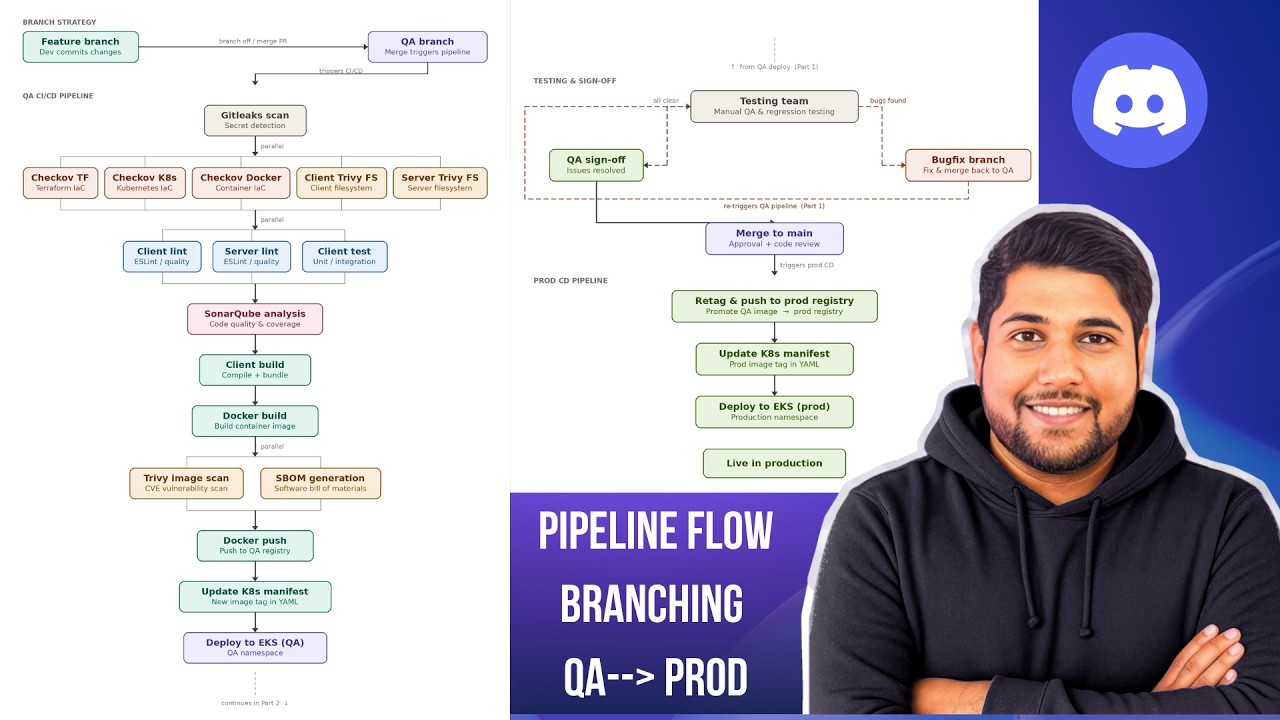
are also going to understand about the environment. So, we are how many branches will be there. If I want to develop a new feature, when the feature branches will be created, from which branch it's going to get created. We are going to talk about environments as well. How many environments will be there? What are the lower environment? What are the upper environment? Each environment is created for what purpose? Then we are going to be doing the local development setup. Means key when developer pushes the code before any pushes the code to GitHub, before that they are going to run the application in their local machine just to make sure that their code is working. While running the application in local, we don't focus on the security part. finding the bugs. We just try to focus on making sure key application code that is written, it should be running. Then we are going to set up the AWS infrastructure. Inside infrastructure, EKS mainly. In in including that, there will be other things also. For example, there will be certificate managers, then secret manager, Route 53, and so many other things. So, we are going to understand that. Then we are going to write the CI/CD pipeline for lower environment. This is one of the most important part because people don't understand when we deploy to lower environment, how we are going to promote it to upper environment, right? That will be there. Side by side, we are going to understand from security point of view, what are the integrations that we have to do. So, we are going to explain you at every level what kind of security integrations we have to do, why do we have to do it, and what is the main purpose of it, right? Then we are going to set up the secret management. See, by default when you most people who are working with Kubernetes, they will use the Kubernetes secrets, right? But the thing is key that's not very secure. It can be exposed also. So, in order to avoid that, we are going to set up a system where we are going to store our secret credentials over AWS Secret Manager, and then we are going to fetch the values from there inside our Kubernetes cluster, right? Side by side, we are also going to understand about secret management already discussed, right? Then custom domain, Route 53, and ACM SSL. So, basically we don't want to access our application over just a load balancer URL. We want to access it over some custom domain like xyz. com. So, how do we get this domain? First, I'm going to explain you practically and show you also. Then we are going to see how to get SSL certificate for it using AWS Certificate Manager, how to manage this domain using AWS, we are going to see practically. Right? And then comes the most important part, promotion to prod and full stack monitoring. So, once we have deployed the application to lower environment, it's working fine, testing team has done given a sign-off, there is no bug or even if bug fix branch is created, how to handle that, we are going to understand that as well. Then we are going to understand how to promote the application to prod environment once everything is done with lower environment. And then we are going to perform the monitoring. So, for monitoring also, we are not just monitoring the metrics, we are monitoring few of the most important parts. First, metrics of the workloads like RAM, CPU usage. Tracing also we are going to do. This is quite useful when you talk about when you find out the reason for slowness of the issue slowness issue in your monitoring of the logs as well. So, all three things we are going to perform the monitoring of, right? All these things will be in a single course. Now, let me explain you with help of diagram like what are the stages will be there, what kind of pipeline we are going to be using, all those things. So team, now we are going to understand with a flow diagram what exactly will be things that we'll be doing. First, we are going to understand whenever new feature needs to be developed in the project, how exactly branches are going to be created, then they are going to be merged back to the original branch which is going to trigger a pipeline. Now, talking about stages in our pipeline, we'll be having we'll be starting with the security scan of GitLeaks. Then we are going to perform other security scans, and we are going to be understanding how to do it parallelly. That means key we are going to understand parallel execution of stages. Checkov for Terraform, Kubernetes, Docker, then Trivy client Trivy file system scan we are going to do. Then we are going to perform the linting as well for front and back end and the testing as well. And then we are going to perform the SonarQube analysis, code quality and code coverage, and how to integrate it, how to set it up, all those things we'll be seeing. Then we are going to build the application for compilation and bundling of the application. Then we are going to build a Docker image. In Docker image also, we are going to understand how to write the Docker file, what is the best way, how to harden the Docker image so that we get the perfect secure Docker image. Then we are going to see how to integrate Sbom. Most people do not teach this, but this is one of the most important thing from enterprise pipeline view. Then we have Trivy image scan, then we are going to push the image to Docker registry. We are going to understand how to what is the best way to tag the image so that it stays unique plus it is useful for our project. Then we are
Segment 3 (10:00 - 15:00)
going to understand the animal manifest file what manifest files will be needing, how to set up the MySQL database, how to make sure key secrets are properly used. All those things we are going to see. Then we are going to update the docker image and we are going to deploy to lower environment. Once we have deployed your deployment will be sent to testing team. That application has been deployed and now you can start testing the testing team is going to start testing it. If they found any bugs they're going to create bug fix branch and then a pipeline is going to trigger again. Again testing team will start testing. If no testing is find out QA sign off will be given. Then the develop branch of QA branch which ever we are using it's going to be merged back to main. Once the branch has been merged back to main it's going to trigger the CD pipeline for prod. The most important part in prod deployment you have to understand or even in QA deployment is the authentication to the Kubernetes cluster. Because most people generally use the cube config file of service account or admin which is not secure or they could use token of the service account. In many ways these have limitations. These are the not these are not the best option. So we are going to find the best option which does require no secrets to be added. That means we are going to use a secret less method and this is the foolproof most secure method because we are not at all adding any kind of secret any kind of configuration file. Not even cube config, not even token. Okay. So that we are going to understand and this is the most important part of the project. So we are going to understand that then we are going to understand how to promote the application, update the animal manifest file and deploy to EKS cluster in a secret less way using the secret less authentication. That will be done and then we are going to deploy the application to production so that we can access it, right? Side by side you also need to make sure that we are actually monitoring our application. So we need to understand that as well. So team before we jump to monitoring part we need to understand the exact flow that happens. So once application has been deployed how exactly it goes or it will be accessible over browser. How route 53 will be utilized, how SSL certificate will be integrated, how to get the custom domain from Namecheap or the cheapest way possible. How exactly it's it goes to the ALB controller, how exactly it goes to increase the source and from there how exactly the application will be going to the application pod. How MySQL will be hacking the volume dynamic volume we are talking about not the static volume, right? That will be there. How exactly our secrets manager will be set up, right? There will be resources we have to create secret manager, yes or operator, KWS Kubernetes secret. Right? Then we are going to set up secret for docker registry also because we'll be using a private docker registry, right? So these will be the part of like basically what resources will be inside the Kubernetes cluster. So team when it comes to monitoring the application it's not just about monitoring the metrics on just monitoring the CPU and RAM of the application. We are going to monitor the metrics, logs, we are going to perform the tracing also. So that any kind of issue happens with respect to application we should be notified immediately and we should be able to find information with respect to that is using the Grafana dashboards. Most of you already know metrics and logs. Tracing is something that might be new to many of you. So let me just explain you in short tracing is basically going to help you find slowness issue. If you have a microservice application or multi-tier application if slowness is happening you'll be able to know where exactly it is happening. So you'll be able to understand like where exactly slowness is happening and with respect to that once you get that information you'll be able to debug the issue easily. So all these things will be covered. Now the best part about the course is that once you have implemented complete course at the end you will be able to are going to understand how exactly you can add this project in your resume, what points you have to add, what are the quantitative metrics you have to add because at this point you know in resume people prefer that you should be having quantitative metrics. For example based on what task you did in the project, what kind of impact it did have. For example if I'm integrating SonarQube so what percentage of bugs got reduced, how exactly it was done. So we have to add like quantitative metrics also. So we can explain key based on our task what kind of changes or what kind of impact did it bring to the project. So yes even these things I'm adding in the course so that you can understand how exactly to add this project in your resume, how to explain it, how to explain your roles and responsibilities with respect to project. What was your task bring the what kind of impact did it bring to the project. All those things will be in the course. So yeah, I hope at this point you are very clearly about what exactly you'll be learning in the course and if you find that this course is relevant to you and it is going to bring you a lot of like knowledge then make sure to proceed. Also guys just note that key whatever documentations, whatever source code, everything will be added in the course modules. So inside each module
Segment 4 (15:00 - 15:00)
whatever document is required it will be added and the project source code as well. So yeah, make sure to proceed with that.