#DjiPocket4 #videocamera #digitalcamera #cinematicvideo
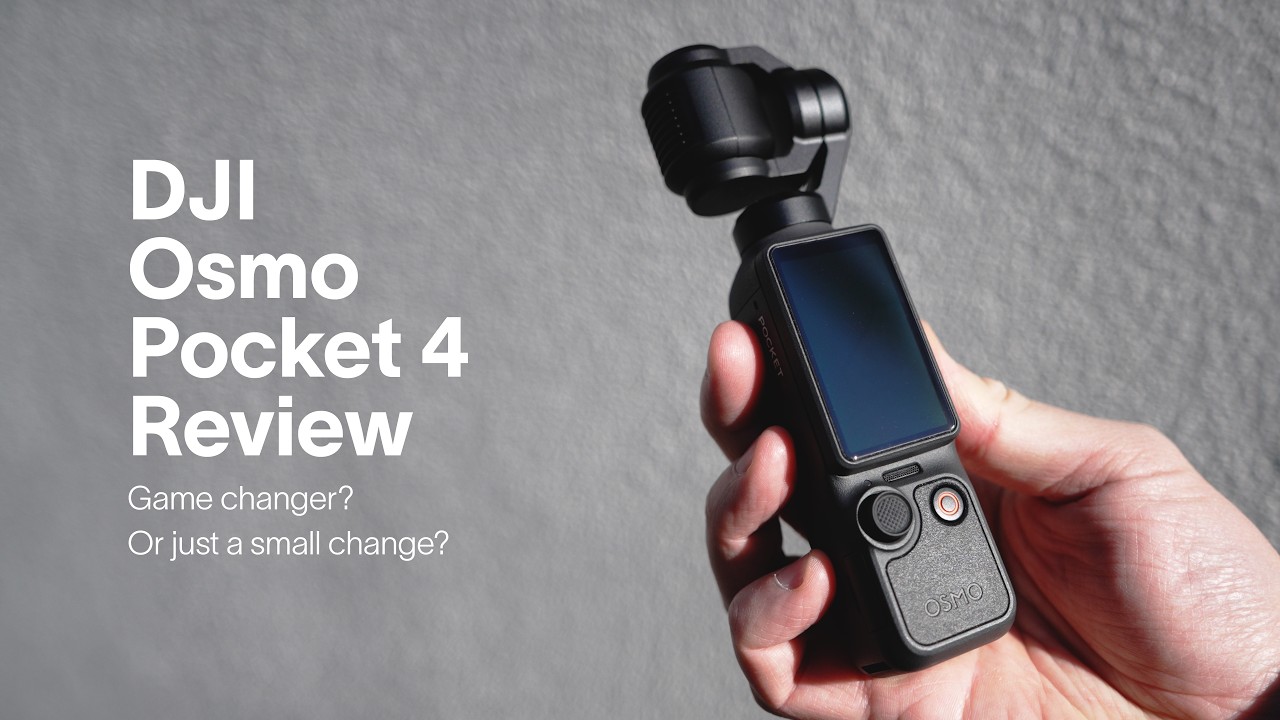
The DJI Osmo Pocket 3 has truly taken the mainstream camera world by storm, and now the DJI Osmo Pocket 4 is looking to shake things up once again. I've used it for the last couple of months now and in this video review, I give you the side-by-side rundown of whether the Osmo Pocket 4 is worth the upgrade from the Osmo Pocket 3.
⚡️ My Creative Business Mentorship—The Creative Leap.
Enroll now to make a living doing what you love.
https://patkay.studio
💪📸 Get 30 tips in 30 days to supercharge your photography
https://patkay.com/30
🧠 Learn photography from me
https://patkay.com/learn
📷 Use the gear I use
https://geni.us/A6HPT
Оглавление (4 сегментов)
Segment 1 (00:00 - 05:00)
There really hasn't been a camera that's come out recently that has taken the world by storm quite as much as the DJI Osmo Pocket 3. This camera has somehow touched the hearts of the masses and at least anecdotally, you know, I see them absolutely everywhere, especially when I'm traveling. Perhaps more so than any other camera and for good reason. You know, the Osmo Pocket is extremely beginner-friendly. It's small and discreet and the image quality is great, especially for its size. So, when DJI reached out to sponsor this video and talk about the new Osmo Pocket 4, of course, I jumped at the chance. And for transparency, while this is a sponsored video, you can trust that I'll try to keep my opinions as fair and as balanced as possible. And just so that you know, I've used the previous version, the OP3, quite [snorts] a lot, extensively. I know it really, really well. I've used it on a ton of vlogs that you can find on the channel already. And to be quite honest, [snorts] I really enjoy this product. So, if anything, I'm actually going into this review with a little bit more of a critical eye on it than most. So, I really hope that comes across in the video. Now, in this review, I will show you a ton of example footage that I've also taken here in Japan, but also on my recent trip to New York. I'll also include a bunch of examples shot side-by-side between the OP3 and the OP4. I'll talk about the changes in the new version and then I'll finish it with an actual recommendation at the end of the video that isn't some kind of like, you know, wishy-washy, you decide for yourself kind of recommendation. But now we've got the intro out of the way, I will shoot the rest of this video on the OP4 so that you can see what it looks like with good studio lighting in a studio setting. But I apologize about the rather plain and if not messy background. I'm currently in the middle of moving. Okay, so DJI says they've focused on three main core areas this time around with the new Osmo Pocket 4, enhanced imaging, smarter shooting, and making the Pocket more user-friendly. So, let's tackle each one of these in reverse one by one because I think it makes a little bit more sense this way. User-friendliness. There's a few standout features that have changed with the OP4. One of them is the brand new 5D joystick that looks and feels a lot more like the joysticks on other DJI products. In practice, it's a lot more sensitive and has quite a bit more travel distance because it is taller. In general, I kind of like it and I like how you can fine-tune how fast things move in the settings. Underneath the screen, when you flip it up, there's now two new buttons, a zoom toggle button on the left and a custom button on the right that you can assign actions to based on single, double, and triple taps. Inside the unit, you'll find a brand new built-in storage of 107 GB. This is amazing and it also means that you never really have to put an SD card in it unless you really want to. And the SD card slot now is protected by a little dust cover. Nice. Now, to transfer all of that data, perhaps one of my favorite new features is that the USB spec has been updated to 3. 1, enabling 800 MB per second exporting. This is actually amazing if you are a heavy user as it's five to 10 times faster every single time you transfer. Continuing inside, we have a slightly updated battery capacity of 1545 mAh versus the 1300 mAh from the previous version. And the final change here is a slight modification to the back of the gimbal unit where there's now a four-pin magnetic connector, which is great for things like this new fill light that comes with the Creator Combo. Now, from a hardware perspective, you get all of those features in roughly the same size. The Pocket 4 is slightly taller, wider, and heavier, but these differences are pretty tiny and you really have to see them side-by-side to really notice. Smarter shooting. Now, on the smart side of things, DJI has upgraded its tracking to ActiveTrack 7. 0. What that means is that with a simple double tap, you can lock onto most things, people, cars, pets, virtually any subject. In practice, while the OP3 was actually no slouch at this and I found it fairly sticky, the OP4 is actually next level. You know, in this test, it does the traditional face tracking really, really well. You can see that it doesn't lose sight of me the entire time, going in and out of harsh light, across the frame, and so on. But when I went to go and push the ActiveTrack to see how well it could actually do, well, check this out for
Segment 2 (05:00 - 10:00)
yourself. I tracked this random lady walking across the street and not only did the OP4 grab the subject straight away, as you can see here, whenever she would go behind poles as well, the tracking would just pick her back up again after it got lost and continue tracking when she was back in view. Pretty impressive stuff. Tracking things like cars was also no problem as well and it even showed the entire frame of the truck here in this shot. Another new feature of the Osmo Pocket 4 is that it now has gesture controls. Now, you can simply just make a palm gesture to enable or disable the ActiveTrack and then make a peace sign to start or stop the recording. And this is amazing for those situations where you've set up the composition perfectly and you don't want to touch it and you want to start recording. — [snorts] — And then there is the last new feature here, which is the much better Osmo audio integration along with spatial audio, which unfortunately I can't show you in a YouTube video because I'm outputting in mono, but it also supports Osmo audio four-channel output, meaning that you can connect two DJI mics at the same time and you can set it to save those tracks as well as the onboard audio all at the same time as well. And if you didn't notice, I've been recording on the DJI Mic 3 this entire video. Enhanced imaging. And now for the last core area and I'm sure the area that most of you want to know about, how does the image quality actually look? You know, after all, the Pocket 4 now comes with a brand new 1-in CMOS sensor that outputs 14 stops of dynamic range and supports 10-bit full Dlog, not the Dlog-M version like you see in the Osmo Pocket 3. DJI says that the new sensor has more detail, more accurate color, cleaner night shots, and lower heat as well. They also say that it recovers more shadow and highlight detail. Is all of that true? Well, to answer this straight up, I would say mostly yes. But the thing with the Pocket series is that, you know, most people who use this camera are looking for simplicity and ease of use, right? They're people who are going to be mostly beginners or they're going to be people who aren't going to be pixel peeping all that much. And while the changes are most certainly visible if you know what you are looking for, you really do need to know what you're looking for to be able to tell the tiny little differences. The changes are not that drastic. But this is also a testament to how good the Pocket 3 actually was. Let's dive in a little further. You know, up until now you've been looking at b-roll specifically shown from the new Osmo Pocket 4 on its own. But now, let's do some comparison shots of both the OP3 and OP4 side-by-side. Now, this is a shot of me walking across Shibuya Crossing and I like this shot because it's pretty tough from a dynamic range perspective. You know, there's bright highlights in the back and the front is all shadow, pretty much. And in this shot, you can see that there's a big difference in detail on this guy's backpack in shadow. Even the back of his pants and the jacket stand out more on the OP4. On the back billboard sign here in the highlights, you can see that the OP4 handles highlights much, much better, making them not only far less hot, but they show much more detail in the ad as well. Mind you, this is both shot on Dlog-M for the OP3 and full Dlog on the OP4 and you have to be shooting in these modes to get the full dynamic range. But this is also how I recommend you use these devices and how I use them as well. Here's another shot to demonstrate the dynamic range difference. In this shot, you can see in the distance there's a really bright portion at the end of the street and you can see how much better the OP4 handles the heat of the highlight and how much detail you get back compared to the OP3. Aside from that, however, I would say that the biggest difference imaging-wise is actually color balance and contrast. You know, the OP4 looks a little bit warmer and more true to life than the OP3 and the contrast is slightly less aggressive on the OP4 in general as well. Not that the OP3 is bad on its own, it still looks great, but side-by-side, you can see that the OP4 has had a lot more image tuning done and it looks far more closer to life and less stylized. Now, let's talk about low light. The Pocket 3 was already pretty good at low light and with the OP4, I didn't actually see that big of a difference in terms of noise performance when shooting on the log modes. In this scene, we can see the superior highlight performance of the OP4 that comes from the better dynamic range and highlight roll-off and handling. And this shot is in log again and you can only get this performance in log. There is a slight performance difference when shooting on the standard picture
Segment 3 (10:00 - 15:00)
mode and the OP 4 definitely has better noise reduction here. Keep in mind that for the entire video, every single shot that you've seen on this video in terms of b-roll is done with sharpening and noise reduction both set to zero as that is how I typically like to use it and how most people are going to be using it as well. But the Osmo Pocket 4 has a revamped low-light mode that you can use, but in my experience it's only really good for extremely low-light scenarios. You know, scenarios like such as this shot look very similar to the standard picture profile. It's not until you get into scenes like this where you can barely see in real life that the low-light mode actually really helps. I will say that the new low-light mode adds far too much sharpening for my liking and you can't change the sharpening settings while you're in that mode either, locking you into what DJI recommends. In general, I think both the OP 3 and the OP 4 were already pretty decent in low light and the slight dynamic range improvement here definitely shows, but again, you have to know what you're looking for. Other imaging upgrades, the Pocket 4 also has a few other new tricks up its sleeve. The 2x zoom now works with ActiveTrack Dlog and in the new photo mode as well. It's also now able to capture 4K 240 frames per second slow motion, which is pretty wild for a device of this size. And it now comes with six built-in film tones and built-in beauty filters, which are all right, but I would personally never use them because I'm always filming in Dlog and I prefer to edit in post rather than have those effects built in camera. All right, that's it for the new stuff. But at the end of the video here, I wanted to list out some of the things that I wish were in this version, but aren't. And the first is startup time. The startup time has been slightly improved, but I think it's still a little bit too slow. I would like to see the next version be ready to record as soon as you pull it out within about 2 seconds from when I flip the screen open. You know, so many times I wish I could record something in the moment, but by the time it's like pull out of my pocket, flipped on, locked and ready to record, I've already missed that moment. I'd like to also see a version with different focal ranges. You know, I think 20 mm is slightly too narrow still for vlog purposes and I think it's slightly too wide to use as a general purpose focal length. It would be really cool to have two lenses on it for example, you know, one at 16 mm perhaps and the other at 35 or 50 or something like that. You know, that way you can do your vlog stuff at the super wide angle, but also be able to get all of the detail stuff with like a more natural or telephoto focal length. I was also disappointed to find that the Creator Combo no longer comes with the extended battery pack and I think this is because the internal battery is bigger, which is nice, but sometimes, you know, I'm out all day, literally all day and I need to juice up the device partway through the day and having that battery pack is extremely useful. Thankfully, the old version still works with this new one and I think that they swapped out the battery pack for the fill light. And finally, I really kind of hate this new gimbal clamp thing. You know, it's easy to put on, but so frustrating to take off that I just kind of just defaulted to putting it in its new little soft case thing without using the clamp at all, but that's just a minor thing. On the plus side, overall, I think that the new upgrades are decent and a step forward in many different ways. You know, as a full-time content creator and someone who already uses the Pocket 3 a lot, I really like all of the quality of life improvements because they make my workflow far more seamless. I also enjoy the slight improvements to the imaging as well. But do all of the improvements justify the upgrade? Well, let's get into the recommendations and who I think the Pocket 4 is for. Recommendations. So, the Pocket 3 was released 3 years ago and it is still a fantastic camera, but if you're an existing Pocket 3 user and you're more on, you know, the beginner side or the casual side of things, then I would say that while the new quality of life features like the internal storage, the faster transfer speeds, you know, the new buttons and the joystick, etc. are good, you can still get a lot of functionality and value out of this previous version of a DJI Osmo Pocket. I would say that going to the DJI store to check out the differences in person would be your best bet before you consider upgrading to this new version.
Segment 4 (15:00 - 16:00)
However, if you are a Pocket 3 power user and you use it all of the time, then I would say that it is most certainly worth the upgrade. You know, these quality of life upgrades means that your workflow is going to be so, so much smoother and having things like full fat Dlog and faster transfer speeds actually make a tangible difference in the quality of your workflow and the speed upgraded image quality is nice as well. If you don't own a Osmo Pocket at all and you don't know what Dlog means or even how to use it, then I would recommend that you pick up the Pocket 3 at a discounted rate because that's going to be your best bang for buck. As soon as this new Pocket 4 goes online for sale, all the Pocket 3 prices are going to drop down very, very quickly and so second hand is going to be your best bet. However, if you are considering getting into the Pocket world for the first time and say you are a new content creator or someone who is looking to level up their productions and so on, then the Pocket 4 is most certainly a great place to start. All right, that's it for the video. Let me know in the comments below if you're going to be picking up the new DJI Osmo Pocket 4 or if you have any questions about it, I will answer them there. So, I'll see you in the next video, but until then, get out there and make something that matters. Peace.