Vecna Fire VFX from Stranger Things
8:16

Vecna Fire VFX from Stranger Things

Film Riot 26.12.2025 37 094 просмотров 2 646 лайков

Machine-readable: Markdown · JSON API · Site index

Поделиться Telegram VK Бот
Транскрипт Скачать .md
Анализ с AI
Описание видео
►Big VFX Bundle https://aejuice.com/product/big-vfx-bundle/?ref=filmriot&coupon_code=filmriot&utm_source=youtube_filmriot&campaign=filmriot_2 ►VFX Pro Bundle https://aejuice.com/product/vfx-pro-bundle/?ref=filmriot&coupon_code=filmriot&utm_source=youtube_filmriot&campaign=filmriot_2 ►Free VFX Pack https://aejuice.com/product/free-vfx-assets/?ref=filmriot&coupon_code=filmriot&utm_source=youtube_filmriot&campaign=filmriot_2 ----------------------------------------------------------------- *GOODIES* The Film Riot + Smallrig Multitool! Multi-Tool Kit (7-in-1): https://geni.us/7in1wrench Multi-Tool Kit (10-in-1): https://geni.us/10in1wrench COLOR GRADING LUTs: http://bit.ly/buyFRluts SOUND FX: http://bit.ly/buyFRsfx MUSIC: https://bit.ly/storeFRmusic VFX ASSETS: http://bit.ly/buyFRvfx ----------------------------------------------------------------- Theme Song by Hello Control: http://bit.ly/hellocontrol
Оглавление (2 сегментов)

Segment 1 (00:00 - 05:00)

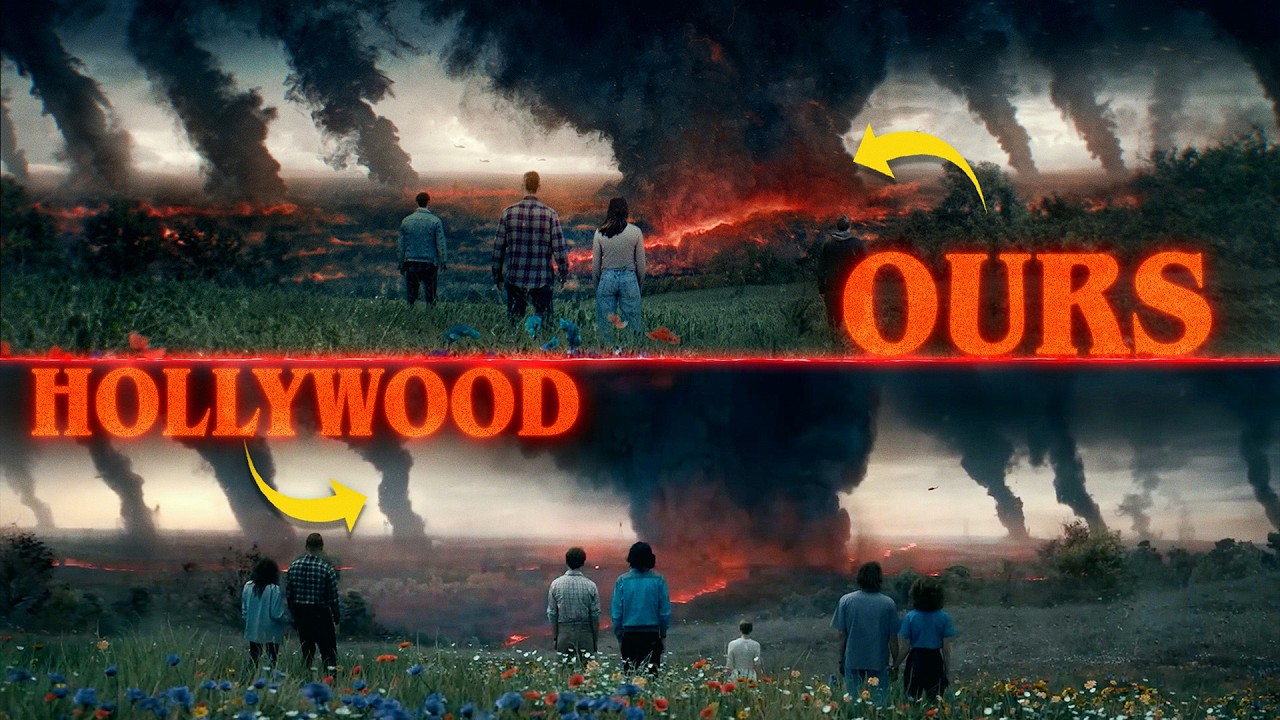
We're doing it again. Can we recreate this epic shot from the latest season of Stranger Things? Last time we had some of our own footage in the mix, but this time we're recreating the shot with nothing but a model from CG Trader and some VFX assets from AE Juice. And we're going to jump right in, starting with the fire since that takes up the majority of the frame. While the fire was almost definitely a sim in the original created by talented artists who worked on the show, we wanted to challenge ourselves and see if we could get anywhere close to the same vibe using stock. And like last time, we're jumping into AEU's free media browser to search through our purchase packs. And this is excellent because you can see all of your purchase packs here and any of the other packs that you might be interested in. So, it lets you work really fast. And they have a ton of packs. They do also have a New Year's Eve sale for 30% off. And you can get an extra 10% off using our code film riot if you want to grab these for yourself. Plus, they have their big VFX bundle, which is a bunch of their most popular products, some of which we're using today. And if you saw the last episode and purchase this bundle through our link during Black Friday, AEU is going to give you the new dust pack for free. If you haven't got it, it's a great bundle overall and definitely worth grabbing. Excellent at enhancing all kinds of scenes. Now, they do have a ton of fire assets, but for the main elements in our shot, we found these practical large ground fires worked best. But to have that concave shape around the force field area of the fire, we used a mesh warp to distort it, some more than others. And to mask and taper the base more naturally, we mask the bottom sections to darken and add contrast. This looks odd now, but we will fix the color soon. We also used a few duplicates of this fire window asset for some extra turbulent shapes. And after gathering them all, we set everything to screen. To get more of this lower shape, we found this elemental fire inferno. We flipped it upside down, then masked and graded it darker. And lastly, we have this flamethrower asset, also from the elemental fire pack, to add some extra texture around the flames. So now we'll drop this into a new comp and rework the look of the fire. We'll tint it black and white and use Video Copilot's color vibrance to make it warm. Then we'll lower the vibrance value. To beef it up, we'll place a curbs first and lift the mid so it feels like a thick wall of fire. That's all girthy perverted. — Next, we'll add an optical glow with boosted size low amount and lift the highlight rolloff. With a couple of extra curves, we'll boost brightness and lift the reds in the shadows. And lastly, for highlights, we'll use a lummetry effect. And under curves, luma versat will bring down the saturation of the brightest areas to give us that white hot look. There's not much room to see a lot of the background, but we want a similar night building exterior setting. So, we'll use pixels, which is also actually a part of the AEU manager under the free section. And this is ridiculously useful to have right inside of After Effects as well. And again, it's my favorite price. We chose this image and brought it into Photoshop to remove the person and car with Jen Phil, then colored different areas and brought out that blue tone we see contrasting so nicely with the fire in the original. We also wanted to layer up a bunch of elements between the fire and background like this fog behind glass which we tinted warm and lowered the opacity. Then this ground fog and dirt impact close with the same applied. And we found this jetream asset in the dust pack which works great for smoke after we tinted it black. We also use this planet impact dust wave at the start and to try and get something similar to these weird energy lines we see at the side of the original. We used a snow drift asset rotated with keyframed position to move to the edge of the screen. Then we tinted it warm mesh warp to a curve and a turbulent displacement turbulent — with animated offset and evolution for that shaky look. Now with an adjustment layer above these, we'll add the chromatic displacement effect and use the fire comp as the map to get that distortion over everything. Above the fire, we're going to place some assets to use for the portal force field thing we see Beckna creating. This magic pack particle stars placed in the center and tinted to match. Then this magic shock wave, which we looped in its own comp with duplicates stacked to give a quick constant pulse and a duplicate of these placed smaller inside before using turbulent displacement and then a glow effect. We added this fireball into the mix. Then this deflection asset from the trap code magic pack. And then we use this chromatic muzzle front from our own pack, also available on AE Juice. With all these combined, we have this, which we can use in our main comp with adjustment layers for displacement like we did with the fire, but also to blur and boost brightness, giving us this. Now, above all of this, we also added some extra displacement using this ship dust top asset from that same dust pack. Then for some extra assets on top we use muzzle smoke emitting from the center. This close fog dirt impact close and blizzard as atmospherics. For each of these we have adjustment layers using the assets as mats with blur and boosted brightness effects so that we're using

Segment 2 (05:00 - 08:00)

the same color from the fire layer below. Meaning if we change the fire color, we don't have to go back and change each individual asset. And even though we can't see any in the original, we like these ember assets that we found. So, we added those two. Lastly, we added an adjustment layer with a subtle glow over everything. And for Vecna, we found this great STL model on cgtrader. com, which was also in the same type of pose already. However, after a long day of heartbreak and pain, we just could not get anything to work for rigging. So, we went with this model instead and used the Blender Rigify add-on, but that failed. So, we tried Miximo, which also one last time with a manual armature, which finally worked. And now with him posed with his arm up, we did some simple animation, key framing a lot of the rig throughout with subtle movements. For extra motion, we added a noise modifier to the rotation of different bones. This helps add some shake and variation as if he's struggling with the power. We use sculpt mode to alter his proportions a bit as well and sharpen some of the tendrils to match his more spiky look this season. And we also created some extra spikes for his back with simple meshed and tapered curves. Using shape keys, we sculpted and animated the tendrils to look like they had that jolty staggered growing effect we see in the original by keyframing the shape key values at different points. For his skin, we found this cool organic matter 02 material from 3D textures. mme, giving Vecna his meaty look and some subsurface scattering for the fire light to pick up. We also decided to key frame the mapping location to give that classic Vcna flowing skin animation. Even though it's a lot more subtle in the original, we just thought it looked cool, so deal with it. For lighting, we first tried using a render of our comp as an emission shader on a plane in front of him, but we ended up getting a better result just by placing point and spotlights around him using warm colors and temperatures. We used a few colder lights, too, on the top left with key frame power to match the original scene's flickering lights, giving us this. Now, once that rendered, we'll bring it into our comp and place it beneath a few of the top layers. We then used a camera lens blur effect to knock him out of focus, some effects to add brightness and contrast, and a bit of light wrap before finishing the shot with some camera shake and a grade, giving us this. It's definitely more of a chaotic version than the original, but what I love so much about this and what Thompson does best is taking assets and bending them to work in ways that you wouldn't think of at first. The way that he uses assets like these AE Juice assets reminds me a lot of sound design, using a sound of a screaming tea kettle as a train or bacon as rain. I love the no boundaries creativity of that and it constantly leads to results that surprise me. Again, check out AE Juice to get the big VFX bundle that we use today at 30% off for their new year sale and an extra 10% off when you use our code film riot. But that's it for us and 2025. Until next year, don't forget to write, shoot, edit, repeat. See you later, tall.

Другие видео автора — Film Riot

Ctrl+V

Экстракт Знаний в Telegram

Экстракты и дистилляты из лучших YouTube-каналов — сразу после публикации.

Подписаться

Дайджест Экстрактов

Лучшие методички за неделю — каждый понедельник