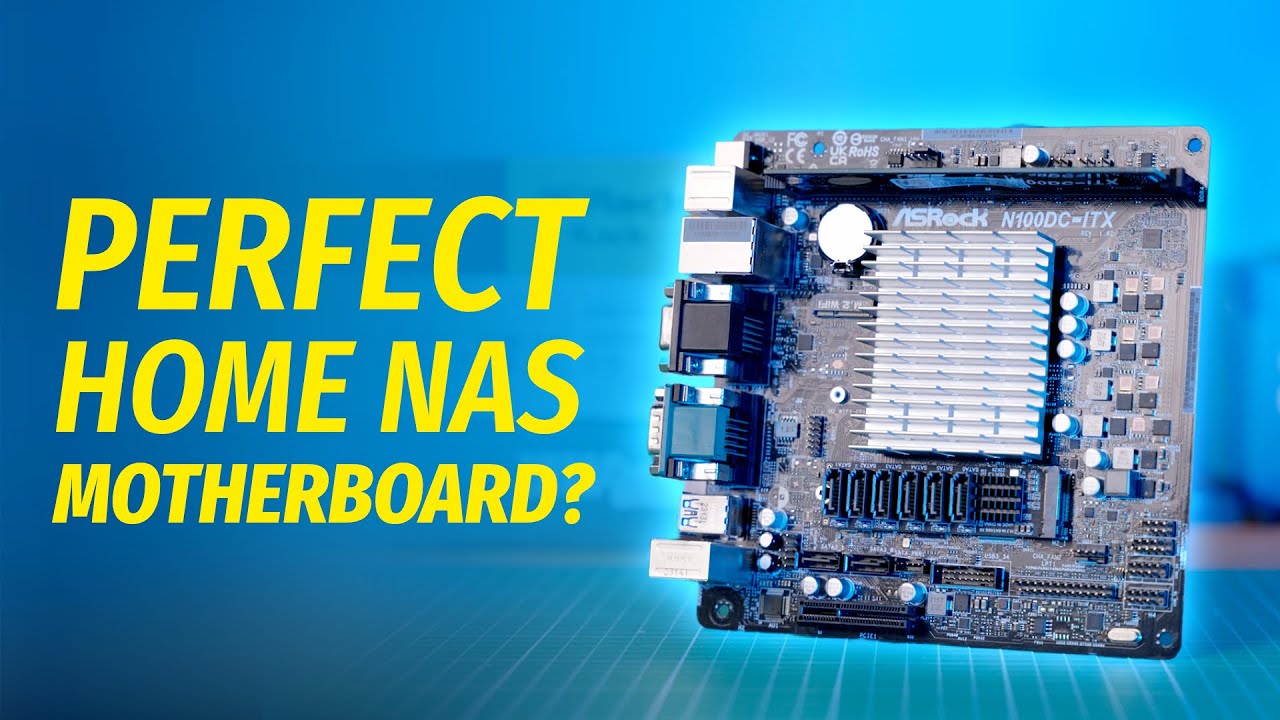
This is Asrock IMB-X1231 It’s got two 2. 5 gig ethernet ports 3 M. 2 slots, 8 SATA ports in total, four on the motherboard itself, and four more on this weird little M. 2 add-on card and all sorts of serial ports, parallel ports, and display connectors. It also takes laptop memory, but not just any old SODIMM sticks Because the IMB-X1231 is one of the few miniITX Alder Lake motherboards that support ECC RAM. Moreover, as you can see, I paired it with a regular i5 CPU, not a Xeon or anything like that and it also fully supports ECC RAM. Oh, and did I mention that it consumes less than 10W at idle? Honestly, there’s no reason why you shouldn’t just go ahread and buy this motherboard right now. I mean it! Open a new tab, search for “Asrock IMB-X1231 buy”, and… oh. Wow, uh, okay… Yep, that’s right. Asrock does not sell the IMB-X1231 to private customers. So I asked them to send it to me for a video. And they kinda just did?... Which I didn’t expect. So now I feel like a dog that finally caught the mailman, and doesn’t know what to do next. And, since I can’t make a whole video just talking about one motherboard I guess i’m gonna use it as an excuse to also rant about ECC. # Motherboard First, let’s take a closer look at the motherboard. The IMB-X1231 is one of Asrock’s Industrial motherboards. These boards are supposed to be a bit more durable than your typical consumer stuff. They’re made to withstand extreme temperatures, wider humidity ranges and other kinds of harsh environments. And to put these claims to the test, I’m going to put this motherboard in a microwave, set it to defrost, and see what happens! Just kidding! I wouldn’t want to experiment with an expensive piece of gear like that. Besides, there’s a much better and safer way to unleash your inner mad scientist – I’m talking, of course, about today’s sponsor – Brilliant. org is a one of a kind online learning platform With thousands of interactive courses on math, engineering, computer science And tons of other subjects. Their courses are tailored to a wide range of proficiency levels — from a complete noob to a STEM graduate, so no matter your level, you’ll definitely find the right course for you. Instead of experimenting with electricity at home, You could learn about how engineers around the world are working on maximizing the value of electric cars. And the best part – learning with Brilliant is way cheaper than the cost of a motherboard, a new microwave, and potentially a house fire. If you go to brilliant dot org slash wolfgang, you can even experience [Brilliant. org](http://Brilliant. org) for free, for 30 days. The first two hundred people to sign up with the link, will also get 20 percent off on their annual subscription. So thank you Brilliant for sponsoring today’s video, and now, let’s get back to our motherboard. On the other hand, a big giveaway here, in the case of IMB-X1231, is the number of ports and connectors. This motherboard comes with things like eDP, LVDS, GPI, GPO, Serial – things that you might not care about in a homelab environment, but that can be really useful if you want to use this board in an industrial setting. At the same time, it’s not like the IMB-X1231 doesn’t have any other cool features. For starters, it’s got 4 onboard SATA ports, which is normal for MiniITX boards, But what’s not normal is this optional accessory, the M2X4-SATA-4P. It kind of looks like an M. 2 Sata controller, but as you can see, it doesn’t actually have any logic on it. Instead, the 4 SATA ports are basically routed to the onboard SATA controller on the motherboard, which gives you a total of 8 SATA ports, with no need for an external controller. I’ve seen ASUS do that with their FPS-II card, but other than that – it’s a pretty novel trick. Now Asrock did mention that you’ll need a special BIOS to use the add-on SATA card. Since there isn’t a BIOS setting to switch between the regular M. 2 functionality and the SATA card for this M. 2 slot. But, since this motherboard is pretty much unobtanium as it is, I don’t think it makes any difference. As for other expansion slots, the IMB-X1231 includes a second M. 2 slot, an M. 2 WiFi slot right underneath it, And an M. 2 SATA slot for the B-Key SATA SSDs. Now that we’ve talked about storage, let’s address the elephant in the room – ECC support. I’ve paired this motherboard with two 32 gigabyte SODIMM sticks of unregistered ECC memory. And yes, ECC memory in this form factor does exist, since plenty of workstation laptops actually come with ECC support. As for the CPU, I went with the Intel i5-13500, which is the lowest end CPU in the lineup that comes with ECC support. And if that sounds weird, I don’t blame you. For years, Intel only enabled the ECC support for lower end consumer SKUs, like Pentium, Celeron and i3. which was enough for modest home server builds and NASes, And if you need more performance, you basically had to buy a Xeon CPU.
Segment 2 (05:00 - 10:00)
However, with the release of their 12th gen CPUs, Intel, in typical Intel fashion, flipped the script completely. Now it’s the lower end CPUs that lack ECC support. With almost all i5, i7 and i9 CPUs fully supporting unregistered ECC memory. Now, we’re gonna talk about Intel’s weird relationship with ECC a bit later in the video, but for now, let’s talk about the power consumption Now the power consumption is a weird one. Out of the box, the board would draw around 13W at idle, and refused to go lower than C3 in powertop. Not having much hope, I emailed my Asrock contact about it and described the problem. I was honestly expecting an answer along the lines of “deal with it”, but Asrock surprised me once again. Within a week, they sent me an updated BIOS version Which included the settings to enable C-States support Likewise, as I mentioned before, I also needed a custom BIOS to use the weird SATA adapter. Which Asrock, once again, sent to me upon request. Now, I don’t know if Asrock treats all of their B2B clients like that, or if I got some special treatment as a Youtube personality. But let’s hope it’s the former. And so, after updating the BIOS, the total system power consumption at idle, with an NVME SSD, two 32 gig sticks of RAM, an i5-13500 and the SATA adapter, is now around 9 to 10W. And the system can now reach the C6 state. Now obviously, you probably don’t care about all that, It’s a B2B only motherboard, and a typical consumer doesn’t really have the luxury of emailing an Asrock representative and having a special BIOS made for them within a week. Case in point: An Unraid forums user yupop emailed Asrock and asked for help with their Asrock board not reaching the C6 state. Asrock responded as follows Regarding your question, we have confirmed with R&D department again that the motherboard does not support C6, C8 and C10. Sorry for inconvenience. But as it turns out, you can actually enable the hidden C-State settings on almost any LGA1700 Asrock board, using an internal AMI tool called AMI Setup Control Environment. An Unraid forums user "genesisdoeswhatnintendont" posted a little guide on the whole process, which I’m going to link in the video description. That’s how you know that Asrock had absolutely no input on this video, by the way. Like, can you imagine them greenlighting it? By the way, I’m also building a slightly more attainable Alder Lake based home server soon, and I’ll probably be going through that guide in a bit more detail in the build video, so make sure to subscribe, if you don’t want to miss it. # So… now what? So, why did I just spend like 10 minutes telling you about a motherboard that might as well be a work of fiction? And why are miniITX motherboards with ECC support so rare anyway? The Asrock C236 WSI was always super rare, And the Coffee Lake boards like Asrock C246 WSI and Gigabyte C246M-WU2 are pretty much impsosible to find nowadays. The IMB-X1231 would be a perfect spiritual successor for these boards, And now that even i9s come with ECC support, you can build a pretty beefy small form factor virtualization host. But, alas, none of the Asrock industrial boards with ECC support are available for private customers. I’ve also asked Asrock if there are any plans to sell the IMB-X1231 through the retail channels, And they once again confirmed that no, the board is going to stay B2B only. Period. Now, you might be upset at Asrock for keeping this beauty away from the homelab enthusiasts, and I can’t blame you. But the company you should really blame for the scarcitiy of small form factor boards with ECC support is… intel Ever since the release of the 975X chipset, Intel has been marketing ECC as something that’s only relevant for servers and professional workstations. And look, I’ve been guilty of saying that as well Not because I’m an paid Intel shill who’s trying to promote their Xeon CPUs, but because of how difficult it is to build a power efficient system with both QuickSync and ECC support. Even to this day, most of mainstream Intel motherboards do not support ECC. And those that do, often cost a hefty premium or are really hard to buy. And it’s not because adding ECC support to a CPU or a chipset is expensive or takes time. On the contrary, disabling the ECC support is a deliberate marketing choice on the part of Intel, and has always been motivated by greed, rather than some supposed technical limitations. And I think there’s no better proof for that than the AMD Ryzen CPUs. Ever since the very 1st generation, all Ryzen CPUs came with full support for ECC memory. Moreover, you never had to buy a special “workstation” motherboard to use ECC. And even though the ECC support for individual motherboards still remains spotty and poorly documented, Even entry level AM4 motherboards with the A-chipset usually come with ECC support. Now, AMD never officially advertised ECC support for the Ryzen CPUs. They’re just quote unquote “not disabling" it. Even though the feature is not officially validated, according to AMD, it is enabled and working on almost all the Ryzen CPUs
Segment 3 (10:00 - 12:00)
as mentioned in the Reddit AMA thread dedicated to the release of the first gen Ryzen chips So we’ve got one CPU manufacturer that treats ECC as a premium enterprise feature And only locks it down to certain CPU and chipset combinations, and we have another CPU manufacturer that basically goes “oh, ECC? i mean i guess you can use it. Like, what are we’re gonna do, disable a perfectly working feature just for laughs? And just like Intel, AMD also has a separate enterprise slash workstation platform with fully validated ECC support. And the number of people who actually want to see ECC support on a consumer platform is pretty low. AMD could probably get away with saying “if you want ECC, you’ll need to get an EPYC CPU”. But unlike Intel, they made a concsious decision not to disable the ECC support, and even mentioned the homelab enthusiasts as one of the potential audiences for the Ryzen chips. ’ And honestly, the choice between AMD and Intel would be much simpler, if not for two things. One, Intel’s hardware video transcoding technology is still vastly superior to AMD’s And two, unlike the Ryzen CPUs, the ones without integrated graphics, most Ryzen APUs don’t actually support ECC. The only Ryzen APUs that do support ECC are their Pro series APUs Which, just like this motherboard, are only sold to businesses and system integrators. And if you’re building a compact and power efficient system with no dedicated graphics, you’re really going to want to have a integrated GPU. Even if it’s just for things like display output and BIOS configuration. Coincidentally, unlike AMD’s CPUs, Ryzen APUs are also based on their laptop chip designs Which makes the APUs a lot more power efficient at idle, without a major performance hit. At least that was the case for AM4, I’m not sure if AM5 is any different. So to sum it up, Linus Torvalds is right, and ECC support should never have been a premium server-only function. But, alas, if you want to build a small form factor power efficient media server with hardware transcoding – you’re either gonna have to pay a lot of money, or just give up on ECC. Out of these four things – power efficiency, availability, ECC support and hardware video transcoding – you can only pick 3 And the Asrock IMB-X1231 is probably the example for it. It’s small, power efficient, supports both ECC and QuickSync and you can’t even buy it. That’s gonna be it for this video, I hope you guys enjoyed it, and as usual, I’d like to thank my Patrons