Writing Math and Chemistry Equations on Anki (4 Methods)
9:47

Writing Math and Chemistry Equations on Anki (4 Methods)

Ray Amjad 16.02.2021 47 000 просмотров 1 109 лайков обн. 18.02.2026
Поделиться Telegram VK Бот
Транскрипт Скачать .md
Анализ с AI
Описание видео
📷 Follow Me on Instagram: https://www.instagram.com/theramjad/ === Timestamps === 00:00 - Introduction 00:12 - 1. Copying Images and Taking Screenshots 00:58 - 2. Using Superscript & Subscript 03:24 - 3. Using an Equation Editor 04:13 - 4. Writing Equations Directly 08:33 - 4.1. Writing Chemical Equations 09:35 - Conclusion === Links === - Codecogs Equation Editor: https://latex.codecogs.com/eqneditor/editor.php - Introduction to LaTeX: https://www.youtube.com/watch?v=Jp0lPj2-DQA - Mathjax Chemistry Cheatsheet: https://mhchem.github.io/MathJax-mhchem/ - Mathpix: https://mathpix.com/ - Mathpix (Referral Link): https://accounts.mathpix.com/signup?referral_code=tDVfBYTJC9

Оглавление (7 сегментов)

  1. 0:00 Introduction 52 сл.
  2. 0:12 1. Copying Images and Taking Screenshots 112 сл.
  3. 0:58 2. Using Superscript & Subscript 367 сл.
  4. 3:24 3. Using an Equation Editor 143 сл.
  5. 4:13 4. Writing Equations Directly 821 сл.
  6. 8:33 4.1. Writing Chemical Equations 187 сл.
  7. 9:35 Conclusion 49 сл.
0:00

Introduction

hey friends and welcome back to another video this one will be fairly short as i'll be going over four different methods to include maths and chemistry equations on tanki from the easiest to the hardest as always timestamps will be in the description so do check those out during the video
0:12

1. Copying Images and Taking Screenshots

so by far the easiest method is by taking screenshots or by copying images so if i would search something like quadratic formula then i could just select this image over here press copy and then paste it over here and then write some like quadratic formula and added that flashcard or if i had like a chemistry equation then i could use the snipping tool on windows by pressing windows shift s and then select this area and then let go and then press ctrl v again to paste and i could write something like reduction of hydroxynite trials to amines and then press ctrl enter to make that a flashcard
0:58

2. Using Superscript & Subscript

now the second method is by using superscripts and subscripts and there's actually a superscript and subscript tool uh built in tanki so if i were to write like a2b2 then i could select the first two and then press this to superscript it and then press the second one to subscripts that so if i were to use an example such as a quadratic equation then i could write a x squared plus bx plus c equals zero and this two over here i could press the sub uh superscript tool to superscript that and then just press add now if i were to write a chemical equation that would be a bit more difficult so if i wrote equation for cellular respiration then that would be the metabolism glucose which is c6h12o6 plus 02 and then if we want a right arrow then what i actually do is go to google search right arrow symbol and then just click on one of the websites and here we have a right arrow so just copy that and then paste it into here and then we can carry on and write co 2 plus h2o now we need to uh subscript some of these and if we hover over this we can see this subscript shortcut is c uh and equals sign so if i were to write control and equals and then control select this press controls equal control equal again and then just repeat that over and if i wanted to uh make it a superscript then i would press ctrl shift equals and that will make a superscript but let's just make a subscript again by pressing ctrl equal and then just press add again now searching up symbols is actually quite neat so if i would search like a lambda symbol then i could also find the symbol over here copy that and if i were to write something like a speed of a wave then that would be c equals f lambda and this is actually bold so let's unbold it so uh the speed of a wave is the frequency times the wavelength and then press add so the third method
3:24

3. Using an Equation Editor

is by using an online equation editor such as this one and which will be linked down below so if i were to use fractions then you can see if i click on this fraction symbol over here then it inserts a fraction and if i fill in these curly braces then you can see i get a over b and if i write like equals c uh to the power of d then you can see it's appearing over here and if i wanted to make this bigger then i would just choose a bigger font size and then either download the image or press ctrl shift s for the snipping tool again and then just paste this in tanki again so that's one way of writing custom equations which you don't find often or you can't really google it too easily
4:13

4. Writing Equations Directly

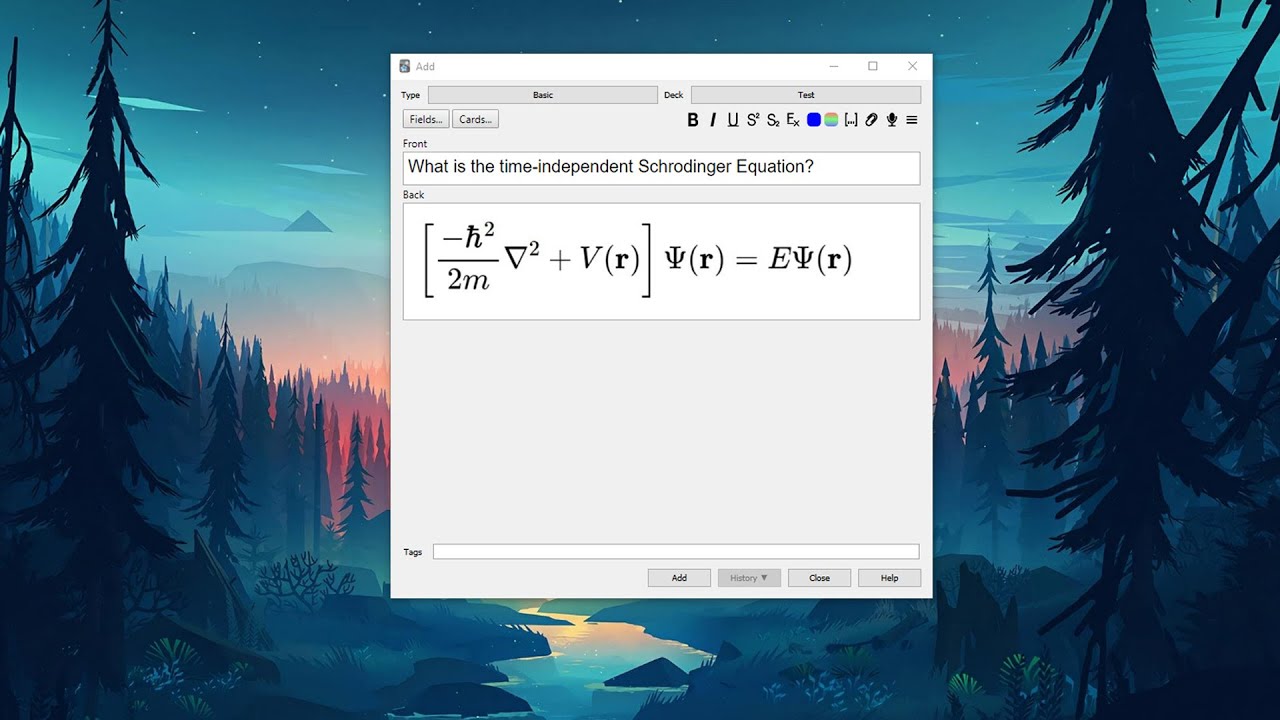
so if you click on some of the equations over here like this or this then you see more symbols appearing over here and this is actually a type setting language called latex and it's quite easy to learn the basics of it there'll be a link down below for anyone interested but it's very powerful because it can write almost anything using it so for the fourth and final method rather than writing latex into here and then copying the image we can also write it directly into anki so there's something called uh math jacks so we have three types we have math jack's blog we have math inline math checks and math jack's chemistry so if we choose inline math checks that basically means it appears on the same line so we see that we have these two um things appearing after we click the button and this is the opening area of the math jackson line and this is a closing area so if i write something like ax to power of two plus bx plus c equals zero then this is this will actually render out in a similar style to this uh using latex and you can see how it renders by pressing cards and then on cards you can press back template and you can see how this has rendered out um and if we wanted to write something alongside it like is the quadratic formula then you can see if we go back over here and view it then it's the same it's all on the same line because this is math and jack's inline now if we insert math jack's block then go over here do math jack's block you can see it's a similar way of writing it um the opening and closing but instead of curly brackets we have square brackets so if i were to actually turn this into max mathjax block then turn that into a square bracket and then just square back bracket and now block means that it's going to appear on its own line uh so this is actually going to be moved on to a new line so if i go to cods press back template and then you can see even though over here i wrote on the same line and this appears the equation appears on its own line because it's a block so writing complicated equations can get pretty difficult quite quickly so if i wanted to write on this equation sure i could write out but it take me quite a while to search up the notation um and stuff like that so i instead use a tool called math picks and this is a nice tool because you get a number of snips for free and i can see some of the things i've snipped before and what it does it converts it into latex so if i press download the program and then press this then select what i want it to convert into latex and then let go so you can see it's converted into later code here and there's a confidence meter for how confident the program thinks it that this is right so if i choose the first version and then click it to copy it and then in this section i want this to be on its own block uh press paste and then let's remove this as a quadratic formula part and then if i go back to cards and go to back template and you can see this has rendered out quite nicely from the latex which i put in into the anki page now the only issue of math picks is that if you go to the website and you go to pricing and you can see you only get a free certain amount of snips free each month and if you're a student and you use school email then you get 100 for each month which is usually more than enough but if you want even more free then you can sign up to math picks using the referral code in the description and i think we get about a hundred extra free but if you end up converting a lot of equations and it's probably worth buying the math picks pro and if you're tired of pressing cards and going to back template to see how the latex looks rendered out then what you can do on math picks is that you can copy whatever latex you want go to right area and then paste this into here and you can see updating live as you write out so if i just add more things onto it then it updates live and then i can press save if i want to as well and then just copy this back into this nice block now you can do something very
8:33

4.1. Writing Chemical Equations

similar to write chemistry if you don't want to copy chemistry equations from google images or a textbook or something then you can go to this hamburger icon over here and then press math jack's chemistry and inside here you can write out the chemistry equation you want so here is a math jax chemistry cheat page which i'll link down below in the description and if i were to copy out this equation and then paste it into here then press cards back template and you can see this has rendered out quite nicely and if i chose something a bit more complicated i know i don't know like this uh then uh paste that into here instead press cards again press back template then you can see this is a more complicated equation in which it's copied out and just reading through this page hopefully you get an idea for how it works and it's quite intuitive as well so like if you wanted to have a reaction that can go either way then you can just write out this instead and all that sort
9:35

Conclusion

of jazz anyways that's basically it you've learnt a few different ways you can add math and chemistry equations thank you if you found the video useful then leave a like if not leave a dislike and do let me know why otherwise i may see you next video

Ещё от Ray Amjad

Ctrl+V

Экстракт Знаний в Telegram

Транскрипты, идеи, методички — всё самое полезное из лучших YouTube-каналов.

Подписаться




