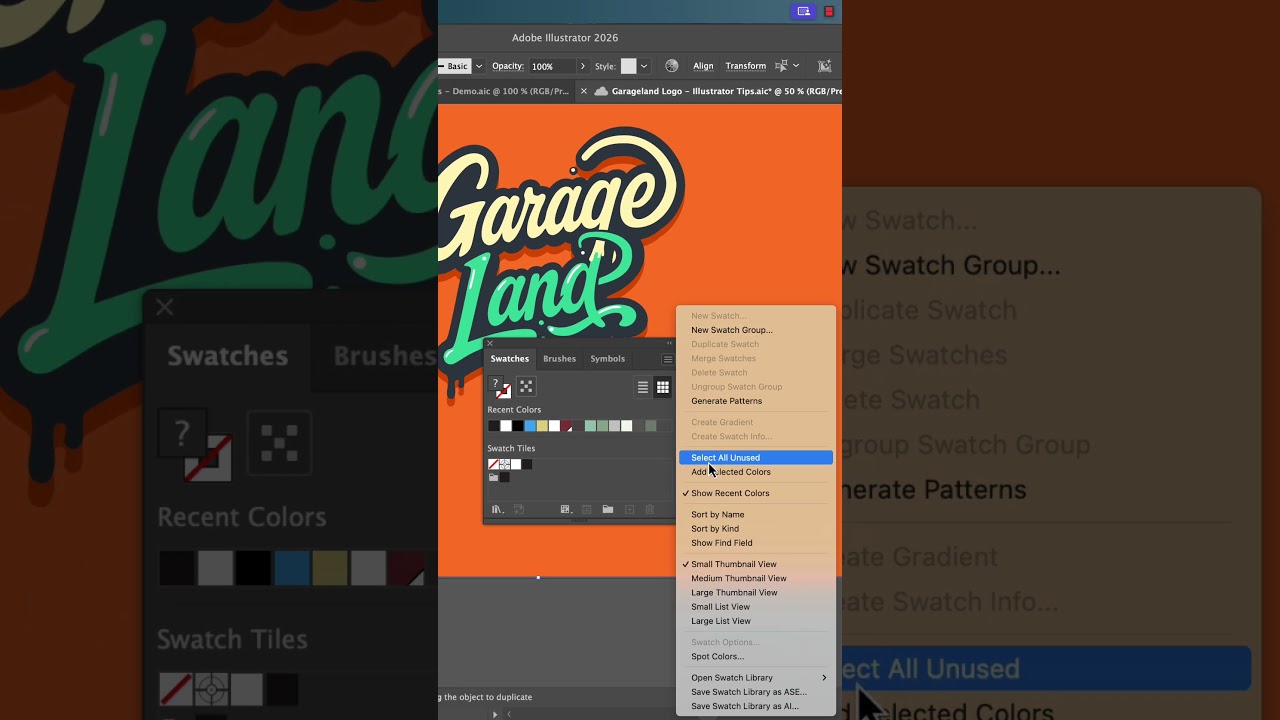
Tidy up your #adobeillustrator artboards with swatches and trim view!
2:01

Tidy up your #adobeillustrator artboards with swatches and trim view!

Bring Your Own Laptop 10.02.2026 2 052 просмотров 70 лайков

Machine-readable: Markdown · JSON API · Site index

Поделиться Telegram VK Бот
Транскрипт Скачать .md
Анализ с AI
Описание видео
Tidy up your #adobeillustrator dartboards with swatches and trim view! #graphicdesigner #graphicdesign #illustrator
Оглавление (1 сегментов)

Segment 1 (00:00 - 02:00)

Are you an untidy slob in Illustrator like me? Oh, you've got something. It's on artboard. But then if you zoom out Oh, no. It's getting a It's everywhere. You, my friend, can go up to view and they snuck this little option in here. It's called trim view. Boop. It just tidies everything up. Look at me. I use it so often I've made mine a shortcut. I just hit tab on off designer. I want to be designer I actually am. Let me know in the comments which you are. Let's get even tidier and try and trick people into thinking you know what you're doing. In my swatches panel here, we've got all of the swatches. My favorite default swatch is this one. Who decided that was going to be a good swatch? Let's clean it up. Let's go to swatches. Let's go to select all unused. And let's just go bin. Yes, delete them. Oh my goodness. Look at us. We're clean and tidy. Let's go and add the swatches we're actually using. So, I'm going to go U and to the same flyyou menu. I'm going to say uh add the selected swatches. Bam. Look at us. We're pros. They're all in there. And a last little bonus, check this out. If I select all of these, I can grab this first one. Hold shift, grab the last one. Check this out. Let's go to the flyyou menu. They snuck this little update in. Where is it? Create swatch info. You're like, what's it going to do? I'm just going to click create. Look at that. All of our swatches. First time I saw it though, I was like, need some style. But don't worry, you can click on them. Okay. And over here, look, Illustrator's given us some swatch info. I can say I want two rows. I want three rows. I can play with the spacing. I can go through and decide I don't need the HSV. Don't need the color name, don't need the ink type. You can also go to command T for the type tool. And you can go through and pick your brand font. Oh, it's already looking better. So, with a few tricks, you can kind of tidy up your files, make it all look good, save it, send it to another designer, make them feel bad about their Illustrator hygiene, okay? And you look like a professional. If you're liking these tips, follow me here for more. And if you're like, I didn't realize half that stuff existed, you might be ready for my Illustrator Advance course.

Другие видео автора — Bring Your Own Laptop

Ctrl+V

Экстракт Знаний в Telegram

Экстракты и дистилляты из лучших YouTube-каналов — сразу после публикации.

Подписаться

Дайджест Экстрактов

Лучшие методички за неделю — каждый понедельник